
Imagine diving headfirst into your favorite game, the world unfolding before you in breathtaking detail. Does your current screen feel a little… small? You’re not alone. Gamers are constantly seeking that extra edge, that more immersive experience, and a 34-inch ultrawide monitor might just be the key to unlocking it.
But let’s be honest, stepping into the world of 34-inch gaming monitors can feel like navigating a maze. So many specs, so many brands, and what does “ultrawide” really mean for your gameplay? It’s easy to get overwhelmed by refresh rates, resolutions, and response times, leaving you wondering if you’re making the right choice for your budget and your gaming setup.
That’s where we come in. This post cuts through the jargon and the endless choices. We’ll explore what makes a 34-inch monitor a game-changer and guide you through the important features to look for. By the end, you’ll have a much clearer picture of how to find the perfect ultrawide display to level up your gaming.
Top 34 Inch Monitor Gaming Recommendations

- 1ms MPRT: Colors fade and illuminate instantly with a 1ms response time, eliminating ghosting and piecing together precise imagery during action-packed scenes and gaming.
- Luminous Backcover Lights: A colorful LED light illuminates the back cover of the monitor, delivering a uniquely modern design.
- WQHD Resolution: At 5 million pixels, Wide Quad HD Resolution (3440 x 1440) display resolution provides you with the next level of refined, and detailed picture over the current 1080P standard.
- 21:9 Ultrawide: See more and do more with an ultrawide monitor. 21:9 provides you with 30% more screen space versus the conventional monitor. With an ultrawide resolution of 3440 x 1440, expand your performance and productivity.


- 【SEAMLESS CONNECTIVITY & PERFORMANCE】 Seamlessly link your devices to our two HDMI ports and two DisplayPort providing up to 240Hz refresh rate, ensuring not only versatile connectivity but also a buttery-smooth visual experience for both work and play. Built-in Speakers and Audio Out Jack also provides diverse audio options.
- 【INTEGRATED SPEAKERS】Whether you're at work or in the midst of an intense gaming session, our built-in speakers provide rich and seamless audio, all while keeping your desk clutter-free.
- 【EASY ON THE EYES】 Protect your eyes and enhance your comfort with Blue-Light Shift technology. This feature reduces harmful blue light emissions from your screen, helping to alleviate eye strain during long hours of use and promoting healthier viewing habits.
- 【TRUE TO LIFE COLORS】Experience vibrant and true-to-life colors with a 100% sRGB color gamut performance, ensuring accurate and stunning visuals for all your creative and multimedia tasks.
- 【ENHANCED GAMING EXPERIENCE】 Elevate your gaming prowess with a lightning-fast 1ms response time with blur reduction and an ultra-smooth 240Hz refresh rate. Enjoy unparalleled responsiveness and seamless visuals reinventing what you perceive as a great gaming experience.

- WQHD Resolution: At 1 million pixels, Wide Quad HD Resolution (3440 x 1440) display resolution provides you with the next level of refined, and detailed picture over the current 1080P standard.
- 1ms MPRT: Colors fade and illuminate instantly with a 1ms response time, eliminating ghosting and piecing together precise imagery during action-packed scenes and gaming.
- Eye Care
- PBP & PIP - Multitasking Without limites
- Luminous Backcover Lights: A colorful LED light illuminates the back cover of the monitor, delivering a uniquely modern design.

- 34 inch Curved 1500R UWQHD(3440 x 1440) @ 200Hz Fast VA Ultrawide Gaming Monitor with AI built-in.
- Performance: Up to 200Hz Refresh Rate | OD 1ms Response Time丨 FastVA | AI Blue light reduction | AI Crosshair | AI PQ | AdaptiveSync | Support VRR with HDMI2.1
- Ergonomic Stand: Tilt / Kensington Lock: -5°~15°(+/-2°) / Yes丨VESA Compatible (100 x 100mm) | 178° Wide Viewing Angle | PBP, 21:9 Ultrawide
- Input &Output: DP 1.4 (Up to 200)|HDMI2.1 X 2 (Up to 200)|Earphone |No speakers
- Warranty: SANSUI 34-inch Curved gaming computer monitor support money-back and free replacement warranty from order date within 30 days and lifetime technical support.

- DO MORE ON ONE SCREEN: See every detail on the wider display featuring a 21:9 aspect ratio; Ultra WQHD provides the simplest way to maximize screen real estate and experience truly seamless multitasking on just one screen.Brightness (Typical) : 300 cd/㎡. Static Contrast Ratio 3000:1.
- ENJOY A BILLION COLORS W/ INCREDIBLE DEPTH: With HDR10 that displays over 1 billion colors compared to 16.7 million for typical SDR technology, dark colors are darker and the brightest are even brighter; Content is experienced as the creator intended
- CARE FOR YOUR EYES DAY and NIGHT: An ambient light sensor on the monitor detects lighting in your workstation and automatically adjusts brightness; Eye Saver Mode minimizes excessive blue light, and Flicker Free relieves eye strain
- SEE CONTENT SMOOTHER, EVEN GAMING: A faster than average refresh rate updates the image on screen more often every second; 100Hz refresh rate reduces lag and motion blur when playing games, watching videos, or working on design projects
- STAY IN SYNC WITH THE ACTION: AMD Radeon FreeSync keeps the refresh rate of your monitor and graphics card in sync to reduce image tearing for a superfluid entertainment experience; Watch movies and play games without interruptions
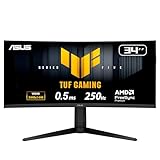
- Ultra Wide QHD Curved Display: 34-inch WQHD (3440 x 1440) 1500R curved gaming monitor with overclock to 250Hz refresh rate designed for professional gamers and immersive gameplay
- Fast Response Time: 0.5ms(min) response time to further reduce ghosting creates fluid gaming experience
- FreeSync Premium Pro Technology: Delivers a seamless, tear-free gaming experience by enabling VRR (variable refresh rate) by default
- ASUS Extreme Low Motion Blur Sync: ELMB SYNC technology enables ELMB together with variable refresh rate, eliminating ghosting and tearing for sharp gaming visuals with high frame rates
- High Dynamic Range Support: HDR technology with DisplayHDR 400 compliance supports HDR-10 format to enhance bright and dark areas

- Immersive Curved Display: 34-inch WQHD (3440x1440) 1500R curved gaming monitor with ultra-fast 165Hz (supports 144Hz) refresh rate designed for professional gamers and immersive gameplay
- Ultra-Fast Response Time: ASUS Extreme Low Motion Blur (ELMB ) technology enables a 1ms response time (MPRT) to eliminate ghosting for sharp gaming visuals at high frame rates
- Smooth Gaming Performance: FreeSync Premium technology to eliminate screen tearing and choppy frame rates
- Enhanced Visual Quality: High Dynamic Range (HDR) technology with professional color gamut delivers contrast and color performance that meets the DisplayHDR 400 certification
- Versatile Connectivity Options: Extensive connectivity with DisplayPort 1.4 x2, HDMI (v2.0) x2, USB Hub ports

- 34 Inch Curved 240Hz UWQHD(3440*1440) Fast VA Ultrawide 21:9 HDR400 Gaming Monitor with AI Crosshair and AI Bluelight.
- Performance: 240Hz Refresh Rate | MRPT 1ms Response Time | Freesync | AI PQ(Visual Enhance) | Ultra Vivid(Weak/Middle/Strong) | AI Crosshair | AI Bluelight | Sniper Scope | Game Mode | VRR( Support xBOX,PS,Switch,can only be used when connected to HDMI2.1)
- Ergonomic Stand: PIP/PBP | Tilt -5°~15°(+/-2°) | VESA Compatible (100x 100mm) | 178° Wide Viewing Angle | Durable Metal Stand
- Ports: HDMI2.1*2 (Up to 2k 240Hz) | DP 1.4 X 2 (Up to 2k 240Hz) | Earphone |No speakers
- Warranty: SANSUI 34-inch 240Hz Curved gaming monitor support money-back and free replacement warranty from order date within 30 days and lifetime technical support.
Choosing Your Next 34-Inch Gaming Monitor: A Buyer’s Guide
Are you looking for a gaming monitor that stretches your field of view and pulls you into the action? A 34-inch ultrawide monitor might be exactly what you need. These monitors offer more screen space than traditional ones, giving you a bigger picture for work and play. Let’s dive into what makes a great 34-inch gaming monitor.
Key Features to Look For
When you shop for a 34-inch gaming monitor, several features really matter.
- Resolution: Most 34-inch ultrawide monitors use a resolution called WQHD (3440 x 1440). This resolution provides a sharp and detailed image. It’s like having two 1440p monitors side-by-side, but without the annoying gap in the middle.
- Refresh Rate: This tells you how many times the screen updates per second. For gaming, a higher refresh rate means smoother motion. Look for at least 100Hz, but 144Hz or higher is even better for fast-paced games.
- Response Time: This measures how quickly a pixel can change color. A low response time (like 1ms) reduces motion blur and ghosting, so fast movements look clear.
- Panel Type: There are a few common types:
- IPS (In-Plane Switching): These panels offer excellent color accuracy and wide viewing angles. They are great for games where colors pop and you want to see the action clearly from different positions.
- VA (Vertical Alignment): VA panels provide the best contrast ratios, meaning deeper blacks and brighter whites. This makes dark scenes in games look more dramatic.
- TN (Twisted Nematic): These are usually the fastest and cheapest, but colors and viewing angles are not as good. For a 34-inch ultrawide, IPS or VA are generally preferred.
- Adaptive Sync Technology: This feature synchronizes your monitor’s refresh rate with your graphics card’s frame rate. This prevents screen tearing and stuttering. Both NVIDIA G-Sync and AMD FreeSync do this. Make sure your monitor supports the technology your graphics card uses.
Important Materials and Build Quality
The materials used can affect how durable and premium your monitor feels.
- Screen Coating: Most monitors have an anti-glare coating. This helps reduce reflections from lights or windows, which is important for comfortable gaming.
- Stand: A sturdy stand is crucial. It should allow you to adjust the height, tilt, and swivel of the monitor. Some stands also allow you to rotate the screen, though this is less common on ultrawide monitors. A metal stand often feels more solid than a plastic one.
- Build Materials: Look for monitors with a solid frame and base. While most gaming monitors are made of plastic, a well-built plastic chassis feels less cheap and more durable.
Factors That Improve or Reduce Quality
Several things can make a monitor great or not so great.
- Color Accuracy: Good color accuracy means the colors you see on screen are true to life. This is measured by things like sRGB coverage. Higher percentages are better.
- Brightness and Contrast: A bright screen is easier to see in well-lit rooms. Good contrast makes images look more realistic.
- Curvature: Many 34-inch ultrawide monitors have a curved screen. This can make the edges of the screen feel closer to you, creating a more immersive experience. A curve of 1000R or 1500R is common. A sharper curve (like 1000R) wraps around you more.
- HDR (High Dynamic Range): HDR allows for a wider range of colors and brightness levels, making games look more vibrant and lifelike. However, not all HDR is created equal. Look for certifications like DisplayHDR 400, 600, or 1000 for better performance.
- Viewing Angles: If you often have friends watching you play or you like to sit in different spots, good viewing angles are important. IPS panels excel here.
User Experience and Use Cases
A 34-inch ultrawide monitor offers a fantastic experience for many activities.
- Gaming: This is where ultrawide monitors shine. They provide a wider field of view in compatible games, letting you see more of the game world. This can give you an advantage in strategy games and make first-person shooters more immersive.
- Productivity: The extra screen space is great for multitasking. You can have multiple windows open side-by-side without feeling cramped. This is perfect for coding, editing, or simply browsing the web.
- Media Consumption: Watching movies or TV shows on an ultrawide monitor can be a cinematic experience, especially if the content is also in an ultrawide format.
Frequently Asked Questions (FAQ)
Q: What is the best resolution for a 34-inch gaming monitor?
A: The most common and recommended resolution for a 34-inch ultrawide gaming monitor is WQHD (3440 x 1440).
Q: How important is the refresh rate for gaming?
A: The refresh rate is very important for gaming. A higher refresh rate (like 144Hz or more) makes games look smoother and reduces motion blur.
Q: What is the difference between IPS and VA panels?
A: IPS panels offer better color accuracy and viewing angles, while VA panels provide higher contrast ratios for deeper blacks.
Q: Do I need adaptive sync technology?
A: Yes, adaptive sync technology (G-Sync or FreeSync) is highly recommended for gaming. It prevents screen tearing and makes gameplay smoother.
Q: What does response time mean, and why is it important?
A: Response time measures how fast a pixel changes color. A low response time (like 1ms) reduces motion blur and ghosting in fast-moving games.
Q: Is a curved monitor better than a flat one for gaming?
A: Many people find curved monitors more immersive for gaming because the curve brings the edges of the screen closer to your eyes.
Q: What is HDR, and does it make a big difference?
A: HDR (High Dynamic Range) allows for a wider range of colors and brightness, making games look more vibrant and realistic. Better HDR performance makes a noticeable difference.
Q: Can I use a 34-inch ultrawide monitor for work?
A: Absolutely! The extra screen space makes them excellent for multitasking and productivity tasks.
Q: What is the typical aspect ratio of a 34-inch monitor?
A: The typical aspect ratio for a 34-inch ultrawide monitor is 21:9.
Q: How do I know if my graphics card is compatible with a monitor’s adaptive sync technology?
A: NVIDIA graphics cards work with G-Sync, and AMD graphics cards work with FreeSync. Check your graphics card’s specifications.

Hi, I’m Larry Fish, the mind behind MyGrinderGuide.com.. With a passion for all things kitchen appliances, I created this blog to share my hands-on experience and expert knowledge. Whether it’s helping you choose the right tools for your culinary adventures or offering tips to make your kitchen more efficient, I’m here to guide you. My goal is to make your time in the kitchen not only easier but also enjoyable! Welcome to my world of kitchen mastery!