
As an Amazon Associate I earn from qualifying purchases.
Photoshop demands power, color accuracy, and smooth performance. A slow or underpowered laptop turns editing into a frustrating wait.
What matters most is a strong processor, ample RAM, and a display that renders colors faithfully. Storage speed and connectivity also play a role in keeping your workflow efficient.
These picks were selected for their balance of performance, display quality, and value. They cover different needs, from budget-friendly options to specialized tools for serious creators.
Our Top 7 Laptop Computers For Photoshop Picks at a Glance
| Product | ||
|---|---|---|
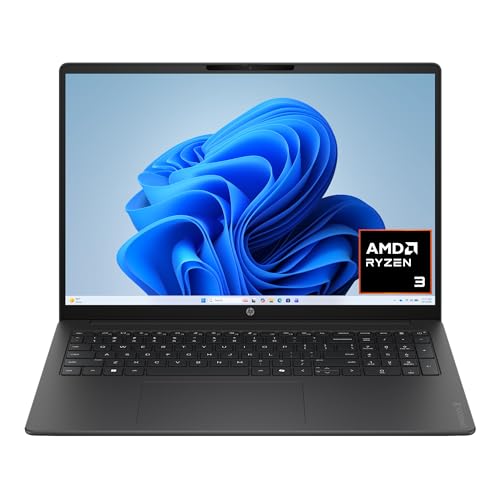 |
HP OmniBook 3 16 Inch Laptop With AMD Radeon 610M GPU Best overall for Photoshop |
Check Price |
 |
Acer Aspire Lite 15 With 16GB RAM And 256GB SSD Best budget all-rounder |
Check Price |
 |
HP EliteBook 820 G3 With Intel Core i5 Best renewed business option |
Check Price |
 |
SAGAWHALE 15.6 Inch Laptop With 16GB RAM Best for multitasking |
Check Price |
 |
RIANIFEL 15.6 Inch Laptop With Privacy Shutter Best for media and privacy |
Check Price |
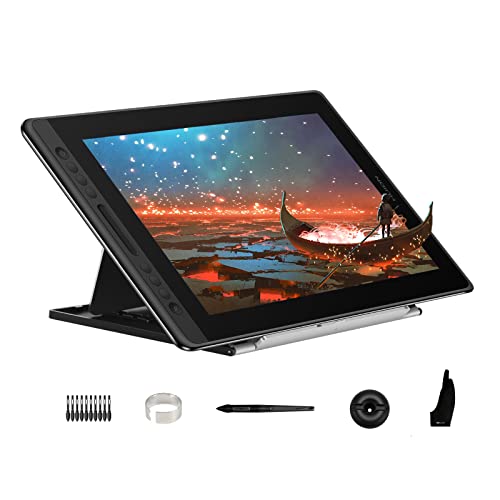 |
HUION Kamvas Pro 16 Drawing Tablet Best for digital artists |
Check Price |
 |
XPPen Deco 01 V3 Drawing Tablet Best portable drawing tablet |
Check Price |
Top 7 Laptop Computers For Photoshop: Detailed Reviews
1. HP OmniBook 3 16 Inch Laptop With AMD Radeon 610M GPU
The HP OmniBook 3 16 inch is a laptop computer for Photoshop that balances performance and portability. Its 2K IPS touchscreen delivers sharp detail and accurate colors, essential for photo editing, while the AMD Radeon 610M GPU ensures smooth rendering. The Ryzen 3 processor and 16GB RAM handle multitasking, and the 512GB SSD speeds up file access. Battery life reaches up to 14 hours, with fast charging for quick top-ups.
What We Like:
- 2K touchscreen provides crisp visuals and precise color accuracy for editing
- AMD Radeon 610M GPU handles Photoshop tasks without lag
- 16GB RAM and 512GB SSD offer fast performance and ample storage
- Long battery life with quick charging support
- Advanced AI noise reduction improves call clarity
What Could Be Improved:
- Ryzen 3 processor may struggle with extremely heavy workloads
- No dedicated high-end GPU for complex 3D rendering
This is ideal for photographers and editors who need a reliable laptop computer for Photoshop with good display quality and battery life. Skip it if you require top-tier processing power for intensive tasks.
2. Acer Aspire Lite 15 With 16GB RAM And 256GB SSD
The Acer Aspire Lite 15 is a Laptop Computer For Photoshop that balances performance and portability. Its Intel Core N150 processor with 4 cores and up to 3.7GHz boost speed handles multitasking smoothly, while the 15.6-inch FHD IPS display with anti-glare ComfyView ensures sharp, clear visuals for editing. The 16GB RAM and 256GB NVMe SSD provide fast load times and efficient storage, making it suitable for heavy editing tasks on the go.
What We Like:
- Strong multitasking with 16GB RAM and a 4-core processor
- FHD IPS display with anti-glare for clear, wide-angle viewing
- Lightweight and compact design for easy portability
- Full-function USB ports for versatile connectivity
- Windows 11 optimized for responsive performance
What Could Be Improved:
- 256GB SSD may limit storage for large Photoshop files
- 15W processor may struggle with prolonged heavy workloads
Buy this if you need a portable, capable Laptop Computer For Photoshop for multitasking and light editing. Skip it if you require more storage or a higher-end processor for intensive tasks.
3. HP EliteBook 820 G3 With Intel Core i5
The NIAKUN 15.6-inch laptop runs Windows 11 Pro out of the box with Office 365 pre-installed, so you can start editing or working immediately. Its 1920×1080 IPS display delivers clear visuals for Photoshop tasks, while the 180° hinge makes it easy to share your screen during collaborations. The 5000mAh battery lasts up to 6 hours, and ports like Mini HDMI and USB 3.0 keep your workflow connected.
What We Like:
- Windows 11 Pro and Office 365 come pre-installed for instant productivity
- 15.6-inch IPS screen offers sharp, wide-angle visuals for editing
- 180° hinge allows flat screen positioning for easy sharing
- 6-hour battery life supports mobile work sessions
- 2-year warranty and 6-month return policy add peace of mind
What Could Be Improved:
- Intel Pentium processor may struggle with heavy Photoshop workloads
- 8GB RAM and 256GB SSD limit multitasking and storage capacity
This is a solid Laptop Computer For Photoshop if you need a ready-to-use system for light editing and office work. Skip it if you require high-end performance for complex projects or larger storage.
4. SAGAWHALE 15.6 Inch Laptop With 16GB RAM
The SAGAWHALE 15.6-inch laptop is a practical choice for a laptop computer for Photoshop with its FHD IPS display and efficient 4425Y processor. The 16GB RAM and 256GB SSD ensure smooth multitasking and quick file access, while the wide-angle screen delivers clear visuals for editing. Windows 11 Pro comes pre-installed, so you can start working right away without setup delays.
What We Like:
- 16GB RAM keeps Photoshop and other apps running without lag
- 256GB SSD speeds up boot times and file transfers
- FHD IPS display offers sharp colors and wide viewing angles
- Windows 11 Pro is ready to use out of the box
- 2-year warranty and 24/7 support add peace of mind
What Could Be Improved:
- 256GB storage may fill up quickly with large Photoshop files
- 4425Y processor may struggle with heavy, complex edits
This is a solid pick for students or professionals who need a reliable laptop for light to moderate Photoshop work. Skip it if you require high-end performance for large-scale projects or need more storage.
5. RIANIFEL 15.6 Inch Laptop With Privacy Shutter
The RIANIFEL 15.6" laptop is a slim and light option for everyday tasks, including Photoshop work. Its Pentium Gold 6500Y processor, 16GB RAM, and 256GB SSD ensure smooth performance for light to moderate editing. The FHD IPS display offers clear visuals, while the four-speaker stereo setup and privacy shutter camera make it ideal for secure video calls and media consumption. Connectivity is comprehensive with USB, HDMI, and Type-C ports, plus WiFi and Bluetooth support.
What We Like:
- Four-speaker stereo delivers clear, immersive sound for media and calls
- Physical privacy shutter ensures secure video calls and peace of mind
- FHD IPS display provides sharp, vivid visuals with wide viewing angles
- Comprehensive connectivity covers most peripherals and wireless needs
- Slim, lightweight design with a numeric keypad for portability and convenience
What Could Be Improved:
- Pentium Gold processor may struggle with heavy Photoshop tasks
- 256GB SSD storage could be limiting for large project files
This laptop computer for Photoshop suits students and professionals who need a portable, secure device for light editing and media. Skip it if you require heavy-duty processing power or larger storage for complex projects.
6. HUION Kamvas Pro 16 Drawing Tablet
The HUION Kamvas Pro 16 is a drawing tablet with a 15.6-inch fully laminated screen and anti-glare glass, designed for precise digital art. Its 120% sRGB color accuracy ensures vibrant, true-to-life colors, while the adjustable stand lets you work at angles between 20 and 60 degrees for comfort. The battery-free pen offers lag-free tracking and 60° tilt recognition, and the touch bar plus six express keys streamline your workflow.
What We Like:
- 120% sRGB color gamut delivers accurate, vivid colors for professional editing
- Adjustable stand reduces strain on your neck and shoulders during long sessions
- Battery-free pen with tilt support and lag-free tracking for natural drawing
- Touch bar and six express keys speed up workflow with customizable shortcuts
- 3-in-1 USB-C cable reduces clutter and simplifies setup
What Could Be Improved:
- Anti-glare glass may slightly reduce brightness compared to glossy screens
- Requires a separate computer to function, as it is not a standalone device
Buy this if you need a color-accurate, ergonomic drawing tablet for Photoshop and digital art. Skip it if you want a standalone device or prefer a glossier, brighter display.
7. XPPen Deco 01 V3 Drawing Tablet
The XPPen Deco 01 V3 is a compact drawing tablet with a 10×6.25-inch workspace and a battery-free stylus offering 16,384 pressure levels and 60-degree tilt support. This means you get precise control over line weight and shading, mimicking traditional tools like pencils or brushes. The 8 customizable shortcut keys let you streamline workflows, while USB-C connectivity ensures easy setup with PCs, Macs, and Android devices. Its slim 8mm profile makes it highly portable for artists on the go.
What We Like:
- 16K pressure levels and tilt support deliver natural, responsive strokes
- 8 customizable shortcut keys improve efficiency for both left and right-handed users
- USB-C connectivity works with PCs, Macs, and Android devices
- Lightweight and thin design fits easily in a backpack
- Large active area provides ample space for detailed work
What Could Be Improved:
- No built-in screen means you must look between tablet and display
- Android support requires version 10.0 or higher
This is a great Laptop Computer For Photoshop alternative for beginners or mobile artists who need precision and portability. Skip it if you prefer screen-based drawing or need standalone functionality.
How to Choose the Right Laptop Computer For Photoshop
A Laptop Computer For Photoshop needs power and precision. Start with the processor: a multi-core CPU like AMD Ryzen or Intel Core i5/i7 handles heavy filters and large files without lag. RAM is next—16GB is the baseline for smooth multitasking, while 32GB future-proofs your workflow.
Graphics and display
Dedicated GPUs, such as AMD Radeon or NVIDIA, accelerate rendering and complex effects. For color accuracy, aim for a 100% sRGB or Adobe RGB display with at least Full HD resolution. A matte screen reduces glare during long editing sessions.
Storage and ports
SSDs load projects faster than HDDs, so prioritize 256GB or more. USB-C or Thunderbolt ports simplify connecting external drives or monitors. Battery life matters less for desktop use, but a 6-hour runtime keeps you mobile.
Build and extras
Durability and weight affect portability. A backlit keyboard helps in dim studios, and a privacy shutter is useful for client calls. For digital artists, a drawing tablet with pressure sensitivity may be a better fit than a traditional laptop.
Final Thoughts on the Best Laptop Computers For Photoshop
The HP OmniBook 3 16 Inch Laptop with AMD Radeon 610M GPU is the best overall Laptop Computer For Photoshop, balancing power and display quality. If you need a budget option, the Acer Aspire Lite 15 with 16GB RAM delivers solid performance without overspending.

Hi, I’m Larry Fish, the mind behind MyGrinderGuide.com.. With a passion for all things kitchen appliances, I created this blog to share my hands-on experience and expert knowledge. Whether it’s helping you choose the right tools for your culinary adventures or offering tips to make your kitchen more efficient, I’m here to guide you. My goal is to make your time in the kitchen not only easier but also enjoyable! Welcome to my world of kitchen mastery!