
As an Amazon Associate I earn from qualifying purchases.
Finding a Tablet To Play Roblox means balancing smooth gameplay with a screen, battery, and build that suit the person using it. A cheap tablet may handle casual sessions, but limited storage or modest hardware can become frustrating over time.
Focus on the processor, memory, display refresh rate, battery capacity, and available storage. A larger screen helps with visibility, while a compact model may be easier for younger users to hold.
These five picks come from the supplied product specifications, not hands-on testing. I selected models that offer different combinations of performance, portability, storage, child-focused features, and included accessories.
The guide starts with the strongest all-round choices, then covers more specialised options. Each review explains who the tablet suits and the trade-offs you should consider.
Our Top 5 Tablet To Play Roblox Picks at a Glance
| Product | ||
|---|---|---|
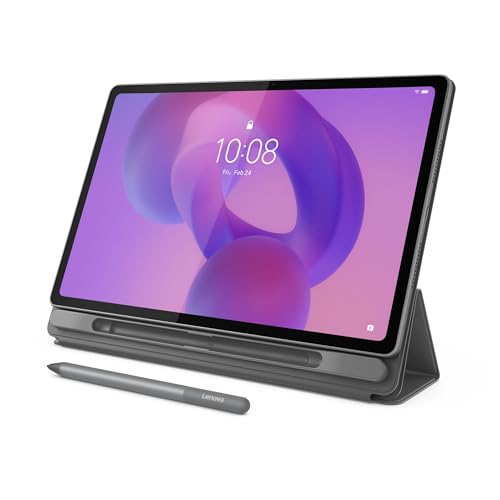 |
Lenovo Idea Tab Plus Large-screen gaming and learning |
Check Price |
 |
Samsung Galaxy Tab A11 WiFi Compact, reputable everyday use |
Check Price |
 |
URAO 10.1-inch Android 16 Tablet Storage-heavy family use |
Check Price |
 |
aiprotablet Kids Tablet Younger Roblox players |
Check Price |
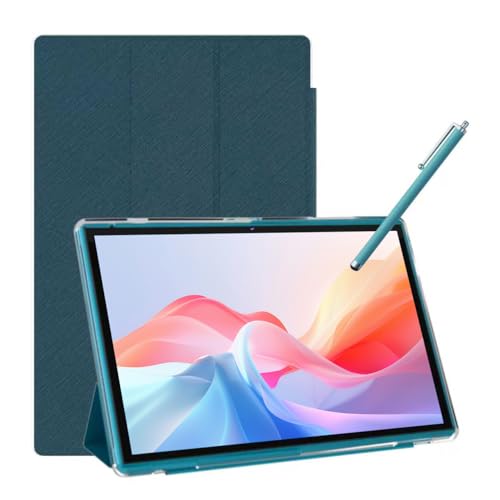 |
NOVOJOY 10.1-inch Android 15 Tablet Accessory-ready budget use |
Check Price |
Top 5 Tablets To Play Roblox: Detailed Reviews
1. Lenovo Idea Tab Plus
The Lenovo Idea Tab Plus is a Tablet To Play Roblox for families that want a larger, sharper screen without giving up portability. Its 12.1-inch 2.5K IPS display runs at 90Hz, so Roblox worlds and menus should look detailed and move smoothly, while up to 800 nits helps in brighter rooms. The MediaTek Dimensity 6400 is the strongest listed processor in this group, paired with 8GB memory and 128GB storage. Quad Dolby Atmos-tuned speakers add fuller sound for games, videos, and learning apps.
What We Like:
- The 12.1-inch 2.5K display gives Roblox a spacious, detailed view.
- The 90Hz refresh rate is suited to smoother on-screen movement.
- The Dimensity 6400 and 8GB memory provide the strongest listed hardware in this group.
- Quad Dolby Atmos-tuned speakers make shared gaming and video watching more enjoyable.
- At just over a pound, it remains practical to carry between rooms or activities.
What Could Be Improved:
- The large 12.1-inch body may feel less convenient for younger children to hold during long sessions.
- Its 128GB storage is useful, but a family sharing games, videos, and learning content may eventually need to manage space.
- The display and stronger hardware may be more than you need if Roblox is the tablet’s only demanding use.
Buy this if you want the sharpest display and strongest listed processor among these picks, plus roomier visuals for Roblox, schoolwork, and streaming. It suits families sharing one tablet. Skip it if you prefer a smaller device for young hands or need only a basic Roblox machine.
2. Samsung Galaxy Tab A11 WiFi
The Samsung Galaxy Tab A11 WiFi is a practical Tablet To Play Roblox if you want portability without giving up balanced hardware. Its 8.7-inch 90Hz display makes menus, movement, and scrolling feel more responsive, while the MediaTek Helio G99, 4GB RAM, and Mali-G57 MC2 GPU suit everyday gaming. You get 64GB storage plus a microSD slot supporting up to 2TB, useful for family apps and downloads. Android 15 with One UI 7, a 5100mAh battery, Wi-Fi, Bluetooth 5.3, and a 3.5mm jack round out the package.
What We Like:
- The 90Hz refresh rate should make Roblox navigation and camera movement feel smoother.
- The compact 8.7-inch size is easy for children to hold and carry.
- The microSD slot gives you substantial room for apps, games, and media.
- The 5100mAh battery supports longer everyday use between charges.
- The headphone jack and USB-C port suit shared family use and wired accessories.
What Could Be Improved:
- The 1340 x 800 TFT screen is less sharp than a higher-resolution display, especially for text and detailed visuals.
- The 64GB internal storage may fill quickly before you add a microSD card, which is sold separately.
- It is Wi-Fi only, the charger is not included, and this international model has no warranty.
Buy it if you want a reputable, compact tablet for Roblox, streaming, schoolwork, and everyday family use, with expandable storage and a smoother 90Hz screen. Skip it if you need cellular connectivity, a charger in the box, warranty coverage, or a sharper display for detailed content.
3. URAO 10.1-inch Android 16 Tablet
The URAO 10.1-inch Android 16 tablet is a practical Tablet To Play Roblox for families that need room for games, apps, and downloads. Its 128GB built-in storage, 36GB (6+30) RAM claim, and support for up to a 1TB TF card (not included) suit storage-heavy use. The octa-core 1.8GHz processor is designed for multitasking, while the 1280×800 IPS display provides a wide viewing area. A 6000mAh battery supports up to 8 hours of mixed use, and Wi-Fi 6, Bluetooth 5.4, and Google Mobile Services add flexibility. No GPS is included.
What We Like:
- 128GB of built-in storage leaves useful space for Roblox and family apps.
- Expandable storage supports cards up to 1TB, though the card is not included.
- The 6000mAh battery supports up to 8 hours of mixed use.
- Wi-Fi 6 and Bluetooth 5.4 provide current wireless connectivity.
- Google Mobile Services gives you access to familiar Android services.
What Could Be Improved:
- The 1280×800 display is functional, but it is less detailed than a higher-resolution panel.
- The tablet has no GPS, which limits location-based uses.
- iOS accounts cannot be shared directly with this Android tablet.
Choose this URAO tablet if your family values storage, a large battery, and expandable capacity for Roblox, apps, and media. It suits shared household use better than a compact device. Skip it if you need GPS, a sharper display, or straightforward account sharing between Android and iOS.
4. aiprotablet Kids Tablet
This Tablet To Play Roblox pairs a child-focused protective case with Google Kids Space and parental controls, making it suitable for younger players aged 3 and up. Its 10-inch 1280×800 IPS display offers a clear, high-contrast view with eye-protection features, while the T7280 octa-core processor is designed for everyday learning and play. The adjustable case stand helps hands-free use, and the included keyboard and other accessories support interactive activities. Battery life is rated for over 8 hours of use, with fast charging and up to 7 days of standby.
What We Like:
- Google Kids Space provides a child-oriented place to explore educational apps.
- Parental controls help you manage a younger child’s tablet use.
- The protective case and adjustable stand suit family handling.
- The 10-inch display gives Roblox and learning apps a roomy view.
- The keyboard and included accessories add flexibility for schoolwork and play.
What Could Be Improved:
- The 1280×800 resolution is modest for a 10-inch screen, especially for text-heavy activities.
- The protective case and bundled accessories may make this setup less convenient to carry.
- Its child-focused software and controls may feel restrictive for older children wanting a more open Android experience.
Buy it if you want a family tablet for a younger Roblox player, with protective hardware, Google Kids Space, and parental controls ready out of the box. Skip it if you prefer a sharper display, a slimmer setup, or a more general-purpose tablet for older children and adults.
5. NOVOJOY 10.1-inch Android 15 Tablet
The NOVOJOY is a Tablet To Play Roblox aimed at families who want useful extras beyond gaming. Its Android 15 system, quad-core processor and listed 8GB RAM, including 5GB expansion, support everyday apps and Roblox play, while 32GB storage can expand by up to 1TB. The 10.1-inch 1280×800 IPS display gives games and videos a broad viewing area. A 6000mAh battery is rated for 6–8 hours of continuous use, and the included stylus and foldable protective case add practical value for schoolwork, browsing and travel.
What We Like:
- The included stylus makes text entry and simple touch tasks more convenient.
- The foldable protective case adds everyday protection and viewing flexibility.
- Storage expansion of up to 1TB suits families with many apps and files.
- The 10.1-inch screen provides a comfortable size for Roblox and video viewing.
- Android 15 gives the tablet a current software platform.
What Could Be Improved:
- The 1280×800 resolution is functional but less sharp than higher-resolution tablet screens.
- The 32GB internal storage may feel limited before you add an expansion card.
- The listing does not provide detailed processor performance information for demanding games.
Buy it if you want an accessory-ready family tablet for Roblox, browsing, videos and light schoolwork, especially with expandable storage. Skip it if you want the sharpest display, clearly documented gaming performance or generous built-in storage without adding expansion media.
How To Choose A Tablet To Play Roblox
Choose the right Tablet To Play Roblox size
Choosing a Tablet To Play Roblox starts with the screen. A larger display gives you more room to see game details and can be easier for shared play, reading, and schoolwork. A compact tablet is simpler for younger children to hold and more convenient to carry, but the smaller view may feel less comfortable during longer sessions.
Think about where your family will use it most. If the tablet will stay at home, screen space may matter more than portability. If children will carry it between rooms or on trips, a lighter, more manageable design may be the better compromise.
Check performance and everyday responsiveness
Roblox includes many different experiences, so a tablet needs more than an attractive display. Look for a modern processor, enough memory for the operating system and apps, and a current version of Android where applicable. These factors influence how quickly games open, how smoothly you move through menus, and how well the tablet handles switching between Roblox and other apps.
Do not judge performance from storage capacity alone. A large storage number gives you room for games, downloads, photos, and learning apps, but it does not automatically make Roblox run better. Also check that the tablet supports the apps and services your family already uses.
Prioritise storage, battery, and connectivity
Storage matters more in a family tablet because several people may install apps and save content. Choose enough built-in space for your intended use, and check whether expandable storage is available if you expect the library to grow. Wi-Fi is usually sufficient for home play, while a portable connection may matter if you need internet access away from home.
Battery life affects how often you need to interrupt play or schoolwork for charging. Since manufacturers describe battery performance differently, consider the tablet’s charging setup and whether its included accessories suit your routine. A headphone connection or supported wireless audio can also help keep game sound from disturbing others.
Consider age, supervision, and durability
For younger Roblox players, an appropriate size and simple controls can be more useful than advanced features. Check the tablet’s parental-control options, app permissions, and account-management tools before handing it over. Roblox itself also has family-safety settings, so review those separately rather than relying only on the tablet.
Finally, budget for protection. A case and screen protector can reduce worry during family use, while a bundled keyboard, stand, or other accessory may add value if the tablet also needs to support homework. Balance those extras against the core needs: comfortable handling, dependable connectivity, suitable performance, and enough storage.
Which Tablet To Play Roblox Should You Choose?
The Lenovo Idea Tab Plus is the best overall pick here for families that want a large-screen tablet suited to both Roblox and learning. Its broader role makes it the most versatile choice in this group. The Samsung Galaxy Tab A11 WiFi is the best alternative if you prefer a compact tablet from a reputable everyday-use range. Choose it when easier handling and general household use matter more than maximum screen space.

Hi, I’m Larry Fish, the mind behind MyGrinderGuide.com.. With a passion for all things kitchen appliances, I created this blog to share my hands-on experience and expert knowledge. Whether it’s helping you choose the right tools for your culinary adventures or offering tips to make your kitchen more efficient, I’m here to guide you. My goal is to make your time in the kitchen not only easier but also enjoyable! Welcome to my world of kitchen mastery!