
As an Amazon Associate I earn from qualifying purchases.
Choosing a Cpu And Motherboard Combo can simplify a PC build, but the wrong platform can limit your memory, storage and upgrade options. You also need to match the processor’s socket with the motherboard.
Focus on the CPU’s core count, thread count and boost speed, then check the motherboard’s memory type, expansion standards, storage support and form factor. AM4 and DDR4 options can suit lower-cost builds, while AM5 and newer Intel platforms offer more current features.
These five combinations were selected from the listed products to cover distinct needs, including budget gaming, balanced AM5 systems, demanding multitasking, high-end AMD builds and Intel AI-focused PCs.
The guide starts with the strongest overall options, then explains what makes each pairing different and what to check before you buy.
Our Top 5 Cpu And Motherboard Combo Picks At A Glance
| Product | ||
|---|---|---|
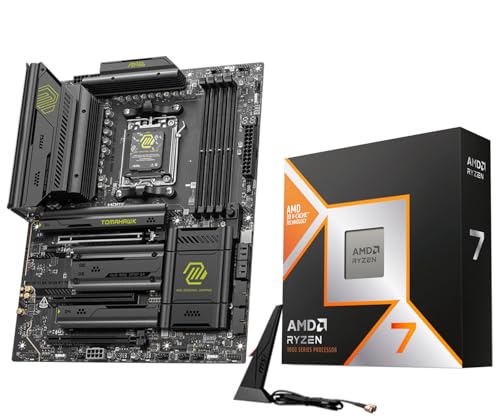 |
Micro Center Ryzen 7 9800X3D + MSI X870E High-end AM5 gaming systems |
Check Price |
 |
Micro Center Intel Core Ultra 7 270K + Z890 AI-focused Intel builds |
Check Price |
 |
Micro Center Ryzen 9 9900X + ASUS B650-A Demanding multitasking and creation |
Check Price |
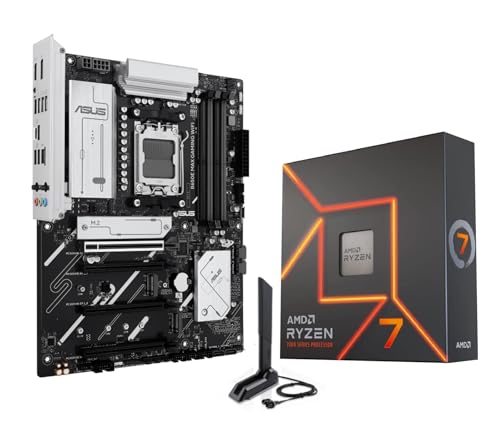 |
Micro Center Ryzen 7 7700X + ASUS B650E Balanced AM5 gaming builds |
Check Price |
 |
Micro Center Ryzen 5 5500 + ASUS TUF A520M Budget AM4 gaming builds |
Check Price |
Top 5 CPU And Motherboard Combos: Detailed Reviews
1. Micro Center Ryzen 7 9800X3D + MSI X870E
This Cpu And Motherboard Combo pairs AMD’s Ryzen 7 9800X3D with MSI’s MAG X870E Tomahawk WiFi for a premium AM5 gaming system. The processor offers 8 cores, 16 threads, a 5.2 GHz maximum boost, 104 MB of combined L2 and L3 cache, and an unlocked design. The ATX motherboard adds DDR5 support up to 256GB, PCIe 5.0, two PCIe 5.0 M.2 slots, USB4, 5G LAN, and Wi-Fi 7. Its 14+2+1 power design and dual CPU power connectors suit demanding builds.
What We Like:
- The 9800X3D is built specifically for high-end gaming performance.
- PCIe 5.0 support gives compatible graphics and storage upgrades a modern interface.
- Two PCIe 5.0 M.2 slots provide fast storage expansion.
- DDR5 support reaches up to 256GB for large, demanding systems.
- USB4, 5G LAN, and Wi-Fi 7 provide strong connectivity options.
What Could Be Improved:
- A cooler is not included, so you must purchase a compatible thermal solution separately.
- The ATX board and premium feature set may be excessive for a basic gaming build.
- PCIe 5.0 benefits depend on using compatible expansion cards or storage.
Buy it if you want a high-end AM5 gaming foundation with fast storage support, extensive connectivity, and room for substantial DDR5 memory. Skip it if you need a compact, low-cost system or already own a suitable cooler and motherboard for a simpler processor upgrade.
2. Micro Center Intel Core Ultra 7 270K + Z890
This Cpu And Motherboard Combo pairs Intel’s Core Ultra 7 270K with a Z890 AYW GAMING WIFI W board for demanding AI, productivity, creation, and gaming builds. Its 24 cores, 24 threads, up to 5.5 GHz turbo, and 36MB cache give you substantial multitasking headroom, while integrated graphics can handle display output without a separate graphics card. The board adds 12+1+2+1 80A DrMOS power stages, large heatsinks, DDR5 support, Wi-Fi 6, PCIe 5.0, 20Gbps USB-C, and a Thunderbolt USB4 header.
What We Like:
- The 24-core design suits heavy multitasking and content creation.
- Integrated graphics lets you start a build without a discrete GPU.
- The robust 80A power stages support stable delivery under demanding workloads.
- Large VRM, M.2, and PCH heatsinks help manage platform heat.
- Wi-Fi 6, PCIe 5.0, and 20Gbps USB-C provide modern connectivity.
What Could Be Improved:
- This platform is more than you need for basic office work or light gaming.
- The motherboard requires DDR5 memory, which limits reuse of older DDR4 kits.
- The many firmware, cooling, and connectivity features may add setup complexity for first-time builders.
Buy it if you want an AI-focused Intel system with serious multitasking capacity, integrated graphics, and a well-equipped Z890 foundation. It suits creators, power users, and DIY builders who value expansion and connectivity. Skip it if your workloads are light or you want the simplest, most economical build.
3. Micro Center Ryzen 9 9900X + ASUS B650-A
This Cpu And Motherboard Combo pairs AMD’s 12-core, 24-thread Ryzen 9 9900X with ASUS’s ATX ROG Strix B650-A WiFi board for demanding AM5 builds. The processor reaches 5.6 GHz boost, includes 76 MB of L2 and L3 cache, runs at a 120W default TDP, and supports overclocking. You get DDR5 memory support up to 192GB, one PCIe 5.0 M.2 slot, two PCIe 4.0 M.2 slots, four SATA ports, Wi-Fi 6E, Bluetooth 5.2, and USB 3.2 Gen 2×2 Type-C connectivity.
What We Like:
- Twelve cores and 24 threads suit demanding multitasking and content-creation workloads.
- The 5.6 GHz maximum boost gives the processor strong peak performance potential.
- Three M.2 slots provide flexible fast-storage expansion, including one PCIe 5.0 slot.
- DDR5 support up to 192GB leaves substantial room for memory-intensive builds.
- Wi-Fi 6E, Bluetooth 5.2, and modern USB connectivity reduce the need for add-in cards.
What Could Be Improved:
- The Ryzen 9 9900X does not include a cooler or thermal solution, so you must provide one separately.
- Only one of the three M.2 slots supports PCIe 5.0; the other two use PCIe 4.0.
- The ATX motherboard is a poor fit for compact cases.
Buy this pairing if you want a capable AM5 foundation for multitasking, creation work, and high-end gaming, with DDR5, PCIe 5.0 storage support, and useful wireless connectivity already covered. Skip it if you need a compact build, want a bundled cooler, or have no use for 12-core processing power.
4. Micro Center Ryzen 7 7700X + ASUS B650E
This Cpu And Motherboard Combo pairs AMD’s eight-core, 16-thread Ryzen 7 7700X with the ASUS B650E MAX Gaming WiFi motherboard for a balanced AM5 gaming build. The processor reaches up to 5.4 GHz, supports DDR5-5200, and is unlocked for overclocking, while its 105W default TDP means you need to provide a suitable cooler because none is included. The board adds PCIe 5.0, one PCIe 5.0 M.2 slot, two PCIe 4.0 M.2 slots, and support for up to 256GB of dual-channel DDR5 memory.
What We Like:
- Eight cores and 16 threads suit gaming alongside demanding desktop tasks.
- PCIe 5.0 support gives compatible graphics and storage upgrades room to develop.
- Three M.2 slots simplify adding multiple fast storage drives.
- BIOS FlashBack, Q-LED Core, and a pre-mounted I/O shield make setup easier.
- The AM5 socket supports Ryzen 7000, 8000, and 9000 series processors.
What Could Be Improved:
- A CPU cooler is not included, so you must choose and purchase one separately.
- The 7700X’s 105W default TDP calls for adequate cooling, particularly if you plan to overclock.
- Only one of the three M.2 slots supports PCIe 5.0; the other two use PCIe 4.0.
Buy this combo if you want a capable, upgrade-friendly AM5 foundation for balanced gaming, with DDR5, PCIe 5.0, and plenty of M.2 expansion. Skip it if you want a lower-power system, need a bundled cooler, or have no interest in the AM5 platform’s upgrade path.
5. Micro Center Ryzen 5 5500 + ASUS TUF A520M
This Cpu And Motherboard Combo pairs AMD’s six-core, 12-thread Ryzen 5 5500 with ASUS’s TUF Gaming A520M-PLUS WIFI board for an affordable AM4 build. The processor reaches 4.2 GHz boost, supports DDR4 and includes the AMD Wraith Stealth cooler, helping you avoid a separate cooler purchase. The motherboard adds 802.11ac Wi-Fi, 1 Gb Ethernet, four SATA ports and one M.2 socket for a fast storage drive. You will need a discrete graphics card, and the platform uses PCIe 3.0 rather than newer standards.
What We Like:
- Six cores and 12 threads provide a capable foundation for everyday use and budget gaming.
- The included Wraith Stealth cooler simplifies the parts list and installation.
- Built-in 802.11ac Wi-Fi gives you wireless connectivity without an add-in card.
- The M.2 socket supports a compact, fast storage setup.
- The micro-ATX board fits more compact builds while supporting up to 128GB of DDR4 memory.
What Could Be Improved:
- The Ryzen 5 5500 requires a discrete graphics card because it has no usable onboard graphics for display output.
- PCIe 3.0 limits expansion and storage bandwidth compared with newer AM5 platforms.
- The board’s 1 Gb Ethernet and 802.11ac Wi-Fi are functional but not the newest networking options.
Buy this combo if you want an economical AM4 gaming or general-purpose PC and already plan to use a separate graphics card. It makes sense for a compact DDR4 build with Wi-Fi and M.2 storage included. Skip it if you need integrated graphics, PCIe 4.0 or 5.0, or a newer upgrade platform.
How To Choose A CPU And Motherboard Combo
The right Cpu And Motherboard Combo starts with your intended workload, not the processor name alone. A gaming-focused build has different priorities from a system for content creation, multitasking, or AI-related software. Decide what you want the computer to do most often, then match the processor, motherboard platform, memory support, expansion options, and upgrade plans to that goal.
Match the platform to your workload
Choose the CPU category first. High-end gaming systems benefit from a gaming-oriented processor and a motherboard platform suited to the rest of the build, while demanding multitasking and creation work may justify a higher-core-count option. For a balanced gaming PC, a midrange AM5 combination can make more sense than paying for performance you will not use. Budget builds may still benefit from an older platform if keeping the total cost low matters most.
Check socket and chipset compatibility
The motherboard must support the processor’s socket and platform. Confirm that the listed CPU and board belong together before you buy, especially if you mix parts from different generations. The chipset also affects the features available to you, including expansion, connectivity, memory support, and potential upgrade options. A cheaper board may be perfectly suitable, but only if it provides the connections and support your build requires.
Plan around memory, storage, and expansion
Think beyond the CPU and motherboard. Check how much memory you need, which memory type the platform supports, and whether the board offers enough room for your storage and expansion plans. You should also account for graphics hardware, extra drives, add-in cards, and the number of rear and internal connections you expect to use. Planning these requirements first helps prevent compromises after the parts arrive.
Balance today’s needs with future upgrades
A motherboard can influence how long your build remains useful. If you expect to upgrade the processor, add storage, or expand memory later, prioritize a platform and board that leave you suitable options. If you are building to a strict budget, spending more on future flexibility may not be worthwhile. Compare the complete system cost, including cooling, memory, storage, graphics, and power requirements, rather than judging the combo in isolation.
Which CPU And Motherboard Combo Should You Choose?
The Micro Center Ryzen 7 9800X3D + MSI X870E is the best overall pick for a high-end AM5 gaming system, pairing the stated gaming focus with a premium platform. The Micro Center Ryzen 7 7700X + ASUS B650E is the best alternative if you want a more balanced AM5 gaming build. It should suit buyers who want strong general gaming capability without targeting the highest-end option in this list.

Hi, I’m Larry Fish, the mind behind MyGrinderGuide.com.. With a passion for all things kitchen appliances, I created this blog to share my hands-on experience and expert knowledge. Whether it’s helping you choose the right tools for your culinary adventures or offering tips to make your kitchen more efficient, I’m here to guide you. My goal is to make your time in the kitchen not only easier but also enjoyable! Welcome to my world of kitchen mastery!