
As an Amazon Associate I earn from qualifying purchases.
The right Tablet For Reading And Web Browsing should make long articles comfortable without feeling oversized or sluggish. You may also want streaming, reliable wireless connectivity, or enough storage for apps and downloads.
Screen size and resolution matter for reading, while memory, storage, battery life, and operating system shape everyday browsing. A keyboard or pen can also make sense if you want one tablet to handle work and entertainment.
These five picks cover different priorities rather than repeating similar models. They include affordable Android tablets, a media-focused Fire tablet, premium Apple and Microsoft options, and a compact older Samsung choice.
This guide explains what sets each model apart, who should consider it, and which compromises you should expect before choosing.
Our Top 5 Tablet For Reading And Web Browsing Picks at a Glance
| Product | ||
|---|---|---|
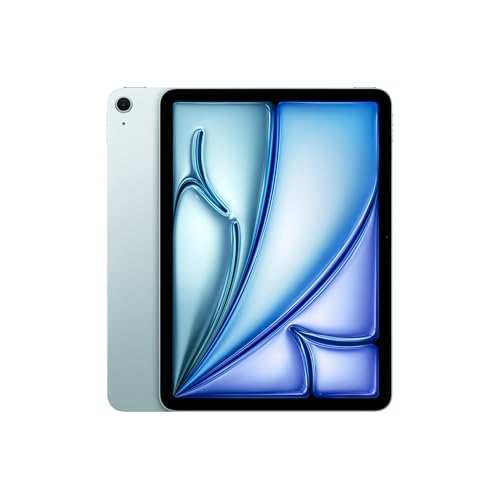 |
Apple iPad Air 11-Inch M3, 256GB Renewed Premium all-round performance |
Check Price |
 |
Microsoft Surface Pro 12-Inch Copilot+ PC Reading and serious work |
Check Price |
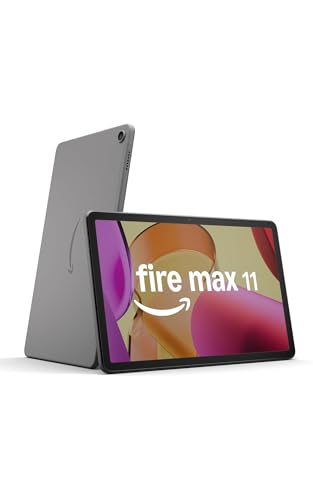 |
Amazon Fire Max 11 Tablet Streaming and reading |
Check Price |
 |
Callsky-Tab 10.1-Inch Android 15 Tablet Affordable everyday browsing |
Check Price |
 |
Samsung Galaxy Tab A 7-Inch Basic compact reading |
Check Price |
Top 5 Tablet For Reading And Web Browsing: Detailed Reviews
1. Apple iPad Air 11-Inch M3, 256GB Renewed
This Tablet For Reading And Web Browsing pairs Apple’s M3 chip with an 11-inch Liquid Retina display and 256GB of storage in a renewed iPad Air. The processor gives you plenty of headroom for multitasking, demanding apps, and creative work, while the bright screen, wide P3 colour, and True Tone make articles, documents, and video look detailed and comfortable. You also get Wi-Fi 6E, Bluetooth 5.3, a 10Gb/s USB-C port, and a 12MP rear camera. Its renewed condition makes this premium setup more accessible, but the Wi-Fi model needs a network for online use.
What We Like:
- The M3 chip handles multitasking and creative apps with substantial performance headroom.
- The 11-inch Liquid Retina display delivers bright, detailed visuals for reading and streaming.
- True Tone and wide P3 colour make the screen more pleasant for varied content.
- 256GB gives you useful local space for apps, documents, media, and files.
- Wi-Fi 6E, Bluetooth 5.3, and a fast USB-C port support modern accessories and connections.
What Could Be Improved:
- The Wi-Fi-only design means you need a wireless network or phone hotspot for browsing away from home.
- The M3 chip may be more performance than you need if your travel use is limited to basic reading.
- As a renewed tablet, its condition may matter more to you than with a new device.
Buy it if you want a compact travel tablet that combines premium screen quality, strong M3 performance, and generous storage for reading, browsing, media, and heavier tasks. Skip it if you only need a simple reader, prefer cellular connectivity, or want a brand-new device rather than a renewed one.
2. Microsoft Surface Pro 12-Inch Copilot+ PC
The Microsoft Surface Pro 12-inch Copilot+ PC is a Tablet For Reading And Web Browsing that also handles documents, video meetings, and presentations. Its Snapdragon X Plus processor, AI-ready NPU, 16GB RAM, and 512GB storage support multitasking, while the 12-inch PixelSense touchscreen keeps reading and browsing portable. This is the only 2-in-1 here with a keyboard and stylus included, letting you switch between touch, typing, and handwriting. The package also includes a 65W dual USB-C/USB-A charger and a 12-month Microsoft 365 Personal subscription card.
What We Like:
- The keyboard makes longer emails and documents more practical.
- The stylus supports handwritten notes and touch-based navigation.
- The 12-inch touchscreen balances portability with useful workspace.
- 16GB RAM and 512GB storage suit serious everyday multitasking.
- The charger includes both USB-C and USB-A ports.
What Could Be Improved:
- The keyboard and stylus are third-party compatible accessories, not original Microsoft Surface accessories.
- Its Snapdragon X Plus ARM platform supports most mainstream applications, but compatibility may vary with some software.
- The compact 12-inch display offers less workspace than a larger laptop for complex documents.
Buy it if you want one travel device for reading, browsing, typing, handwritten notes, meetings, and document work, especially with Microsoft 365 included. Skip it if you only need a simple reader or prefer original Microsoft accessories and a platform with fewer software-compatibility considerations.
3. Amazon Fire Max 11 Tablet
The Amazon Fire Max 11 is a strong Tablet For Reading And Web Browsing if you want one device for books, websites, streaming, and games. Its vivid 11-inch display uses 2.4 million pixels at 2000 x 1200, while certified low-blue-light technology may make longer sessions more comfortable. Wi-Fi 6, an octa-core processor, and 4GB memory support fast streaming and multitasking. The stated 14-hour battery life suits travel days, and the aluminum body, strengthened glass, and slim design should be easy to carry. Optional keyboard and stylus add work and creative flexibility, but cost extra.
What We Like:
- The sharp 11-inch screen gives films, websites, and books plenty of room.
- Wi-Fi 6 and 4GB memory support responsive streaming and multitasking.
- The stated 14-hour battery life suits long journeys and extended downtime.
- Certified low-blue-light technology is a useful touch for longer reading sessions.
- The aluminum design and strengthened glass offer a more durable feel.
What Could Be Improved:
- The optional keyboard and stylus are sold separately, increasing the cost of a work-focused setup.
- An 11-inch tablet takes more room in a bag than a compact reading device.
- Its broad entertainment focus may be more than you need if reading is your only priority.
Buy the Fire Max 11 if you want a travel tablet that combines comfortable reading, web browsing, streaming, and light creative or work use. It makes sense for extended media sessions, especially with its battery claim and Wi-Fi 6. Skip it if you want the smallest possible reader or need included accessories.
4. Callsky-Tab 10.1-Inch Android 15 Tablet
The Callsky-Tab 10.1-inch Android 15 tablet is a practical Tablet For Reading And Web Browsing when your phone feels cramped. Its 1280 × 800 IPS display gives ebooks, websites and video more room, while Widevine L1 supports HD streaming. You get 64GB built in plus a 128GB microSD card for 192GB total storage. The 3GB of physical RAM can use up to 9GB of virtual expansion. Wi-Fi 6, Bluetooth 5.4, USB-C charging and a 6000mAh battery suit everyday travel use, and its approximately 15-ounce weight keeps it portable.
What We Like:
- The 10.1-inch IPS screen gives reading and browsing more space than a phone.
- Widevine L1 supports HD streaming on compatible services.
- The included 128GB microSD card brings total storage to 192GB without a separate purchase.
- Wi-Fi 6 and Bluetooth 5.4 support modern wireless connections.
- At approximately 15 ounces, it is easy to carry around the house or on a trip.
What Could Be Improved:
- The 1280 × 800 resolution is fairly modest for a 10.1-inch display, so text and images will not look as sharp as on a higher-resolution tablet.
- The advertised 12GB extended RAM includes up to 9GB of virtual memory; only 3GB is physical RAM, so this is better suited to everyday use than demanding multitasking.
Buy it if you want an inexpensive, larger-than-a-phone screen for ebooks, websites, streaming, email and video calls, with generous included storage. Skip it if you need premium display sharpness, stronger multitasking performance or a tablet designed for demanding work rather than everyday travel use.
5. Samsung Galaxy Tab A 7-Inch
The Samsung Galaxy Tab A 7-inch is a small, basic Tablet For Reading And Web Browsing, built around a 7-inch 1280 x 800 PLS TFT touchscreen. Its compact size makes it easy to carry and suitable for short reading sessions, while Wi-Fi and Bluetooth 4.0 cover straightforward wireless use. The quad-core 1.3GHz processor and 1.5GB RAM suit simple tasks, but 8GB storage leaves little room for apps or downloaded content. Android 5.1 Lollipop is notably old, making modern browsing and app support its main limitations.
What We Like:
- Its 7-inch screen keeps the tablet highly portable.
- The 1280 x 800 resolution is suitable for basic reading.
- Wi-Fi and Bluetooth 4.0 handle simple wireless connections.
- The 5MP autofocus camera supports occasional snapshots.
- Music playback is rated for up to 100 hours.
What Could Be Improved:
- Android 5.1 Lollipop is too old for a modern browsing-focused tablet.
- The 8GB storage and 1.5GB RAM sharply limit apps, multitasking, and offline content.
- The small display can feel cramped when viewing full web pages.
Buy it if you want the smallest, simplest option for occasional reading, music, and light browsing over Wi-Fi. Skip it if you need current apps, generous storage, smoother multitasking, or a comfortable screen for extended web sessions. Its low hardware demands make sense only for very basic travel use.
How To Choose A Tablet For Reading And Web Browsing
A Tablet For Reading And Web Browsing should make long reading sessions comfortable while staying responsive enough for everyday sites, email, and media. Start by deciding how you will travel with it, because portability, performance, and price rarely peak in the same model. You will get a better match by prioritising your main activity instead of paying for capabilities you will not use.
Choose the right size and portability
A larger tablet gives webpages and documents more room, which can reduce scrolling and make split-screen work more practical. A smaller model is easier to hold during a commute or while reading in bed, and it takes less space in a travel bag. Think about whether you will mostly hold the tablet in your hands or rest it on a table. Weight and physical size matter more over a long trip than they do during a short browsing session.
Match performance to your workload
For books, articles, and basic browsing, you can focus on a straightforward everyday tablet. If you expect to keep many browser tabs open, switch between apps, or handle serious work, a stronger platform is the safer choice. Streaming and reading sit between those uses: you still want smooth navigation, but you may not need a work-focused computer replacement. Be honest about your habits, since extra performance often matters less than a comfortable design and dependable battery use.
Consider your content and software needs
Check whether the tablet’s software suits the apps and services you already use. Android, iPadOS, Windows, and Amazon’s tablet experience can lead to different app choices and workflows, so platform familiarity may save frustration while travelling. If you want to read, browse, and stream from one device, confirm that the services you rely on are available before buying. A tablet that fits your existing routine is usually more useful than one with a longer feature list.
Set a sensible budget
Decide how much you want to spend after identifying your priorities. Premium performance can make multitasking and demanding work easier, while a more affordable tablet may be enough for reading and everyday browsing. A renewed device can offer a route to higher-end performance, but you should pay attention to the fact that it is renewed and make sure the condition meets your expectations. Finally, choose the size and capability you will use regularly rather than buying solely for occasional tasks.
Which Tablet For Reading And Web Browsing Should You Choose?
The Apple iPad Air 11-Inch M3, 256GB Renewed is the best overall pick here, combining premium all-round performance with a travel-friendly 11-inch format. The Microsoft Surface Pro 12-Inch Copilot+ PC is the best alternative if reading sits alongside serious work, since its role is more work-focused. Choose the Amazon Fire Max 11 instead if streaming and reading matter more than demanding productivity, or one of the smaller, more affordable Android options for simpler browsing.

Hi, I’m Larry Fish, the mind behind MyGrinderGuide.com.. With a passion for all things kitchen appliances, I created this blog to share my hands-on experience and expert knowledge. Whether it’s helping you choose the right tools for your culinary adventures or offering tips to make your kitchen more efficient, I’m here to guide you. My goal is to make your time in the kitchen not only easier but also enjoyable! Welcome to my world of kitchen mastery!