
Do you ever stare at your TV, remote in hand, feeling overwhelmed by all the shows you could be watching? You’re not alone! YouTube TV offers a massive library of series, and picking the perfect one can feel like searching for a needle in a haystack. Maybe you’ve wasted precious evening hours scrolling, only to end up rewatching something familiar because nothing else grabbed you.
We get it. The struggle is real when you want to discover a new favorite show but don’t know where to start. That’s why we’re diving deep into the world of Series on YouTube TV. This post is your secret weapon to cut through the noise and find exactly what you’re looking for.
By the time you finish reading, you’ll have a clearer picture of what’s available and how to find hidden gems. We’ll share tips and tricks to help you discover your next binge-worthy obsession. Get ready to level up your TV-watching game!
Top Series On Youtube Tv Recommendations

- 720p resolution - View your favorite movies, shows and games in high definition.
- Alexa voice control - The Alexa Voice Remote lets you easily control your entertainment, search across apps, switch inputs, and more using just your voice. Press and hold the voice button and ask Alexa to easily find, launch, and control content, and even switch to cable.
- Access thousands of shows with Fire TV - Watch over 1.5 million streaming movies and TV episodes with access to thousands of channels, apps and Alexa skills, including Prime Video, Netflix, Hulu, HBO Max, YouTube, Apple TV+, Disney+, ESPN+, Sling TV, Paramount+, and other services right from this TV.*
- DTS Virtual-X Sound - An immersive sound format creates a three-dimensional sound experience with your TV’s speakers.
- Supports HDMI ARC - Sends audio directly from the HDMI jack to a compatible soundbar or AV receiver, removing the need for an extra cable.

- Breathtaking picture: Sharp 4K brings out rich detail on our 55" flat screen TV, while the QLED screen and HDR10 create bright, accurate colors. Roku Smart Picture cleans up incoming TV signals, optimizes them, and chooses the right picture mode.
- Seamless streaming: With fast Wi-Fi and apps that launch in a snap, Roku Select Series TVs get you to your entertainment quickly. You get excellent picture quality, clear sound, automatic updates, and more. It’s simple to use. Hard to outgrow.
- TV, simplified: With setup that only takes minutes, a simple-to-navigate Home Screen, and an uncluttered remote control that does all you need—Roku makes it easier to watch the TV you love.
- A world of free entertainment: Enjoy a huge selection of free live TV, news, sports, movies, shows, and much more—all just a click away.
- More streaming, less searching: With personalized picks right on your Home Screen, quick access to the sports and entertainment you watch most, and fast and easy search in one place—the days of endless scrolling are over.


- Breathtaking picture: Sharp 4K brings out rich detail on our 50" flat screen TV, while the QLED screen and HDR10 create bright, accurate colors. Roku Smart Picture cleans up incoming TV signals, optimizes them, and chooses the right picture mode.
- Seamless streaming: With fast Wi-Fi and apps that launch in a snap, Roku Select Series TVs get you to your entertainment quickly. You get excellent picture quality, clear sound, automatic updates, and more. It’s simple to use. Hard to outgrow.
- TV, simplified: With setup that only takes minutes, a simple-to-navigate Home Screen, and an uncluttered remote control that does all you need—Roku makes it easier to watch the TV you love.
- A world of free entertainment: Enjoy a huge selection of free live TV, news, sports, movies, shows, and much more—all just a click away.
- More streaming, less searching: With personalized picks right on your Home Screen, quick access to the sports and entertainment you watch most, and fast and easy search in one place—the days of endless scrolling are over.

- 1080p resolution - View your favorite movies, shows and games in full high definition.
- Alexa voice control - The Alexa Voice Remote lets you easily control your entertainment, search across apps, switch inputs, and more using just your voice. Press and hold the voice button and ask Alexa to easily find, launch, and control content, and even switch to cable.
- Access thousands of shows with Fire TV - Watch over 1.5 million streaming movies and TV episodes with access to thousands of channels, apps and Alexa skills, including Prime Video, Netflix, Hulu, HBO Max, YouTube, Apple TV+, Disney+, ESPN+, Sling TV, Paramount+, and other services right from this TV.*
- DTS Virtual-X Sound - An immersive sound format creates a three-dimensional sound experience with your TV’s speakers.
- Supports HDMI ARC - Sends audio directly from the HDMI jack to a compatible soundbar or AV receiver, removing the need for an extra cable.

- Breathtaking picture: Sharp 4K brings out rich detail on our 65" flat screen TV, while the QLED screen and HDR10 create bright, accurate colors. Roku Smart Picture cleans up incoming TV signals, optimizes them, and chooses the right picture mode.
- Seamless streaming: With fast Wi-Fi and apps that launch in a snap, Roku Select Series TVs get you to your entertainment quickly. You get excellent picture quality, clear sound, automatic updates, and more. It’s simple to use. Hard to outgrow.
- TV, simplified: With setup that only takes minutes, a simple-to-navigate Home Screen, and an uncluttered remote control that does all you need—Roku makes it easier to watch the TV you love.
- A world of free entertainment: Enjoy a huge selection of free live TV, news, sports, movies, shows, and much more—all just a click away.
- More streaming, less searching: With personalized picks right on your Home Screen, quick access to the sports and entertainment you watch most, and fast and easy search in one place—the days of endless scrolling are over.

- No Setup Required: the remote control replacement for Roku TV which can solve your home backup remote control needs. Simply Insert 2 AAA batteries (Not included) , then turn on your device and it will automatically pair, perfectly replacing your original remote control
- Upgrade Material: our remote replacement is made of high quality ABS and silicone, ABS improves durability, can be used for a long time, and also keeps you and your children away from harm
- Completely Compatible: the replacement remote controls only for roku series TVs, compatible with TCL Roku TVs, Hisense Roku TVs, Onn Roku TVs, Sharp Roku TVs, Philips Roku TVs
- Notice: Only for roku tv, not for roku stick/roku box 1/2/3/4(HD/LT/XS/XD), not for roku ultra/roku express/roku premiere and roku player
- Key Features: Get to favorite apps quickly with 8 shortcut buttons for Disney, Netflix, YouTube, Hulu, Primevideo sling, Apple TV+ and VUDU. Strongest signal by mature infrared technology, farther transmitting distance, stable performance, following the movement of the tv page without obvious delay

- Breathtaking picture: Sharp 4K brings out rich detail on our 85" flat screen TV, while the QLED screen and HDR10 create bright, accurate colors. Roku Smart Picture cleans up incoming TV signals, optimizes them, and chooses the right picture mode.
- Seamless streaming: With fast Wi-Fi and apps that launch in a snap, Roku Select Series TVs get you to your entertainment quickly. You get excellent picture quality, clear sound, automatic updates, and more. It’s simple to use. Hard to outgrow.
- TV, simplified: With setup that only takes minutes, a simple-to-navigate Home Screen, and an uncluttered remote control that does all you need—Roku makes it easier to watch the TV you love.
- A world of free entertainment: Enjoy a huge selection of free live TV, news, sports, movies, shows, and much more—all just a click away.
- More streaming, less searching: With personalized picks right on your Home Screen, quick access to the sports and entertainment you watch most, and fast and easy search in one place—the days of endless scrolling are over.
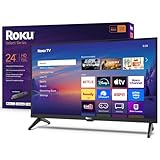
- Seamless streaming: With fast Wi-Fi and apps that launch in a snap, Roku Select Series TVs get you to your entertainment quickly. Our intuitive interface makes exploring popular apps—plus free movies, shows, and live TV—as easy as it is fun.
- Explore a world's worth of TV: Dive into all kinds of entertainment and easily find your favorites or soon-to-be favorites.
- A ton of entertainment at the best price—free: Your go-to streaming destination for free entertainment, Roku has 500+ TV channels, with live in-season shows, hit movies, weather, local news, and award-winning Roku Originals.
- Home sweet home screen: Move apps around and make the Roku experience your own with a home screen that easily gets you to what you want to watch fast.
- Just keeps getting better: Get the newest apps, features, and more with automatic software updates.
Your Guide to Awesome YouTube TV Series
Thinking about diving into YouTube TV for some binge-watching fun? You’re in the right place! YouTube TV is a cool way to watch live TV channels, including a ton of great shows and series, right from your computer, phone, or smart TV. This guide will help you pick the best way to enjoy your favorite series on YouTube TV.
What to Look For: Key Features
When you’re choosing YouTube TV, think about what makes your viewing experience great.
Channels and Content
- Channel Selection: YouTube TV offers many channels. Look for channels that air the series you love. Some channels are known for dramas, others for comedies, and some for reality TV.
- On-Demand Library: Besides live TV, YouTube TV lets you watch shows anytime. Check how big their on-demand library is. More shows mean more choices!
- DVR Storage: YouTube TV has a built-in DVR. This lets you record shows to watch later. The amount of storage time is important. More storage means you can keep more episodes.
- Live Sports and News: If you like sports or news alongside your series, make sure those channels are included.
Technical Stuff
- Streaming Quality: You want clear pictures. Look for options that offer high-definition (HD) streaming.
- Device Compatibility: Can you watch on your TV, tablet, or phone? Make sure YouTube TV works with the devices you use most.
- User Interface: How easy is it to find shows and navigate the app? A simple, clean layout makes watching much more enjoyable.
What Makes the “Materials” Good?
For YouTube TV, “materials” aren’t like fabric or wood. They are the things that make the service work well.
- Reliable Internet Connection: This is super important. A fast and stable internet connection makes your shows stream smoothly without buffering. This is the most crucial “material” for a good experience.
- Good Streaming Device: Whether it’s a smart TV, a streaming stick (like a Roku or Fire Stick), or your phone, a device that can handle streaming well improves quality. Older devices might struggle.
Factors That Boost or Hurt Your Viewing Quality
Lots of things can make your YouTube TV series watching better or worse.
Things That Make it Better
- High-Speed Internet: We mentioned this before, but it’s worth repeating! Faster internet means clearer video and less waiting.
- Good Wi-Fi Signal: If you’re using Wi-Fi, make sure your signal is strong where you usually watch.
- Updated Devices: Keeping your streaming devices and apps updated helps them run better.
- Choosing the Right Plan: Sometimes, different YouTube TV plans offer different features. Pick one that suits your needs.
Things That Make it Worse
- Slow Internet: This is the biggest problem. Buffering and pixelated video are no fun.
- Weak Wi-Fi: A poor Wi-Fi signal causes the same issues as slow internet.
- Outdated Devices or Apps: Old technology can’t keep up with new streaming demands.
- Too Many Devices Streaming at Once: If everyone in your house is streaming something different, it can slow things down for everyone.
User Experience and How You Can Use It
YouTube TV is designed for easy watching.
Easy to Use
- Simple Navigation: Finding your favorite series is usually straightforward. You can browse by channel, search for titles, or check recommended shows.
- Personalized Recommendations: The more you watch, the better YouTube TV gets at suggesting shows you might like.
- Multiple User Profiles: Some plans let different people in your household have their own profiles. This keeps recommendations separate.
Great for Many Uses
- Catching Up on Current Series: Watch new episodes of your favorite shows as they air live.
- Binge-Watching Old Favorites: Many classic series are available on-demand. You can watch entire seasons at once.
- Discovering New Shows: Explore different channels and genres to find something new and exciting.
- Watching with Family: Share your account and watch together. Many plans allow multiple streams at once, so different people can watch different things.
YouTube TV Series: Your Top Questions Answered
Here are some common questions people have about watching series on YouTube TV.
Q: What are the main Key Features of YouTube TV for series watching?
A: Key features include a wide variety of channels that air popular series, an on-demand library for watching anytime, cloud DVR storage to record shows, and good streaming quality for clear video.
Q: What are the “materials” I need for the best YouTube TV series experience?
A: The most important “materials” are a fast and stable internet connection and a device that can stream well, like a smart TV or a streaming stick.
Q: How does internet speed affect my YouTube TV series quality?
A: Fast internet speed gives you clear, smooth video without interruptions. Slow internet causes buffering and blurry pictures, which ruins the viewing experience.
Q: Can I record series on YouTube TV to watch later?
A: Yes, YouTube TV has a cloud DVR that lets you record shows. You can store many hours of content to watch whenever you want.
Q: What if I want to watch a series that isn’t on live TV right now?
A: YouTube TV has an on-demand library. Many popular series are available to watch anytime, even if they are not currently airing live.
Q: How many people can watch YouTube TV series at the same time?
A: Most YouTube TV plans allow up to three simultaneous streams. This means three people can watch different shows on different devices at the same time.
Q: Is YouTube TV good for finding new series to watch?
A: Yes, YouTube TV suggests shows based on what you watch. You can also browse different channels and genres to discover new series.
Q: What if my internet is good, but my video quality is still bad?
A: Make sure your Wi-Fi signal is strong in the area where you’re watching. Also, check that your streaming device and the YouTube TV app are up to date.
Q: Can I watch YouTube TV series on my phone?
A: Yes, YouTube TV works on many devices, including smartphones, tablets, computers, and smart TVs.
Q: Is YouTube TV expensive for watching series?
A: YouTube TV has a monthly subscription fee. The cost can vary depending on the plan you choose. It’s often compared to cable TV prices.

Hi, I’m Larry Fish, the mind behind MyGrinderGuide.com.. With a passion for all things kitchen appliances, I created this blog to share my hands-on experience and expert knowledge. Whether it’s helping you choose the right tools for your culinary adventures or offering tips to make your kitchen more efficient, I’m here to guide you. My goal is to make your time in the kitchen not only easier but also enjoyable! Welcome to my world of kitchen mastery!