
As an Amazon Associate I earn from qualifying purchases.
Choosing a Wireless Keyboard And Mouse For Mac can be harder than it looks. You need the right Apple-friendly layout, connection type, size, and features without paying for extras you will not use.
Think about how you work first. Multi-device Bluetooth switching suits people who move between a Mac, MacBook, and iPad, while a full-size layout with a number pad works better for spreadsheets and office tasks.
These five picks cover different priorities, including compact rechargeable designs, quiet typing, backlit keys, larger layouts, and a simple USB receiver setup. Each product was selected from the provided options for a distinct use case.
The guide starts with the strongest all-round choices, then explains what makes each one different and what trade-offs you should consider before buying.
Our Top 5 Mac Keyboard And Mouse Combos at a Glance
| Product | ||
|---|---|---|
 |
seenda SKM64-2 Bluetooth Combo for Mac Apple users needing flexibility |
Check Price |
 |
SABLUTE Bluetooth Keyboard And Mouse for Mac Quiet multi-device typing |
Check Price |
 |
ProtoArc KM100-A Bluetooth Combo for Mac Backlit full-size typing |
Check Price |
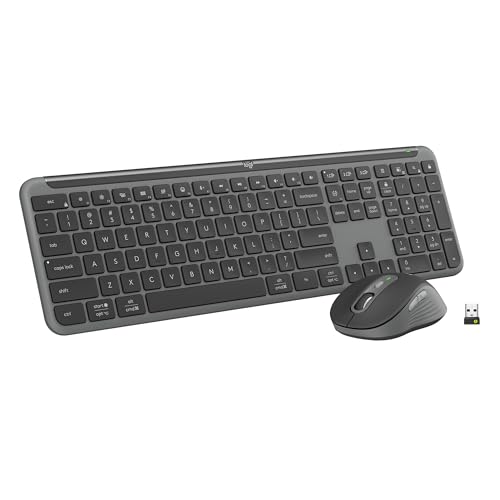 |
Logitech MK955 Signature Slim Combo Larger hands and quiet work |
Check Price |
 |
Macally Bluetooth Keyboard And Mouse for Mac Rechargeable Apple-style setup |
Check Price |
Top 5 Wireless Keyboard And Mouse For Mac: Detailed Reviews
1. seenda SKM64-2 Bluetooth Combo for Mac
The seenda SKM64-2 is a compact Wireless Keyboard And Mouse For Mac users who want a tidy Apple-focused setup. Its standard Apple layout works with macOS 10.12+, iPadOS 13.0+, and iOS 13.0+, while three Bluetooth channels let you switch between compatible devices without reconnecting. Type-C charging avoids disposable batteries, and up to 200 hours of standby helps reduce charging interruptions. Quiet, stable keys suit shared spaces, while the slim stainless steel and ABS design packs easily for mobile work.
What We Like:
- Three Bluetooth channels make switching between Mac, iPad, and iPhone more convenient.
- Rechargeable Type-C power reduces battery waste and ongoing replacements.
- Quiet, stable keys work well in offices, libraries, and shared rooms.
- The compact, thin design is easy to carry in a laptop bag.
- The standard Apple layout feels familiar for Mac users.
What Could Be Improved:
- It connects through Bluetooth only, so there is no USB receiver or wired connection if Bluetooth is unavailable.
- The compact keyboard may feel cramped if you prefer a full-size layout or a dedicated number pad.
- Compatibility is focused on newer Apple operating systems, starting with macOS 10.12+, iPadOS 13.0+, and iOS 13.0+.
Buy this combo if you want a quiet, rechargeable setup that travels easily and can move between several Apple devices. It suits students, shared-office workers, and Mac users with limited desk space. Skip it if you need USB connectivity, a full-size keyboard, or compatibility beyond the listed Apple systems.
2. SABLUTE Bluetooth Keyboard And Mouse for Mac
This Wireless Keyboard And Mouse For Mac pairs a Mac-friendly look with a full-size layout, familiar shortcuts, and low-profile scissor keys. You get crisp, laptop-like typing with less noise, while the mouse uses quiet micro-switches for shared spaces. Bluetooth BT1, BT2, and BT3 channels let you switch among a Mac, MacBook, and iPad. USB-C charging suits newer Apple setups, and the metallic texture gives the combo a more substantial feel. The mouse’s 1200 DPI sensitivity is intended for controlled document, spreadsheet, and app navigation.
What We Like:
- Scissor keys provide a familiar, laptop-like typing feel with reduced noise.
- Three Bluetooth channels make switching between Apple devices straightforward.
- USB-C charging fits easily into many newer Apple setups.
- The quiet mouse is better suited to offices, libraries, and shared rooms.
- The full-size Mac layout preserves familiar shortcuts and key placement.
What Could Be Improved:
- The full-size keyboard needs more desk space than a compact layout.
- It relies on Bluetooth connectivity, so it may not suit you if you specifically want a USB receiver.
- The metallic finish may feel more substantial, but it is less understated than a plain plastic design.
Buy it if you want quiet Mac-style typing, USB-C charging, and simple switching between three Apple devices. It suits office workers, students, and hybrid users who prefer a full-size board. Skip it if desk space is tight or you specifically need a wireless receiver rather than Bluetooth.
3. ProtoArc KM100-A Bluetooth Combo for Mac
The ProtoArc KM100-A is a Wireless Keyboard And Mouse For Mac with a full-size Mac layout, numeric keypad, and soft white backlighting. Three brightness levels help you work in dim rooms without relying on harsh screen light. Its three Bluetooth channels let you connect and switch between up to three devices, useful if you move between a Mac, iPad, and another compatible device. Scissor switches provide responsive, quiet typing, while the flat design keeps your wrists level. Built-in rechargeable batteries reduce the need for disposable cells.
What We Like:
- The numeric keypad suits spreadsheets, finance work, and frequent number entry.
- Backlighting with three brightness levels improves visibility in low-light rooms.
- Triple Bluetooth channels make switching between three devices convenient.
- Scissor switches offer quiet, responsive typing for shared workspaces.
- Rechargeable batteries reduce ongoing reliance on disposable batteries.
What Could Be Improved:
- The flat design may feel less comfortable if you prefer a raised or angled keyboard.
- A full-size keyboard takes more desk space than a compact Mac setup.
- The backlight uses soft white LEDs only, with no colour or lighting customisation.
Buy it if you want a full-size Mac keyboard with a numeric keypad, quiet keys, backlighting, and easy switching between three devices. It suits desk-based work and dimmer rooms particularly well. Skip it if you need a compact setup, prefer an angled keyboard, or want more advanced backlight controls.
4. Logitech MK955 Signature Slim Combo
The Logitech MK955 Signature Slim Wireless Keyboard Mouse Combo is a Wireless Keyboard And Mouse For Mac designed for larger hands, quieter workspaces, and multi-device use. Its full-size, laptop-style keyboard gives you familiar typing, while the contoured M750 L Signature Plus mouse offers quiet clicks and a SmartWheel for either precise or fast scrolling. You can switch the keyboard between a laptop, tablet, and phone with one tap. Customizable keys and shortcuts through Logi Options+ add flexibility, though that software is available only on Windows and macOS.
What We Like:
- The full-size layout suits longer typing sessions and larger hands.
- Quiet typing and SilentTouch clicking help reduce office distractions.
- You can switch the keyboard across three devices with a single tap.
- The SmartWheel handles both line-by-line document scrolling and long web pages.
- Customizable keys and shortcuts add useful control on Windows and macOS.
What Could Be Improved:
- The full-size keyboard takes more desk space than a compact layout.
- The larger mouse may feel bulky if you have smaller hands.
- Mobile users cannot access the Logi Options+ customization features on the tablet or phone itself.
Buy it if you want a full-size Mac-friendly setup, have larger hands, and regularly move between a computer, tablet, and phone. It also suits shared offices where quiet controls matter. Skip it if your desk is tight, you prefer compact peripherals, or you need software customization directly on mobile devices.
5. Macally Bluetooth Keyboard And Mouse for Mac
The Wireless Keyboard And Mouse For Mac from Macally gives you a 110-key, Mac-focused setup with 20 shortcut keys for everyday navigation and commands. Its Bluetooth connection can pair with and switch between up to three devices, including Macs, iOS devices, PCs, and Android hardware. Both keyboard and mouse use built-in rechargeable batteries, and a charging cable is included; the keyboard has an 800mAh battery. The mouse also offers three DPI settings, letting you adjust pointer movement for different work surfaces and preferences.
What We Like:
- The 110-key layout provides more room than a compact keyboard.
- Twenty shortcut keys make common Mac actions easier to access.
- Bluetooth switching between three devices suits mixed-device workspaces.
- Rechargeable batteries reduce the need for disposable cells.
- The Mac-focused design should fit naturally beside Apple hardware.
What Could Be Improved:
- It relies on Bluetooth, so you do not get a stated USB receiver option for computers without Bluetooth.
- The product details do not specify battery runtime per charge.
- The mouse’s three DPI settings offer adjustment, but the available DPI levels are not listed.
Buy this combo if you want an Apple-style keyboard and mouse with a full 110-key layout, multi-device Bluetooth, and rechargeable power. It makes sense for Mac users who also switch between other platforms. Skip it if you need a USB receiver, detailed battery-life figures, or more specific mouse-control information.
How To Choose A Wireless Keyboard And Mouse For Mac
A Wireless Keyboard And Mouse For Mac should make your daily setup simpler, not add another compatibility problem. Start by matching the connection, layout and working habits to your Mac, then check comfort and charging before you compare designs or extra features.
Check compatibility and connection options
Bluetooth keeps your desk clear and works well with Macs that have the right wireless support. If you regularly switch between a Mac and another device, look for a set designed for multi-device use. Confirm how many devices it supports and how you change between them, since a convenient shortcut matters more than a feature you rarely use.
Choose the right keyboard layout and size
Make sure the keyboard layout suits your Mac and your usual shortcuts. A compact board saves desk space, while a full-size model gives you a dedicated number pad and more room for familiar key spacing. If you write for long periods, consider the key feel and noise level; quiet typing is particularly useful in shared rooms, offices and video calls.
Match the mouse to your hand and workload
A mouse should feel comfortable through a full work session, with a shape that fits your hand rather than forcing your fingers into an awkward position. Think about how much pointing, scrolling and document work you do. A keyboard may attract most of your attention, but an uncomfortable mouse can become the bigger problem over time.
Consider power, lighting and desk habits
Rechargeable sets reduce disposable battery waste, but they require you to remember charging. Check whether the keyboard and mouse share a charging routine or need separate attention. Backlighting can help you work in dim conditions, though it may matter less if you usually type in a bright room. Also check the available desk space, because a larger keyboard and mouse need room to sit comfortably without crowding your other equipment.
Finally, decide which compromise you can accept. A slim design may be easier to carry, while a larger set may feel more familiar; a quiet keyboard may sacrifice some of the sharper feedback you prefer. Prioritise the feature that affects your work every day rather than choosing based on the longest list of extras.
Which Mac Keyboard And Mouse Combo Should You Choose?
The seenda SKM64-2 Bluetooth Combo for Mac is the best overall pick if you want flexibility from your setup, making it a sensible choice for Apple users who may work across different devices. The SABLUTE Bluetooth Keyboard And Mouse for Mac is the best alternative for quiet multi-device typing. Choose the seenda for broader flexibility, or the SABLUTE if low-noise, multi-device work matters most.

Hi, I’m Larry Fish, the mind behind MyGrinderGuide.com.. With a passion for all things kitchen appliances, I created this blog to share my hands-on experience and expert knowledge. Whether it’s helping you choose the right tools for your culinary adventures or offering tips to make your kitchen more efficient, I’m here to guide you. My goal is to make your time in the kitchen not only easier but also enjoyable! Welcome to my world of kitchen mastery!