
Does your Mac feel a little crowded with all its ports? You probably love your sleek MacBook, but sometimes it just doesn’t have enough places to plug things in. Ever find yourself juggling cables, trying to decide what to unplug so you can charge your phone or connect your external hard drive? It’s a common problem for Mac users, and finding the right USB hub can feel like a puzzle.
Choosing a USB hub can be tricky. There are so many different types, with different numbers of ports and different features. You might wonder which one is best for your needs, or if it will even work well with your Mac. This guide is here to help you sort through all the choices. We’ll show you what to look for so you can get a USB hub that makes your Mac work better for you.
By reading on, you’ll learn what makes a good USB hub for your Mac. We’ll talk about the important things to consider, like the types of ports you need and how fast they are. After this, you’ll feel much more confident picking out the perfect USB hub that solves your connection problems and makes your Mac setup even more awesome.
Top Usb Hub For Mac Recommendations

- Sleek 7-in-1 USB-C Hub: Features an HDMI port, two USB-A 3.0 ports, and a USB-C data port, each providing 5Gbps transfer speeds. It also includes a USB-C PD input port for charging up to 100W and dual SD and TF card slots, all in a compact design.
- Flawless 4K@60Hz Video with HDMI: Delivers exceptional clarity and smoothness with its 4K@60Hz HDMI port, making it ideal for high-definition presentations and entertainment. (Note: Only the HDMI port supports video projection; the USB-C port is for data transfer only.)
- Double Up on Efficiency: The two USB-A 3.0 ports and a USB-C port support a fast 5Gbps data rate, significantly boosting your transfer speeds and improving productivity.
- Fast and Reliable 85W Charging: Offers high-capacity, speedy charging for laptops up to 85W, so you spend less time tethered to an outlet and more time being productive.
- What You Get: Anker USB-C Hub (7-in-1), welcome guide, 18-month warranty, and our friendly customer service.


- 5 in 1 Connectivity: The USB C Multiport Adapter is equipped with a 4K HDMI port, a 100W USB C PD port, a 5 Gbps USB A data port, and two 480 Mbps USB A ports

- USB-C Hub Multiport Adapter (10-in-1): This versatile USB-C to HDMI adapter features a 4K@60Hz HDMI port, 2x USB 3.0 ports, 3x USB 2.0 ports, 1x USB-C data port, 100W PD charging, and Micro SD/TF card reader. This usb c adapter is an ideal for most laptops, tablets, and phones with USB-C/Thunderbolt 3/Type-C port. Such as: MacBook Pro/Air (2018-2025, M1/M2/M3/M4), iMac, iPad Pro, iPhone 15 Pro/Pro Max, Dell, Lenovo, HP laptops with usb c full function port.
- 4K@60Hz USB-C to HDMI Hub: This Macbook pro air accessories delivers stunning 4K@60Hz (3840×2160) resolution, with downscaling support for 2K@120Hz and 1080P. This macbook adapter multiport allows to mirror or extend your laptop screens or monitors by connecting monitors tvs projectors with hdmi ports. Note: Your USB-C port must support video output (DisplayPort Alt Mode or Thunderbolt) for the adapter to function—otherwise, no signal will be transmitted.
- 6 USB-A/C Data Ports: usb c hub multiport adapter comes with 3 USB 3.0 ports(1 USB-C not for video output + 2 USB-A) with 5Gbps speeds for fast data transfer and charging up to (5V/0.9A), plus 2 USB-A 2.0 ports up to 480mbp/s, you can connect usb keyboard, mouse, usb driver, usb hard disks to your laptop easily via this macbook usb adapter. This macbook hdmi adapter only allows you to connect 1 HDD/SSD and this adapter won't support Apple USB super drive.
- USB C Card Reader & 100 W Power Delivery: This usb adapter for macbook support you to charging your laptop at power up to 100W while connecting multiple peripherals, no more power worries; Also with this mac dongle adapter multiport, you can conveniently browse photos instantly on your usb-c smartphones/laptops and transfer hundred images to your laptop in seconds.
- Strong Compatibility: The macbook hdmi adapter support Windows, MacOS, Linux, and Vista system. Compatible with most usb-c devices such as Macbook pro Macbook Air 2026 2025 2024 2023 2022 M1 M2 M3 M4 M5 13” 14” 15” 16”, MacBook Neo, iMac, iPad pro, iPhone 15/16 Pro/Pro, dell xps 13 15 17, lenovo yoga, hp elitebook, surface pro,etc

- 5-in-1 Connectivity: Equipped with a 4K HDMI port, a 5 Gbps USB-C data port, two 5 Gbps USB-A ports, and a USB C 100W PD-IN port. Note: The USB C 100W PD-IN port supports only charging and does not support data transfer devices such as headphones or speakers.
- Powerful Pass-Through Charging: Supports up to 85W pass-through charging so you can power up your laptop while you use the hub. Note: Pass-through charging requires a charger (not included). Note: To achieve full power for iPad, we recommend using a 45W wall charger.
- Transfer Files in Seconds: Move files to and from your laptop at speeds of up to 5 Gbps via the USB-C and USB-A data ports. Note: The USB C 5Gbps Data port does not support video output.
- HD Display: Connect to the HDMI port to stream or mirror content to an external monitor in resolutions of up to 4K@30Hz. Note: The USB-C ports do not support video output.
- What You Get: Anker 332 USB-C Hub (5-in-1), welcome guide, our worry-free 18-month warranty, and friendly customer service.

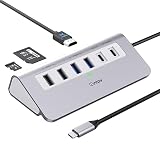
- Hybrid USB C Hub: This usb hub features 1*USB-C 3.2 10Gbps + 2 USB A 3.2 10Gbps, 4 USB-A 3.0 5Gbps and 2 USB-C PD 45W Fast Charging Ports(Not support data transmission) , use the usb hub for pc to extend your laptop, desktop, gaming host and more. Note: Powered usb hub do not support video output function.⚠️Note: The usb hub powered is not recommended for charging computers or other high-power devices.
- 10Gbps Fast Data Transfer: The USB 3.2 hub provides lightning fast data transfer via USB 3.2 port (10Gbps) or USB 3.0 port (5Gbps), allowing you to easily transfer HD photos, videos, and any files in seconds.Suitable for video editing, social media video editing, photography enthusiasts, educators, researchers, and office workers Note: Do not use multiple SSD drives simultaneously
- PD 45W Fast Charging: This usb hub for laptop provides dedicated 2 PD 45W charging ports, can quickly charge your iPhone17/ 16/15 series, iPad, mobile phones and other type-c devices. Note: when you use the powered usb hub, please insert the provided power adapter to charge your device via hub. ⚠️Note: The PD 45W Charging Ports does not support data transfer .
- Ergonomic Design: The aluminium one-piece USB port hub has a unique ergonomic 28-degree made with 50%+ recycled materials angled triangular shape and feet on the bottom to make plugging and unplugging USB devices easier and more stable on the desktop.Note:It is recommended that you avoid using multiple removable drives simultaneously.
- Universal Compatibility: Intpw powered usb c hub includes a USB C to C cable in the package, compatible with most USB-C laptops and PC, such as M1/M2/M3/M4/M5 MacBook Air/Pro, iMac, XPS, Surface Pro.Friendly Note: This design perfectly fits 99% of standard-sized USB-C devices (including regular-thickness USB-C flash drives, phone/tablet cables, etc.). If you're using a custom USB-C device with a thicker port housing, please contact us for compatibility advice.

- 【7 in 1 Multi-functional Hub】 USB C hub with 1 x USB 3.0 port and 4 x USB 2.0 ports, 2 x USB C 2.0 port . USB 3.0, 5Gb/s transfer speed , USB 2.0: 480bps transfer speed, quickly transfer and download videos, music, photos and other files.
- 【Wide Compatibility】 This USB C hub Compatible with USB-C compatible with MacBook Pro/MacBook Retain/MacBook Air or devices with a Type C port,Windows 10, MacOS X, Android, Chrome OS Google (Up), Linux with the latest updates day.
- 【High-Speed Data Transfer】The usb c hub and usb hub equipped with USB Hub 3.0 port, this extra ports for laptop hub enables fast data transfer speeds of up to 5Gbps, allowing you to transfer large files, photos, and videos in seconds. Enjoy a seamless and efficient workflow with this powerful expansion dock.
- 【Wide Appliaction】BERLAT 7-port USB Extender applies to various devices: laptop, pc tower, XBOX, PS4, flash drive, keyboard, mouse, card reader, HDD, cellphone OTG adapter, printer, camera, USB fan or any other USB Peripherals.
- 【 Sleek and Portable Design】Featuring a compact and lightweight design, this USB Type-C expansion dock hub is perfect for on-the-go use. Its durable aluminum alloy casing ensures long-lasting performance, making it an essential accessory for your devices.
- 9-IN-1 USB C Hub: USB C docking station has perfectly combined most functions you need, includes 4K@60Hz HDMI, PD 100W pass-through charging for laptop, USB-C 3.0 & 2 USB-A 3.0 5Gbps data, 2 USB 2.0, SD/TF 3.0 104MB/s Slots—perfect for work, study, or travel. USB-C Cable Length is about 19.7". Long enough to connect your laptop. ⚠️Note: USB-C PD port not support data transfer and video output.
- Brillant 4K@60Hz Display: intpw usb hub for pc can stream 4K@60Hz video to HDTV, Monitors or projectors via HDMI port, presenting you a visually stunning movies, high-definition online meetings. Perfect for education, recreation, work, fitness, gaming and more. ⚠️Note: Please plug in your laptop's power adapter before connecting monitor. USB-C devices should support USB Type-C DP Alt Mode or thunderbolt, otherwise will won’t output images on monitors or screens.
- High-Speed Data Transfer: 3 USB 3.0 Ports transfer speed up to 5Gbps. USB C to hdmi takes only a few seconds to transfer photos or videos to your laptop. 2 USB 2.0 can connect to your keyboard and mouse. USB 3.0/2.0 data port not recommend for charging/video/audio.⚠️Note: USB-C 3.0 port does not support charging and video output.
- PD 100W Fast Charging: Using 100W USB-C PD charging port to charge your MacBook Pro/Air or other USB C laptop. Note: For a better experience, when you use the powered usb hub, please use your orginal power supply or at least 65W power supply to charge your laptop via usb port hub. ⚠️Note: power adapter is not included and PD port not support data transfer and video output.
- Wide Compatibility: intpw usb hub for pc is compatible with almost type-c devices such as MacBook Pro/Air, MacBook M1, M2,M3, iMac, Macbook Neo, iPad Pro, iPhone 17/16/15 Series etc. ⚠️Note: Doesn't unplug or plug the PD charger when using the usb hub usb c. This prevents the device from being disconnected, the HDMI connection screen is not displayed, and data transferred from external USB devices is lost.

- [7-in-1 Multi-port USB C Hub] Acer USBC adapter macbook is made of Aluminum material, expands a USB-C port to 7 ports (1*HDMI 4K@30HZ, 2*USB 3.1, 1*USB-C, 1*Type-C PD charging, 1*MicroSD card slot, 1*SD card slot). The USB hub expands your work from home, office, or on the go. 📌Note: Please connect the power supply with the PD port to provide sufficient power for the USB C hub dongle .
- [4K USB-C to HDMI Adapter] This USB C to hdmi adapter can mirror or extend your screen with an HDMI port. You can use USBC hub to directly stream 4K@30Hz or full HD 1080P video to HDTV, monitors, and projector, which also bring an immersive 3D resolution experience. 📌Note: USB-C devices should support USB Type-C DP Alt Mode(Video transmission function), and 📌NOT for 4K@60Hz and 2K@144Hz.
- [100W Power Delivery] The USB C multiport adapter features Type C fast charge PD port to provide up to 100W of high-speed charging for laptops. Get your USB C devices charged, No Worry about the power while using the other functions. Ideal for MacBook Pro/Air and other USB-C devices. 📌Ensure your laptop's USB-C port supports PD protocol and use a 65W+ charger for best performance.
- [Efficient 5Gbps Data Transfer] Two high-speed USB-A 3.1 ports and one USB-C port enable fast data transfer up to 5Gbps. The USBC dongle can expand your work efficiency either from home or the office. 📌Note: ONLY Support Data Transfer, NOT Support video/audio.
- [Wide Compatibility] The USB C dongle adapter crafted with a high-quality aluminum housing for enhanced durability and heat dissipation. USB hub for laptop is for MacBook Pro, MacBook Air, Acer, XPS, Laptops and Works on Windows, ChromeOS, Linux, Mac OS X 10.5 or higher. 📌Please turn on the Samsung DeX Mode on the Samsung Galaxy Tablet before you use it.
Choosing the Best USB Hub for Your Mac: A Simple Guide
MacBooks are sleek and powerful. But sometimes, they don’t have enough ports. That’s where a USB hub comes in. A USB hub is like an extension cord for your computer’s USB ports. It lets you plug in more things, like a mouse, keyboard, external hard drive, or even an SD card.
Why You Need a USB Hub for Your Mac
Newer Macs, especially MacBooks, often have fewer USB-A ports than older models. They use USB-C (also called Thunderbolt 3 or 4) ports. This is great for speed, but it can be tricky if you have older gadgets. A USB hub bridges this gap. It gives you the ports you need.
Key Features to Look For
1. Port Types and Numbers
- USB-A Ports: These are the classic rectangular ports. Make sure you have enough for your current and future needs.
- USB-C Ports: If your Mac only has USB-C, you’ll definitely want a hub with at least one USB-C port. Some hubs even let you charge your MacBook through this port (called Power Delivery).
- Other Ports: Consider if you need HDMI for a monitor, an SD card reader for photos, or an Ethernet port for a wired internet connection.
2. Data Transfer Speeds
- USB 3.0/3.1/3.2: These are faster than older USB 2.0. Look for speeds like 5Gbps (Gigabits per second) or 10Gbps. This matters for copying large files quickly.
- Thunderbolt 3/4: If your Mac has these, some high-end hubs offer even faster speeds, up to 40Gbps. This is great for demanding tasks.
3. Power Delivery (PD)
If you have a MacBook, you’ll want a hub with Power Delivery. This means you can plug your MacBook’s charger into the hub. The hub then charges your MacBook. You won’t need a separate charger for your laptop when using the hub.
Important Materials and Build Quality
Good hubs are built to last. They often use durable materials.
- Aluminum: Many premium hubs use aluminum. This makes them strong and helps them stay cool.
- Plastic: Some affordable hubs use plastic. They can still work well, but they might feel less sturdy.
A well-built hub feels solid. It won’t bend or break easily. The cables should also be strong and flexible.
Factors That Improve or Reduce Quality
What Makes a Hub Better?
- Reputable Brands: Stick with well-known brands. They usually make reliable products.
- Good Reviews: Read what other users say. Look for hubs with lots of positive feedback.
- Sufficient Power: If you plug in many devices, especially power-hungry ones like external hard drives, a hub with its own power adapter can be better.
What Can Make a Hub Worse?
- Overheating: Cheap hubs can get very hot. This can damage your devices or the hub itself.
- Slow Speeds: If a hub doesn’t deliver the advertised speeds, it’s not good.
- Compatibility Issues: Some hubs don’t work well with all Macs.
User Experience and Use Cases
A good USB hub makes your Mac life easier. Here are some common ways people use them:
- The Creative Professional: Connect cameras, external hard drives for editing, monitors, and SD cards all at once.
- The Student: Plug in a keyboard, mouse, and an external drive for school projects.
- The Home Office User: Hook up a printer, scanner, webcam, and speakers to your MacBook.
- The Traveler: A compact hub can give you the ports you need in hotels or coffee shops.
A seamless user experience means plugging in your hub and having everything work right away. You shouldn’t have to install special software. The hub should feel like a natural extension of your Mac.
Frequently Asked Questions (FAQ) About USB Hubs for Mac
Q1: What is a USB hub for Mac?
A: A USB hub for Mac is a small device that lets you connect more USB devices to your MacBook or iMac than it has ports built-in. It expands your Mac’s connectivity.
Q2: Do I really need a USB hub for my Mac?
A: You need one if your Mac doesn’t have enough USB ports for the devices you want to use, especially if you have older USB-A devices or need extra ports like HDMI or an SD card reader.
Q3: What’s the difference between USB-C and USB-A ports on a hub?
A: USB-C is a newer, smaller, oval-shaped port that’s faster and can do more things, like charging. USB-A is the older, rectangular port that most older devices use.
Q4: What does “Power Delivery” mean for a USB hub?
A: Power Delivery (PD) means the hub can charge your MacBook while you use it. You plug your MacBook’s power adapter into the hub, and the hub sends power to your laptop.
Q5: How fast are USB hubs?
A: Speeds vary. USB 3.0 is about 5Gbps. USB 3.1 or 3.2 can be 10Gbps. Thunderbolt 3 or 4 hubs are much faster, up to 40Gbps, but these are usually more expensive.
Q6: Can I use a USB hub from another brand with my Mac?
A: Yes, most USB hubs are universal and work with Macs. However, it’s always good to check if the hub specifically mentions Mac compatibility.
Q7: Will a USB hub slow down my Mac?
A: A good quality hub usually won’t slow down your Mac. If the hub is faulty or you’re trying to do too many high-speed tasks at once, you might notice a slight difference.
Q8: Can I charge my iPhone through a USB hub?
A: Yes, you can usually charge your iPhone or other smaller devices through the USB ports on a hub. Some ports might charge faster than others.
Q9: Should I get a hub with its own power adapter?
A: If you plan to connect many devices, especially things that use a lot of power like external hard drives, a hub with its own power adapter is better. It provides more stable power.
Q10: How do I know if a hub is good quality?
A: Look for hubs made from sturdy materials like aluminum. Check for good reviews from other users. Reputable brands often offer better quality and support.

Hi, I’m Larry Fish, the mind behind MyGrinderGuide.com.. With a passion for all things kitchen appliances, I created this blog to share my hands-on experience and expert knowledge. Whether it’s helping you choose the right tools for your culinary adventures or offering tips to make your kitchen more efficient, I’m here to guide you. My goal is to make your time in the kitchen not only easier but also enjoyable! Welcome to my world of kitchen mastery!