
As an Amazon Associate I earn from qualifying purchases.
Finding the right Android Gaming Tablets can be difficult when listings emphasise inflated memory figures instead of the features you notice during play. Screen size, refresh rate, processor details, battery capacity and storage flexibility matter more than headline numbers alone.
A faster refresh rate can make scrolling and supported games look smoother, while a larger display gives you more room for controls and menus. You should also consider whether you want a compact everyday tablet, a large-screen model, mobile connectivity or a keyboard for work between sessions.
These five picks were selected from the listed specifications, with priority given to gaming-relevant displays, processors, batteries and useful extras. They are ordered by the overall gaming package, not by colour or storage variant.
The guide covers a large-screen performance pick, a practical 11-inch option, tablets with 120Hz displays, a model with 4G LTE and a keyboard-focused choice for gaming and productivity.
Our Top 5 Android Gaming Tablets Picks at a Glance
| Product | ||
|---|---|---|
 |
HNVHNV 13.4-Inch Android 16 Tablet Large-screen gaming |
Check Price |
 |
COTGOD 11-Inch Android 16 Tablet Balanced gaming and multitasking |
Check Price |
 |
TECLAST 13-Inch Android 16 Tablet Gaming with mobile connectivity |
Check Price |
 |
Samsung Galaxy Tab A11+ Family-friendly everyday gaming |
Check Price |
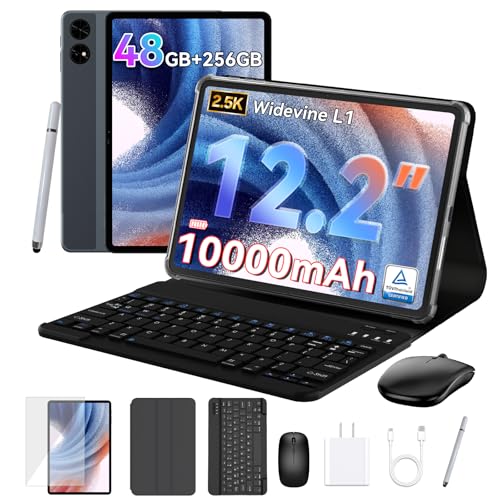 |
TABWEE 12.2-Inch Android 16 Tablet Gaming and productivity |
Check Price |
Top 5 Android Gaming Tablets: Detailed Reviews
1. HNVHNV 13.4-Inch Android 16 Tablet
Android Gaming Tablets buyers who want a large play area should consider the HNVHNV 13.4-inch model. Its 1920×1200 IPS display uses a 120Hz refresh rate, which can make supported games and scrolling look smoother. The Unisoc T7300 octa-core processor is built for demanding mobile use and improved heat dissipation, while the 10000mAh battery supports longer sessions between charges. You also get 256GB storage, expandable up to 2TB with a separately sold TF card, plus Widevine L1, dual-band Wi-Fi, Bluetooth 5.4, face unlock, and split-screen multitasking.
What We Like:
- The 120Hz display makes compatible games and navigation feel smoother.
- The 13.4-inch screen gives games a spacious viewing area.
- The T7300 processor is suited to heavier mobile gaming and multitasking.
- The 10000mAh battery is useful for extended gaming sessions.
- Widevine L1 and 256GB storage suit streaming and sizable game libraries.
What Could Be Improved:
- Its large size may feel less convenient to hold for long handheld sessions.
- The 1920×1200 resolution is practical, but not as sharp as higher-resolution displays of similar size.
- The advertised 2TB storage expansion requires a TF card purchased separately.
Buy it if you want a roomy Android tablet for gaming, streaming, and split-screen productivity, with a high-refresh-rate display and a large battery. Skip it if you prioritise compact portability or the sharpest possible image over screen size, or if you do not want to purchase separate expandable storage.
2. COTGOD 11-Inch Android 16 Tablet
The COTGOD 11-inch tablet is a balanced choice for Android Gaming Tablets, combining a 90Hz 1920×1200 FHD IPS touchscreen with an octa-core processor. The higher refresh rate should make scrolling and supported games look more fluid, while the 11-inch display remains easier to handle than larger alternatives. You get 128GB of storage, expandable by up to 1TB, plus 32GB of listed memory made up of 8GB physical RAM and 24GB virtual memory. Android 16, an 8000mAh battery, dual-band Wi-Fi, Bluetooth 5.0, keyboard and mouse add versatility.
What We Like:
- The 90Hz FHD display should make compatible games and scrolling feel smoother.
- The included keyboard and mouse make the tablet useful for typing and basic productivity.
- Storage can expand by up to 1TB for larger game libraries and media.
- Android 16 includes Google Play access through GMS certification.
- The 8000mAh battery is suited to extended gaming, streaming, or travel use.
What Could Be Improved:
- The advertised 32GB memory includes 24GB of virtual memory, so only 8GB is physical RAM.
- An 11-inch screen offers less gaming space than the larger tablets in this list.
- The listed specifications do not identify a dedicated gaming graphics chip or game-specific performance features.
Buy it if you want one Android tablet for casual to moderate gaming, streaming, web use, and keyboard-based tasks, with expandable storage and bundled accessories. Skip it if you want the largest possible screen, clearly documented high-end gaming hardware, or 32GB of physical RAM rather than virtual memory.
3. TECLAST 13-Inch Android 16 Tablet
The TECLAST 13-inch Android 16 tablet is a large-screen option for Android Gaming Tablets, combining a 13.4-inch 1920×1200 IPS touchscreen with a 120Hz refresh rate. Faster refresh makes scrolling, animations and touch responses feel smoother than on a 60Hz panel. Its octa-core processor and expandable storage support everyday apps, media and multitasking, while 4G LTE keeps you connected away from Wi-Fi. Dual-band 5G Wi-Fi, GPS, Google Play access and an 8000mAh battery add practical flexibility for travel, navigation and entertainment.
What We Like:
- The 120Hz display should make compatible games, menus and scrolling feel noticeably smoother.
- 4G LTE gives you a connection option beyond home or public Wi-Fi, subject to network coverage.
- Built-in GPS is useful for navigation and location-based apps while travelling.
- The 13.4-inch screen provides generous space for games, reading and split-screen multitasking.
- Expandable storage and Google Play support make it easier to install apps and keep media on the tablet.
What Could Be Improved:
- The 1920×1200 resolution is reasonable, but it is not especially dense across such a large 13.4-inch display.
- Its large footprint may feel less convenient than a smaller tablet for handheld gaming or frequent travel.
- Mobile data requires compatible network service, and 5G Wi-Fi performance depends on your router and environment.
Choose this TECLAST if you want a spacious gaming and media tablet with smoother 120Hz interactions, mobile connectivity, GPS and useful multitasking room. It suits travellers and users who prefer a large screen. Skip it if compact portability, sharper high-resolution visuals or the simplest gaming setup matters more than flexibility.
4. Samsung Galaxy Tab A11+
Samsung Galaxy Tab A11+ is a practical choice for Android Gaming Tablets buyers who want an established brand and a tablet that also handles family use. Its bright 11-inch display runs at up to 90Hz, so scrolling and supported games can look smoother. The listed 6GB RAM and 128GB storage support everyday multitasking, while expandable storage gives you room for more games and media. A long-lasting battery, fast charging, and quad Dolby-powered speakers suit browsing, streaming, and play, making this a balanced rather than specialized gaming tablet.
What We Like:
- The 90Hz display can make scrolling and supported games appear smoother.
- Expandable storage gives you more room for games, apps, and media.
- Samsung’s established brand makes it a familiar family-tablet choice.
- Long battery life and fast charging suit extended browsing, streaming, and play.
- Quad speakers powered by Dolby provide fuller sound for games and video.
What Could Be Improved:
- The 11-inch screen is less immersive than the larger tablets in this group.
- The listed 6GB of RAM and 128GB of storage provide less built-in headroom than higher-capacity configurations.
- Its balanced family focus may be less appealing if you want a tablet designed primarily around large-screen gaming.
Buy it if you want a dependable, family-friendly tablet for casual gaming, streaming, browsing, and everyday tasks, with smoother motion and storage expansion. Skip it if your priority is the most immersive large-screen setup or maximum built-in memory; the 11-inch panel and 6GB/128GB configuration are more balanced than expansive.
5. TABWEE 12.2-Inch Android 16 Tablet
The TABWEE 12.2-inch Android 16 tablet suits Android Gaming Tablets buyers who want a large canvas for games, art and work. Its 2.5K QHD CSOT display with 99% sRGB coverage should make detailed graphics and creative work look more vivid. The claimed 48GB memory combines 12GB physical RAM with 36GB virtual RAM, supporting heavier multitasking, though virtual memory is not the same as physical RAM. You also get an 8-in-1 bundle with a magnetic keyboard, mouse, stylus pen and protective case, plus GPS, a 10,000mAh battery and four-year protection.
What We Like:
- The 12.2-inch 2.5K display gives games, artwork and documents more room than a typical compact tablet.
- The 99% sRGB coverage is useful for richer-looking visuals and color-focused creative work.
- The keyboard, mouse, stylus pen and case make the bundle more practical for productivity beyond gaming.
- The 10,000mAh battery and GPS support travel, outdoor use and longer work sessions.
- Android 16 arrives without the listed bloatware, while the extended warranty and 24/7 support add reassurance.
What Could Be Improved:
- The 12.2-inch size makes it less convenient to carry than a smaller tablet, especially with the keyboard and accessories.
- The advertised 48GB includes 36GB of virtual RAM, so you should not expect it to perform like a device with 48GB of physical memory.
- The listing does not provide a specific processor or gaming performance claim, so demanding games remain harder to assess from the stated specifications alone.
Buy this TABWEE if you want one large Android tablet for gaming, drawing, typing and everyday productivity, with the keyboard bundle and accessories included. It makes less sense if you prioritise pocketable portability, need proven performance for demanding games, or prefer a simpler tablet without extra peripherals.
How To Choose Android Gaming Tablets
Choose the screen you will actually use
Android Gaming Tablets work best when the display suits your games and your space. A larger screen can make strategy games, racing titles, and cloud gaming easier to see, but it also adds weight and takes more room in a bag. If you mostly play at home, prioritise viewing comfort; if you travel often, a more manageable size may matter more than maximum screen area.
Check performance for your game library
Look beyond the Android version and check the tablet’s processor, memory, and storage details. Fast-paced 3D games place greater demands on hardware than puzzles or card games, while limited storage can become frustrating if you install several large titles. Also check whether the tablet supports the games and app stores you use, rather than assuming every Android model offers the same experience.
Consider controls, sound, and endurance
Touch controls are fine for many games, but a compatible controller can make racing, action, and platform games more comfortable. Check Bluetooth support and port options if you plan to connect accessories, and consider speaker placement if you play without headphones. Battery capacity, charging support, and heat management also affect longer sessions, although real endurance depends on brightness, game demands, and network use.
Match connectivity and everyday duties
Decide whether you need Wi-Fi only or mobile connectivity for gaming away from home. Cellular support can be useful, but it may add another service cost and is unnecessary if you usually play near a reliable network. Finally, consider multitasking, parental controls, software support, cameras, and keyboard compatibility if the tablet will also handle schoolwork, streaming, browsing, or productivity. A gaming tablet that fits those routines will usually offer better value than one chosen on screen size alone.
Which Android Gaming Tablet Should You Choose?
The HNVHNV 13.4-Inch Android 16 Tablet is the best overall pick here if your priority is an expansive display for gaming at home. Its large-screen focus gives it the clearest advantage for immersive play. The COTGOD 11-Inch Android 16 Tablet is the best alternative, offering a more balanced direction for gaming and multitasking. Choose it if you want a tablet that can handle play without making screen size the only priority.

Hi, I’m Larry Fish, the mind behind MyGrinderGuide.com.. With a passion for all things kitchen appliances, I created this blog to share my hands-on experience and expert knowledge. Whether it’s helping you choose the right tools for your culinary adventures or offering tips to make your kitchen more efficient, I’m here to guide you. My goal is to make your time in the kitchen not only easier but also enjoyable! Welcome to my world of kitchen mastery!