
As an Amazon Associate I earn from qualifying purchases.
Finding the right App For Download Music can be confusing because the options serve different purposes. Some focus on streaming, while others offer simple music search, library scanning, or a child-friendly music player.
Before choosing, consider whether you need free listening with ads, access to a large music service, basic MP3 playback, or parental controls. Device compatibility and how easily you can manage access also matter for younger listeners.
These five picks were selected from the listed products because they offer distinct approaches rather than duplicate colour or size variants. The selection includes major music services, straightforward MP3 tools, and dedicated kids’ devices with music apps.
Our guide explains who each option suits best, what its listed features mean in daily use, and where its limitations may affect your choice.
Our Top 5 App For Download Music Picks at a Glance
| Product | ||
|---|---|---|
 |
Spotify Music by Spotify Flexible everyday listening |
Check Price |
 |
Amazon Music for Android Amazon and Prime users |
Check Price |
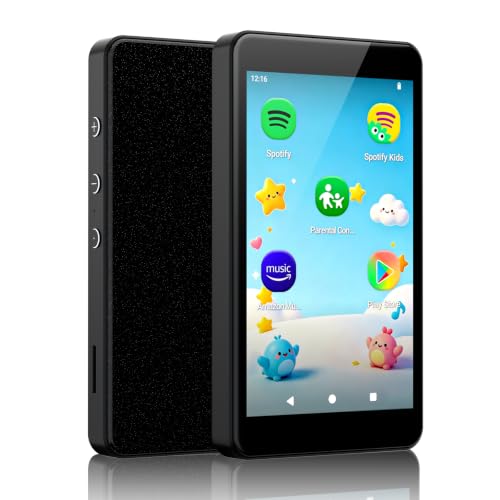 |
Luoran Kids MP3 Player Safer listening for children |
Check Price |
 |
MP3 Music Download by Simon Qiu Simple MP3 playback |
Check Price |
 |
Download Free Music App by Albioni Basic music searching |
Check Price |
Top 5 App For Download Music: Detailed Reviews
1. Spotify Music by Spotify
If you are comparing an App For Download Music, Spotify Music is a familiar music-service app for free listening on mobile devices and tablets. On mobile, you can play an artist, album, or playlist, but playback uses shuffle mode, so you cannot choose the exact track each time. On a tablet, the free experience is more flexible: you can play any song at any time. That difference matters for families, with mobile suiting casual listening and tablets offering more direct song control. It is better viewed as a streaming and playback option than a dedicated download tool.
What We Like:
- You can listen free on mobile without limiting yourself to one artist or playlist.
- Shuffle mode makes casual phone listening straightforward.
- Tablet users can play any song at any time.
- Artist, album, and playlist playback gives you several ways to browse music.
- The familiar Spotify service may suit households already using it.
What Could Be Improved:
- Mobile shuffle prevents you from selecting the exact track you want.
- The listed features do not mention music downloads or offline playback.
- The listening experience is more flexible on tablets than on mobile devices.
Choose Spotify Music if your family wants free access to familiar music on phones and tablets, especially if tablet listening matters. It also suits casual background playback on mobile. Skip it if you specifically need downloadable songs, offline listening, or precise track selection from a mobile device.
2. Amazon Music for Android
Amazon Music for Android is a streaming app for music and podcasts, with a free listening tier supported by ads and no credit card requirement. If you’re comparing an App For Download Music, this option suits households already using Amazon services. Prime members get all the music and top podcasts ad-free, while Amazon Music Unlimited adds 100 million songs on demand, ad-free top podcasts, and Audible audiobooks. Its discovery features are designed to help you find and play music more easily, though the free plan has clear limits.
What We Like:
- You can listen to music and podcasts for free with ads.
- You do not need a credit card to use the free tier.
- Prime members get ad-free access to all the music and top podcasts.
- Unlimited offers 100 million songs on demand.
- The app also provides access to Audible audiobooks through Unlimited.
What Could Be Improved:
- Free listening includes ads, which may interrupt family listening.
- Access to 100 million on-demand songs requires Amazon Music Unlimited.
- The available features differ significantly between free, Prime, and Unlimited users.
Choose Amazon Music for Android if you want free, ad-supported listening or already pay for Prime and value ad-free music and podcasts. It also suits users interested in adding Unlimited and Audible audiobooks. Skip it if you need every feature without a subscription or dislike advertising.
3. Luoran Kids MP3 Player
For families comparing an App For Download Music with a child-focused player, the Luoran Kids MP3 Player offers Spotify, Spotify Kids, and Amazon Music pre-installed. You can start parental controls without registration by setting a passcode, then block or remove apps and limit WiFi or Bluetooth. Its no-browser design reduces open web access, while Android 14 and an app store support additional apps and updates. The 4-inch screen, metal body, protective case, and night-light mode make it portable for everyday listening, though setup still requires parent involvement.
What We Like:
- Spotify, Spotify Kids, and Amazon Music come ready to use.
- Passcode controls let you manage access without registration.
- You can block or remove applications as needed.
- Parent-limited WiFi and Bluetooth provide useful access controls.
- The compact body and protective case suit travel and daily handling.
What Could Be Improved:
- The 4-inch screen may feel cramped for browsing apps or managing settings.
- Android and the app store offer flexibility but add more setup than a basic offline player.
- Online music features still depend on allowing WiFi access.
Buy it if you want familiar streaming services in a child-focused player with no browser and passcode-based controls. It suits families willing to manage apps and connectivity. Skip it if you want a very simple offline MP3 device or prefer not to handle Android and app-store settings.
4. MP3 Music Download by Simon Qiu
This App For Download Music is a straightforward player from Simon Qiu for managing and listening to MP3 tracks. Its library scan helps you find available music in one place, while playlists let you organise songs for different moods or listeners. Song playback covers the basic listening task without adding unnecessary complexity, and music search helps you locate tracks more quickly. The app also includes music download functionality, making it suited to users who want a simple tool focused on finding, arranging, and playing music.
What We Like:
- Library scanning can gather available tracks into an easier-to-browse collection.
- Playlists give you a simple way to organise songs for repeated listening.
- Music search helps you find tracks without manually browsing the whole library.
- Song playback keeps the app focused on its core purpose.
- Music download adds a useful option for building your listening library.
What Could Be Improved:
- The feature set is basic, with no stated advanced playback or family controls.
- Library scanning may feel limited if you want more detailed organisation tools.
- The app’s simple focus may not suit users seeking a broader music service.
Choose Mp3 Music Download if you want a basic app for scanning a music library, creating playlists, searching for songs, and playing MP3 tracks. It may suit straightforward personal listening, but families and children should skip it if they need stated parental controls, safety features, or a richer managed listening experience.
5. Download Free Music App by Albioni
The Download free music app from Albioni is a minimal option for people who want to focus on audio and finding music. Its audio feature makes listening the central purpose, while the search function and engine give you a direct way to look for music. If your priority is an App For Download Music with few stated extras, this stripped-back design may appeal. The available information does not mention playlists, family controls, or membership features, so treat it as a focused search-and-audio utility rather than a full music service.
What We Like:
- Audio remains the app’s central focus.
- Search gives you a direct way to find music.
- The engine is clearly identified as part of its functionality.
- The limited scope may suit users who prefer a simple music tool.
What Could Be Improved:
- The available details do not mention playlists or other music-management tools.
- The sparse feature set may feel limiting if you want a broader listening service.
- The information provided does not clarify any family or child-safety features.
Choose this app if you want a basic audio-focused option with search at its core and do not need many extras. Skip it if your family needs playlists, parental controls, membership integration, or clearly documented features beyond audio and searching.
How to Choose an App For Download Music
Match the app to your listening needs
The right App For Download Music depends on how you expect to use it. Start by deciding whether you want flexible everyday listening, access that fits an existing Amazon or Prime setup, child-focused playback, simple MP3 use, or basic music searching. A focused choice is usually easier to live with than an app that offers features you will rarely use.
Check how music is accessed
“Download” can mean different things, so read the app’s description carefully before choosing. Decide whether you need music saved for playback, a way to search for tracks, or a straightforward player for files you already have. If several people will use the app, consider whether each listener needs a different library, listening style, or level of control.
Prioritise family safety and simplicity
For children, simple controls and a listening setup that feels safer may matter more than a large feature list. Look for an experience that suits the child’s age and your supervision preferences. Clear navigation also helps younger users avoid frustration, while adults may prefer more flexible discovery and playback options. Think about who will manage the app and who will operate it day to day.
Consider device fit and long-term convenience
Before installing anything, confirm that the app suits the Android device or other hardware you plan to use. Also consider how easily you can find music, start playback, and manage saved content over time. An app that is simple for occasional listening may be preferable to one that demands regular setup. Finally, review any access requirements, account arrangements, or service limitations shown in the app listing so your expectations match what the app provides.
Which App For Download Music Should You Choose?
Spotify Music by Spotify is the best overall pick because it offers flexible everyday listening, making it the broadest fit for a family with varied habits. Amazon Music for Android is the best alternative if you already use Amazon services or have a Prime membership. For a child-focused setup, Luoran Kids MP3 Player is the more targeted choice, while the remaining apps suit users who want simple MP3 playback or basic music searching.

Hi, I’m Larry Fish, the mind behind MyGrinderGuide.com.. With a passion for all things kitchen appliances, I created this blog to share my hands-on experience and expert knowledge. Whether it’s helping you choose the right tools for your culinary adventures or offering tips to make your kitchen more efficient, I’m here to guide you. My goal is to make your time in the kitchen not only easier but also enjoyable! Welcome to my world of kitchen mastery!