
As an Amazon Associate I earn from qualifying purchases.
Choosing a Driving Game Console can mean picking between a dedicated racing wheel, a TV game stick or a portable handheld. Each option suits a different type of player, and the wrong choice can leave you with controls or connections you do not need.
Focus on the games and screen you plan to use first. Force feedback, pedal adjustment, platform compatibility, wireless controllers, HDMI output and battery life matter more than a long feature list.
These five picks were selected from the supplied product details, with priority given to useful differences in control style, compatibility and portability. The list does not rely on stated prices, ratings or unverified performance claims.
This guide covers dedicated racing wheels for PC and PlayStation, a multi-platform wheel, a plug-and-play TV console and a portable handheld option.
Our Top 5 Driving Game Console Picks at a Glance
| Product | ||
|---|---|---|
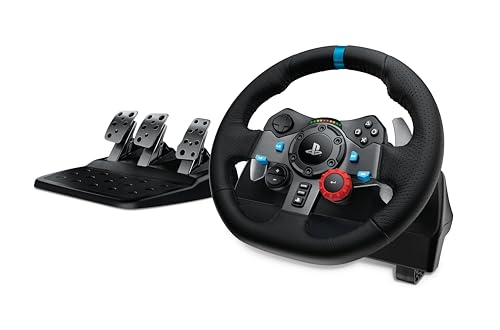 |
Logitech G G29 Driving Force Wheel And Pedals Dedicated sim racing |
Check Price |
 |
HORI Racing Wheel Apex Formula Customisable PlayStation racing |
Check Price |
 |
PXN V3PRO Racing Wheel, Pedals And Shifter Multi-platform players |
Check Price |
 |
Generic M15 Retro Gaming Console And Controllers Living-room multiplayer |
Check Price |
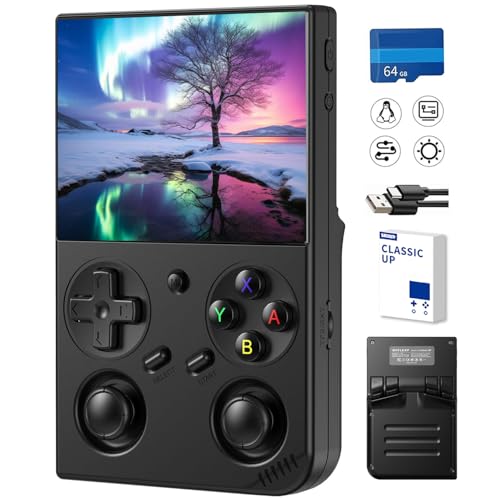 |
Aivuidbs Retro Handheld Console With HDMI Portable and TV gaming |
Check Price |
Top 5 Driving Game Console Picks: Detailed Reviews
1. Logitech G G29 Driving Force Wheel And Pedals
This Driving Game Console setup pairs Logitech G’s G29 Driving Force wheel with floor pedals for a more involved racing experience on PlayStation 5, PS4 and PC. Real force feedback gives steering more physical detail, while the 900-degree rotation lets you turn hand over hand on wide bends. Pressure-sensitive, nonlinear brake pedals provide more controlled braking than basic buttons, and adjustable pedal faces help you refine your position. Helical gearing is designed for smooth, quieter steering, while the sturdy pedal base supports firmer inputs.
What We Like:
- Real force feedback makes steering feel more connected to the car.
- 900-degree rotation suits serious driving simulations and wide turns.
- Pressure-sensitive pedals give you finer control over braking.
- Adjustable pedal faces help you tune the pedal setup.
- The wheel and pedals provide a dedicated sim-racing arrangement.
What Could Be Improved:
- This is a more involved setup than a controller, so it needs suitable space and mounting.
- The strongest feature set is aimed at sim racing rather than casual living-room play.
- You may want additional Driving Force accessories, such as the shifter or desk and rig mounts, for a fuller setup.
Buy the G29 if you want a dedicated racing wheel and pedals for PlayStation 5, PS4 or PC, especially if force feedback, broad steering rotation and progressive braking matter to you. Skip it if you prefer quick controller-based play, have limited space, or only want occasional casual racing.
2. HORI Racing Wheel Apex Formula
The HORI Racing Wheel Apex Formula is a Driving Game Console accessory for PlayStation 5, PlayStation 4, and Windows 11 PC. Its spring-tension steering provides natural resistance, while the 270° rotation suits responsive racing control. Analog pedals let you adjust sensitivity, dead zones, and linearity for smoother throttle and braking. The dedicated app supports customised steering, pedal response, and button layouts, with up to four saved profiles. You can also reassign buttons directly on the wheel to match your preferred driving style.
What We Like:
- Spring tension gives the wheel a more controlled, natural feel.
- Adjustable pedal sensitivity helps you tailor throttle and braking response.
- You can tune steering, dead zones, and linearity to suit different games.
- Four saved profiles make switching between setups convenient.
- Button reassignment supports a more comfortable control layout.
What Could Be Improved:
- The 270° steering range may feel limited to dedicated sim racers who prefer broader rotation.
- Its spring-tension design may not satisfy players seeking more advanced steering feedback.
- The listed PC compatibility covers Windows 11, not other operating systems.
Buy it if you want a customisable racing wheel for PlayStation or Windows 11, especially if adjustable pedals and saved profiles matter to you. Skip it if you want a wider steering range, more advanced feedback, or PC support beyond the listed Windows 11 compatibility.
3. PXN V3PRO Racing Wheel, Pedals And Shifter
This Driving Game Console pick is the PXN V3PRO racing wheel set with a 26 cm wheel, pedals and a shifter for PC, PS3, PS4, Nintendo Switch, Xbox One and Xbox Series X/S. Its dual vibration motors add physical feedback, while 180-degree rotation gives you steering control in compatible racing games. Seven suction cups and a C-type clamp provide several ways to secure it, and the collapsible pedals include separate gas and brake controls. On PS4 and Xbox One, you need the original controller connected and turned off.
What We Like:
- Broad compatibility covers PC, PlayStation, Nintendo Switch and Xbox systems.
- Dual vibration motors add feedback as you drive.
- The 26 cm wheel gives you a more substantial grip than a standard controller.
- Seven suction cups and a C-type clamp offer flexible mounting.
- Separate gas and brake pedals, plus a shifter, create a fuller driving setup.
What Could Be Improved:
- The 180-degree turning range may feel limited if you want dedicated-simulator levels of steering movement.
- PS4 and Xbox One require the original controller to be connected and turned off, adding setup steps.
- You need to secure the wheel with suction cups or the clamp before playing.
Buy this PXN if you want one racing wheel for several platforms and value vibration, pedals, a shifter and flexible mounting. It suits casual and intermediate home racers, but dedicated sim-racing fans should skip it if they expect a wider steering range or a simpler console setup.
4. Generic M15 Retro Gaming Console And Controllers
The Generic M15 is a Driving Game Console-style retro system for your television, monitor or other display. It connects through HD output and includes two 2.4G wireless controllers, making it ready for shared play without buying extra gamepads. Its broad preloaded library covers arcade, handheld, 2D and classic 3D titles, while multiple emulators support various vintage game formats. The straightforward menu keeps setup and navigation simple. A hard-plastic shell and heat-dissipation design are intended to support longer sessions, though the extensive library may vary in quality and appeal.
What We Like:
- HD output makes TV setup straightforward.
- Two wireless controllers support immediate multiplayer gaming.
- The preloaded library spans several retro game categories.
- Multiple emulators broaden format compatibility.
- The simple menu suits users who want plug-and-play access.
What Could Be Improved:
- The large game library may feel inconsistent, with plenty of titles you may never play.
- It is designed around retro gaming, so it will not suit players seeking modern console games.
- The product information does not specify the exact games included, making the library harder to assess beforehand.
Buy it if you want an uncomplicated living-room retro setup with two controllers and many built-in games. It suits casual multiplayer sessions and nostalgic browsing. Skip it if you want current releases, a carefully curated collection, or detailed information about every included title before purchase.
5. Aivuidbs Retro Handheld Console With HDMI
The Aivuidbs Retro Handheld Game Console is a compact Driving Game Console for portable play and TV gaming. Its 3.5-inch IPS screen offers wide viewing angles, while HDMI output lets you move to a larger display quickly. You can connect wireless or wired gamepads through Bluetooth, 2.4G support and wired connections, making multiplayer more practical at home. The preloaded 64GB card provides a broad selection of classic games, and Linux-style software supports additional games in relevant formats. Its 3200mAh battery is rated for 6–7 hours, with USB-C fast charging.
What We Like:
- The 3.5-inch IPS display should remain clear from different viewing angles.
- HDMI output makes switching from handheld play to TV gaming straightforward.
- Wireless and wired gamepad support suits local multiplayer sessions.
- The 3200mAh battery offers a useful 6–7 hours of claimed play time.
- Its compact 12.8cm by 8.1cm by 2.2cm body is easy to carry.
What Could Be Improved:
- The small screen and handheld controls may feel cramped for longer sessions.
- The large preloaded library may require sorting before you find particular games.
- You need a separate display and compatible gamepads for the best living-room experience.
Buy it if you want one small device for classic gaming on the go and occasional TV multiplayer, especially if HDMI and broad controller compatibility matter. Skip it if you want modern games, premium ergonomics or a dedicated home racing setup; this is a flexible retro system rather than a focused racing console.
How to Choose a Driving Game Console
The right Driving Game Console depends on how you plan to play, not simply on the number of included accessories. Decide whether you want a dedicated racing setup, casual living-room play, or something you can carry and connect to a television. That choice will narrow the field before you compare controls and compatibility.
Check platform compatibility first
Confirm that the console, wheel, controller, or handheld works with the system you already own. Compatibility can vary between PlayStation, other consoles, PC, and television use, so check the supported platform before you buy. If several people will play, also consider whether the controls suit each player rather than only the person who sets them up.
Match the controls to your racing style
A wheel and pedals make sense if you want a more involved driving experience and expect to spend time on racing games. A standard controller is usually easier for quick multiplayer sessions, while a handheld design prioritises portability. If you want more control over your setup, look for adjustable or customisable controls, but remember that extra options can take longer to configure.
Consider space and setup
Measure the area where you will play before choosing a wheel-based system. You need room for the wheel, pedals, and any additional control, plus a stable surface that will not move during use. A compact console or handheld is easier to store and share, while a dedicated setup can demand a permanent place near your screen.
Think about who will use it
For solo sim racing, prioritise control, comfort, and a setup you will enjoy using repeatedly. For family or party play, simple controls and fast access may matter more than realism. If television play is important, check how the system connects to the screen and whether the included controllers support the number of players you expect. Choose the arrangement that fits your habits rather than paying for features you will rarely use.
Which Driving Game Console Fits You?
The Logitech G G29 Driving Force Wheel And Pedals is the best overall pick for dedicated sim racing, with a setup focused on driving rather than general gaming. The HORI Racing Wheel Apex Formula is the best alternative if you want customisable PlayStation racing controls. Choose Logitech for a more committed racing station; choose HORI if PlayStation compatibility and adjustment options better match how you play.

Hi, I’m Larry Fish, the mind behind MyGrinderGuide.com.. With a passion for all things kitchen appliances, I created this blog to share my hands-on experience and expert knowledge. Whether it’s helping you choose the right tools for your culinary adventures or offering tips to make your kitchen more efficient, I’m here to guide you. My goal is to make your time in the kitchen not only easier but also enjoyable! Welcome to my world of kitchen mastery!