
Remember those bulky, glowing screens that used to sit on every desk? Those were CRT monitors, and while they might seem like ancient history, some people still swear by them! Choosing a CRT monitor today can feel like navigating a maze. You might be wondering if they’re even worth it anymore, or if you’re just going to end up with a giant paperweight. The sheer variety of models, the technical jargon, and the worry of making the wrong pick can be frustrating.
But what if you could unlock the unique benefits that CRTs still offer for specific tasks, like gaming or retro computing? What if you could confidently find a model that fits your needs and budget? By diving into this guide, you’ll learn exactly what to look for. We’ll break down the key features and help you understand why a CRT might be the perfect, albeit unusual, choice for your setup. Get ready to understand these classic displays like never before!
Top Crt Computer Monitor Recommendations

- Screen performance: 1440 x 900 HD plus resolution is Perfect for home and office - the ideal all, around monitor for your desktop or laptop
- Dual connection options: supports HDMI and VGA ports, compatible with both modern and classic devices, ensuring a versatile user experience
- Response Time - With a response time of 6 milliseconds, all activities on the LED screen transition seamlessly almost instantly.
- Versatile: HDMI/VGA capacitive displays A truly flat and seamless design for retail, restaurants, bars, gyms, no driver required
- High-quality after-sales protection: We provide free replacement of goods within one year of quality problems, you have any questions, please feel free to contact our customer service

- 【INTEGRATED SPEAKERS】Whether you're at work or in the midst of an intense gaming session, our built-in speakers provide rich and seamless audio, all while keeping your desk clutter-free.
- 【EASY ON THE EYES】 Protect your eyes and enhance your comfort with Blue-Light Shift technology. This feature reduces harmful blue light emissions from your screen, helping to alleviate eye strain during long hours of use and promoting healthier viewing habits.
- 【WIDEN YOUR PERSPECTIVE】Our sleek minimal bezel design ensures undivided attention. The nearly bezel-free display seamlessly connects in a dual monitor arrangement, delivering an unobstructed view that lets you focus on more at once, completely distraction-free.


- [GREAT FOR HOME AND OFFICE] 17 Inch monitor for PS3/PS4/Xbox 360/Switch, PC monitors, Laptop extend monitors.
- [LED Monitor] 1280X1024 native resolution screen. LED Screen 250 nits brightness. 1000:1 Contrast Ratio, Aspect Ratio Standard (5:4)
- [Interface]] HDMI is a future-proof video standard that delivers true digital picture and audio clarity.
- [User-Friendly Features&Flexible Connectivity]The VESA 100mm Wall Mount compliant feature allows you to have the monitor mounted on the wall with the appropriate mounting accessory.
- A 17-inch 5:4 monitor offers extra vertical space, ideal for editing documents, coding, or browsing. For camera adaptation, it’s perfect for photographers reviewing high-res images or videos, especially with square or medium format compositions. Its aspect ratio and color accuracy enhance precision in post-processing workflows.
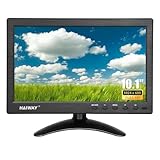
- 【Your Mini Monitor Solution】 Haiway small monitors offers exceptional portability and competitive pricing. With clear user manuals provided, users can effortlessly connect various devices through different input ports. Moreover, all monitors are manufactured in our own factory, ensuring a level of quality and affordability that outshines the competition.
- 【Meeting a Variety of Needs】 Our 10.1 Inch Mini Monitor designed with multiple ports including HDMI, VGA, AV, BNC, USB. This small hdmi monitor provides convenient connectivity for various devices. Easily connect your computer, laptop, gaming console, camera, TV-Box or security camera and more, expanding the versatility of your setup.
- 【Unleash Your Visual Experience】 This impressive Haiway 10.1 inch security monitor with HD 1024*600 resolution, 400 cd/m2 brightness, 16:9 aspect ratio and wide viewing angle demonstrate a super-exclusive imaging capability and brings users a spectacular usage experience.
- 【Optimizing Your Space】 The small hdmi monitor can be easily mounted on the wall with the industry-standard VESA 75 mount (not include) Or mounted on the desktop by provided adjustable mount stand. The 178° wide-angle, provide a comprehensive view.
- 【Covering All Your Bases】 The small computer monitor with two built-in speakers, immerse yourself in an all-in-one entertainment experience. Come with conveniently remote control, allowing you to easily adjust the settings without ever leaving your seat. A coiled spring vehicle power cable, convenient for you to use in your car or truck.

- Retro Desk Display: Placed on desks or shelves as a visual accent inspired by early computer monitor designs for themed workspace styling
- Diorama Scene Element: Used in miniature environments to represent classic office or tech setups, enhancing scene storytelling detail
- Creative Workspace Decor: Adds a nostalgic visual layer to office or study areas, contributing to a themed desktop arrangement
- Model Collection Piece: Suitable for display in miniature collections or themed tech-inspired setups for visual variety and depth
- Scene Building Detail: Helps complete retro office or computer room diorama builds by adding recognizable vintage computing element

- 𝐈𝐦𝐚𝐠𝐞 𝐌𝐢𝐫𝐫𝐨𝐫 𝐅𝐥𝐢𝐩 𝐅𝐮𝐧𝐜𝐭𝐢𝐨𝐧: This mini monitor with an image inversion function that supports mirroring vertically and horizontally. It works perfectly as a teleprompter monitor, printer monitor, car monitor, and home automation system.
- 𝐌𝐢𝐧𝐢 𝐒𝐜𝐫𝐞𝐞𝐧 & 𝐖𝐢𝐝𝐞 𝐕𝐢𝐞𝐰𝐢𝐧𝐠: Equipped with an LCD screen, 1024x600 resolution, 500:1 high contrast ratio, 160° wide viewing angles, and 400cd/㎡ brightness, Eyoyo portable monitor ensure you enjoy clear, sharp, and delicate images. Only 7 inch mini size, portable and lightweight, take it wherever you need a second screen or a video monitor.
- 𝐕𝐞𝐫𝐬𝐚𝐭𝐢𝐥𝐞 𝐂𝐨𝐧𝐧𝐞𝐜𝐭𝐢𝐯𝐢𝐭𝐲: Connect your devices seamlessly with the Eyoyo small monitor. It has rich video input interfaces, including HDMI, VGA, BNC, USB, and AV video inputs, which can meet the needs of PC, laptops, security CCTV cameras, Raspi 4/3/2/1, DVD, VCD, TV-Box, U Disk, car backup monitoring, PS4, X-BOX. Also, you can use it as a small TV by connecting it to a TV box. Note: Supports USB 2.0 via USB port, not USB 3.0. Audio, video, visuals, and files must reside in an initial folder for recognition.
- 𝐓𝐰𝐨 𝐈𝐧𝐬𝐭𝐚𝐥𝐥𝐚𝐭𝐢𝐨𝐧 𝐖𝐚𝐲: For this video monitor, you can install it with desktop stand as a regular desktop pc monitor. Or you can install it as a doorbell monitor screen on the wall with a VESA 75mm mount (Not included), the outdoor environment can be easily checked.
- 𝐑𝐞𝐦𝐨𝐭𝐞 𝐂𝐨𝐧𝐭𝐫𝐨𝐥 & 𝐁𝐮𝐢𝐥𝐭 𝐢𝐧 𝐒𝐩𝐞𝐚𝐤𝐞𝐫𝐬: This small monitor offers remote control alongside button control to simplify operation, suitable for use as a teleprompter, printer monitor, car monitor. It incorporates dual built-in speakers that enable immersive audio quality for video viewing, and music playback, enhancing overall your experience.

- 1800R curve monitor the curved display delivers a revolutionary visual experience with a leading 1800R screen curvature as the images appear to wrap around you for an in depth, immersive experience
- Hdmi, VGA & PC audio in ports
- High refresh rate 75Hz.Brightness (cd/m²):250 cd/m2
- Vesa wall mount ready; Lamp Life: 30,000+ Hours
- Windows 10 Sceptre Monitors are fully compatible with Windows 10, the most recent operating System available on PCs.Brightness: 220 cd/M2

- WIDE INPUT COMPATIBILITY: Built to support a broad range of devices, this small monitor includes HDMI, VGA, AV, BNC, and USB inputs, making it ideal for CCTV systems, DVR/NVR units, retro computers, and classic game consoles
- CONSISTENT 24/7 PERFORMANCE: Built for continuous use in security and industrial setups, the IPS panel delivers clear images with accurate color, keeping camera feeds and system data easy to read on this security monitor display
- FLEXIBLE IMAGE FLIP: The horizontal and vertical flip lets you position this mini monitor anywhere—rack, 3D printer, Teleprompter, or tight spaces—while keeping the image correctly oriented. Enhanced signal processing ensures stable visuals across all formats
- COMPACT 4:3 MONITOR: The rare 4:3 aspect ratio fits perfectly with retro computers, classic game consoles, test benches, and control panels where widescreen monitors don’t work. Its 8-inch portable size is ideal for tight spaces and field use
- AUDIO & REMOTE CONTROLS: This 8 inch monitor features integrated speakers for audio from computer, CCTV cameras, or retro consoles, and the included remote makes input switching and menu adjustments fast and easy
Your Guide to Choosing a CRT Computer Monitor
Remember the big, bulky computer screens of the past? Those were CRT (Cathode Ray Tube) monitors. While most people use flat-panel LCD or LED screens today, some folks still love CRTs for their unique qualities. This guide helps you understand what to look for if you’re considering a CRT monitor.
What Makes a CRT Monitor Great? Key Features to Consider
When you’re hunting for a CRT monitor, a few things really matter. These features make a big difference in how good the picture looks and how you’ll enjoy using it.
1. Screen Size and Aspect Ratio
- Size: CRTs came in various sizes, usually measured diagonally. Bigger screens show more, but they also take up more desk space.
- Aspect Ratio: This is the shape of the screen. Older CRTs are often “squarer” (4:3 ratio), while newer ones might be a bit wider.
2. Resolution and Refresh Rate
- Resolution: This tells you how many tiny dots (pixels) make up the picture. Higher resolution means a sharper, clearer image. Look for monitors that can handle good resolutions for their size.
- Refresh Rate: This is how many times the screen updates the image each second. A higher refresh rate (like 75Hz or 85Hz and above) makes motion look smoother and reduces eye strain.
3. Dot Pitch
This is the tiny gap between the color dots on the screen. A smaller dot pitch (like 0.25mm or less) means a sharper, more detailed image. It’s like the distance between pixels on newer screens.
4. Bandwidth
Monitor bandwidth affects how many pixels it can display at a certain refresh rate. Higher bandwidth allows for higher resolutions and faster refresh rates, giving you a better picture.
What Are They Made Of? Important Materials
CRTs are built with a few key parts.
- Glass: The big, curved front of the monitor is thick glass. This glass helps protect the inside and shape the picture.
- Electron Gun: Inside the monitor, an electron gun shoots beams of electrons at the screen.
- Phosphor Coating: The inside of the screen is coated with tiny dots of material called phosphor. When the electron beams hit the phosphor, it glows, creating the image you see.
What Makes the Quality Good or Bad? Factors to Watch Out For
Several things can make a CRT monitor’s quality shine or falter.
- Wear and Tear: Like any old electronic, CRTs can get worn out. Look for signs of age or damage.
- Burn-in: If a static image stays on the screen for too long, it can leave a faint ghost image. This is called burn-in, and it can reduce picture quality.
- Color Accuracy: Some CRTs are better at showing true colors than others. This is important for artists or anyone who needs accurate colors.
- Geometry: This refers to how straight the lines on the screen are. If the lines are curved or wobbly, it can make the picture look distorted.
Who Uses CRTs and Why? User Experience and Use Cases
Even though they are older, CRTs offer something special for certain users.
- Gamers: Many classic gamers love CRTs for their very fast response times. This means fast-moving action on screen looks super smooth with no blur.
- Retro Enthusiasts: People who enjoy old video games or computers often prefer CRTs to get the original look and feel.
- Artists and Designers: Some professionals still like CRTs for their color accuracy and the way they display images without pixelation.
- General Use: For everyday tasks like browsing the web or writing, a good CRT can still offer a comfortable viewing experience, especially if you prefer a less harsh light than some modern screens.
Remember, CRTs are heavy and take up a lot of space. But for the right person, they can be a fantastic choice!
Frequently Asked Questions about CRT Monitors
Q: Why would someone want a CRT monitor today?
A: People want CRTs for their excellent motion handling, color accuracy, and for a nostalgic, retro experience, especially with older games.
Q: Are CRT monitors bad for your eyes?
A: Not necessarily. Older CRTs with low refresh rates could cause eye strain. But many CRTs have high refresh rates that are good for your eyes.
Q: How much space does a CRT monitor take up?
A: CRTs are much bigger and heavier than modern flat screens. They stick out a lot from the wall.
Q: Can I connect a modern computer to a CRT monitor?
A: Yes, you often can. You might need adapters depending on the ports your computer and monitor have.
Q: What does “burn-in” mean on a CRT?
A: Burn-in is when a faint image stays on the screen permanently after being displayed for a long time. It can happen if you leave the same picture on the screen for too long.
Q: Are CRT monitors hard to find?
A: Yes, they are not made anymore. You usually find them used from people selling old electronics.
Q: What’s the best way to test a used CRT monitor?
A: Turn it on and look for dead pixels, weird lines, or screen distortion. Check how clear the picture is at different resolutions.
Q: Do CRT monitors use a lot of electricity?
A: Yes, they generally use more power than newer flat-panel monitors.
Q: What is a good refresh rate for a CRT monitor?
A: A refresh rate of 75Hz or higher is good. 85Hz and above are even better for smooth images.
Q: Are CRT monitors safe to have in my home?
A: Yes, they are safe. They don’t emit harmful radiation when working correctly.

Hi, I’m Larry Fish, the mind behind MyGrinderGuide.com.. With a passion for all things kitchen appliances, I created this blog to share my hands-on experience and expert knowledge. Whether it’s helping you choose the right tools for your culinary adventures or offering tips to make your kitchen more efficient, I’m here to guide you. My goal is to make your time in the kitchen not only easier but also enjoyable! Welcome to my world of kitchen mastery!