
As an Amazon Associate I earn from qualifying purchases.
You want a printer to make stickers but don’t know where to start. Some are for kids, others for serious crafters, and a few do both. The right one depends on who’s using it and what you need.
Look for print quality, ease of use, and whether it cuts stickers for you. Portability matters if you’re on the go, and inkless models save on mess and cost.
We picked seven printers to make stickers that cover different needs, from simple thermal models for kids to all-in-one dye-sublimation machines for pros. Each excels in its category.
Our Top 7 Printers To Make Stickers Picks at a Glance
| Product | ||
|---|---|---|
 |
Liene PixCut S1 Color Sticker Printer Pro crafters |
Check Price |
 |
Cricut StickerPix Print Photo Printer Design flexibility |
Check Price |
 |
Hello Blink Sticker Maker for Kids Kids on the go |
Check Price |
 |
HiMont AI Voice Sticker Maker Creative kids |
Check Price |
 |
NADAIIN Mini Sticker Printer D20 Budget pick |
Check Price |
 |
Leapom AI Voice Sticker Maker Young creators |
Check Price |
 |
Joyberg Printable Sticker Paper DIY with any printer |
Check Price |
Top 7 Printers To Make Stickers: Detailed Reviews
1. Liene PixCut S1 Color Sticker Printer
The Liene PixCut S1 is a printer to make stickers that combines dye-sublimation printing and AI-powered cutting in one machine. It prints at 300 dpi with 16.7 million colors for vivid, waterproof stickers thanks to four-layer lamination. The AI extracts subjects from photos for precise cuts and offers an app with 50,000+ free assets and 10,000+ templates. You get professional-quality results without switching devices or paying subscriptions.
What We Like:
- Prints and cuts in one step, saving time and workspace
- Dye-sublimation produces durable, waterproof stickers
- AI image extraction simplifies complex designs
- No subscription needed for the app’s vast library
- High-resolution output with true-to-life colors
What Could Be Improved:
- Dye-sublimation requires specific paper, adding cost
- Larger footprint than portable sticker printers
Buy the PixCut S1 if you want a printer to make stickers with pro-level quality and efficiency. Skip it if you need portability or prefer simpler, budget-friendly options.
2. Cricut StickerPix Print Photo Printer
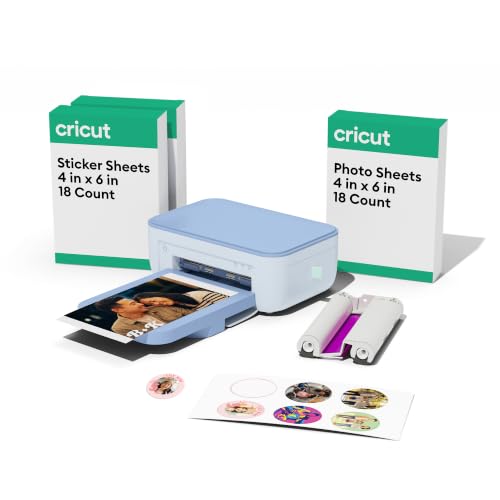
The Cricut StickerPix Print is a compact all-in-one printer that turns your phone into a sticker and photo maker. It uses dye-sublimation for high-resolution, water- and scratch-resistant prints, so your stickers last. You get editable templates, powerful editing tools, and access to over 1.8 million sticker images from hundreds of artists, making it easy to create custom designs. The Essential Bundle includes ink, photo paper, and pre-cut sticker sheets for 18 prints right out of the box.
What We Like:
- Prints vibrant, detailed stickers and photos with long-lasting durability
- Offers a massive library of 1.8M+ sticker images for endless creativity
- Includes editable templates and powerful editing tools for quick customization
- Compact design fits easily in small spaces
- Essential Bundle provides starter supplies for immediate use
What Could Be Improved:
- Requires a compatible device with Bluetooth and high-speed internet
- Ongoing costs for ink and paper replacements
This is ideal for crafters who want a printer to make stickers with high-quality prints and a vast image library. Skip it if you prefer a standalone machine without reliance on a phone or internet.
3. Hello Blink Sticker Maker for Kids
The Hello Blink Sticker Maker for Kids is a portable, inkless thermal printer that lets children create custom stickers anywhere. It connects via Bluetooth to iPhones and Android devices, so you can design and print directly from an app without the mess of ink. The included sticker paper and tape rolls make it ready to use out of the box, and its compact size means it fits easily in a backpack for crafting on the move.
What We Like:
- No ink or cartridges to replace, reducing cost and mess
- Bluetooth connectivity works reliably with most smartphones
- Lightweight and truly portable for travel or playdates
- Includes starter supplies to begin crafting immediately
- Simple enough for younger kids to use with minimal supervision
What Could Be Improved:
- Thermal prints fade over time, especially in sunlight
- Limited to monochrome or simple color designs due to thermal tech
- Small print size restricts larger or detailed sticker projects
Buy this if you want a hassle-free, portable printer to make stickers for kids who love quick, simple crafts. Skip it if you need durable, full-color stickers or larger print sizes for detailed designs.
4. HiMont AI Voice Sticker Maker
The HiMont AI Voice Sticker Maker for Kids is a compact, inkless thermal printer that turns spoken ideas into stickers using AI voice recognition. With six art styles like Simple Drawing, Anime, and Cartoon, one prompt can yield multiple designs. The companion app adds hundreds of templates and requires Bluetooth and 2.4GHz Wi-Fi. Mess-free thermal printing means no ink or toner, and the HD preview ensures crisp black-and-white results before printing.
What We Like:
- Voice-to-art AI makes sticker creation effortless for kids
- Six distinct art styles expand creative possibilities
- Inkless thermal printing keeps hands and surfaces clean
- Comes with paper rolls and colored pens for immediate use
- Portable design lets kids craft anywhere
What Could Be Improved:
- Limited to black-and-white prints only
- Requires app and Wi-Fi for full functionality
This is ideal for creative kids who want to turn ideas into stickers quickly and cleanly. Skip it if you need color prints or prefer a standalone device without app dependency.
5. NADAIIN Mini Sticker Printer D20
The NADAIIN Mini Sticker Printer D20 is a compact thermal printer designed for on-the-go sticker making. It uses heat-sensitive paper to print without ink, keeping costs low and mess minimal. The included app offers templates, fonts, and symbols for custom designs, and the printer connects via Bluetooth for easy phone control. It prints black-only graphics up to 2 inches wide, and its rechargeable battery lasts about a month on a full charge.
What We Like:
- No ink or toner means lower running costs and no mess
- Lightweight and pocket-sized for portability
- Includes three paper rolls to start creating immediately
- App provides creative templates and design tools
- Long battery life reduces frequent charging
What Could Be Improved:
- Limited to black-and-white printing only
- Print width maxes out at 2 inches, restricting larger designs
This is a great printer to make stickers for kids, students, or anyone who wants a simple, portable option. Skip it if you need color or larger prints.
6. Leapom AI Voice Sticker Maker
The Leapom AI Voice Sticker Maker is a compact thermal printer that turns kids’ spoken ideas into instant black-and-white stickers using voice-to-image tech. It skips ink entirely, relying on thermal paper for quick, mess-free prints that children can color afterward. The included kit has three sticker rolls and markers, so they can start creating right away. Its lightweight design and app support for photos and templates add versatility for creative play.
What We Like:
- Voice-to-image tech makes sticker creation effortless for young kids
- No ink or toner means no refills or mess
- Portable size lets children use it almost anywhere
- Includes starter supplies to begin immediately
- App expands options with photos and templates
What Could Be Improved:
- Prints only in black and white, limiting color options
- Thermal paper runs out and needs replacement
- App dependency may reduce standalone functionality
This is a great pick for kids who love hands-on creativity and parents who want a simple, ink-free sticker maker. Skip it if you need full-color prints or a device that works without an app.
7. Joyberg Printable Sticker Paper
The Joyberg Printable Sticker Paper is a pack of 40 matte 8.5"x11" sheets designed for both inkjet and laser printers. The matte finish reduces glare and enhances color vibrancy, while the strong adhesive backing ensures your stickers stay put without peeling. It dries quickly to prevent smudging, and the easy-peel design saves time when applying labels. Compatible with most printers, it avoids jams and curled edges, making it a reliable choice for crafting or organizing.
What We Like:
- Works with both inkjet and laser printers without jamming
- Matte surface reduces glare and improves print clarity
- Strong adhesive backing keeps stickers in place
- Easy-peel design speeds up application
- Versatile for labels, crafts, and organization
What Could Be Improved:
- Not waterproof, so stickers may not last outdoors
- Limited to standard 8.5"x11" size
This is a solid Printer To Make Stickers for crafters or anyone needing custom labels. Skip it if you need waterproof or larger sheets for outdoor use.
How to Choose the Right Printer To Make Stickers
A good printer to make stickers balances print quality with ease of use. First, consider resolution. Higher DPI means sharper images and smoother color gradients, which matters if you’re printing detailed designs or photos. For most craft projects, 300 DPI is the minimum, but 600 DPI or higher gives professional results.
Print size and material compatibility
Think about the sticker sizes you need. Some printers handle small labels, while others support full-page sheets. Also check if the device works with matte, glossy, or waterproof sticker paper. If you plan to use specialty materials, ensure the printer’s feed mechanism can handle thicker sheets without jamming.
Connectivity and software
Wireless options like Bluetooth or Wi-Fi make printing from a phone or tablet effortless. Some models include companion apps with templates or design tools, which simplifies the process for beginners. If you prefer desktop software, confirm compatibility with your operating system.
Cost and maintenance
Initial price isn’t the only expense. Ink or toner costs add up, especially for color-heavy projects. Look for printers with affordable refills or high-yield cartridges. Also, consider the device’s durability—kids’ models should withstand drops, while pro-grade machines need reliable long-term performance.
Final Thoughts on the Best Printers To Make Stickers
The Liene PixCut S1 is the best printer to make stickers for serious crafters, thanks to its high resolution and professional-grade output. If you want design flexibility without sacrificing quality, the Cricut StickerPix is a strong alternative, offering versatility and ease of use for varied projects.

Hi, I’m Larry Fish, the mind behind MyGrinderGuide.com.. With a passion for all things kitchen appliances, I created this blog to share my hands-on experience and expert knowledge. Whether it’s helping you choose the right tools for your culinary adventures or offering tips to make your kitchen more efficient, I’m here to guide you. My goal is to make your time in the kitchen not only easier but also enjoyable! Welcome to my world of kitchen mastery!