
As an Amazon Associate I earn from qualifying purchases.
Finding a Projector Iphone option can be confusing because small projectors vary widely in resolution, wireless connection, built-in apps, and placement flexibility. Your best choice depends on whether you want quick phone mirroring, a smart all-in-one setup, or a lightweight projector for occasional use.
Pay attention to native resolution rather than only supported formats, plus the type of phone connection available. Auto keystone, a rotating design, built-in speakers, and a supplied tripod can make a bigger difference in everyday use than a long feature list.
These five picks were selected from the listed features for different priorities and budgets. They include native 1080P models, compact bedroom projectors, app-equipped options, and designs suited to travel or outdoor viewing.
The guide starts with the strongest all-rounder, then covers brightness information, direct phone connection, portability, and short-throw smart viewing. Check each model’s connection details before buying, especially if you plan to mirror protected streaming content.
Our Top 5 Projector Iphone Picks At A Glance
| Product | ||
|---|---|---|
 |
YGSKK Native 1080P Wi-Fi Projector Best overall home streaming |
Check Price |
 |
Magcubic 200 ANSI Smart Projector Brighter bedroom viewing |
Check Price |
 |
AKIYO 1080P Mini Projector Phone mirroring without Wi-Fi |
Check Price |
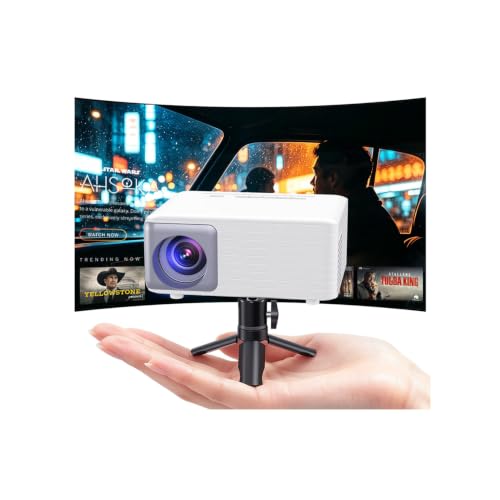 |
Polaring 1080P Projector With Tripod Lightweight travel viewing |
Check Price |
 |
Alwtniet HY300Pro Android 14 Projector Small rooms and bedrooms |
Check Price |
Top 5 Projector Iphone: Detailed Reviews
1. YGSKK Native 1080P Wi-Fi Projector
If you want a Projector Iphone setup without extra streaming hardware, the YGSKK combines native 1080P resolution, built-in apps, Wi-Fi 6, Bluetooth 5.3, and wireless phone support. Prime Video, YouTube, and Hulu are built in, while J-Share lets you connect a smartphone wirelessly. Its 300 ANSI lumens suit darker rooms, and electric focus makes setup easier than manual adjustment. HDMI, USB, and audio inputs add flexibility, while the included HDMI cable supports external devices. The 210° rotation and 50–200-inch screen range help with placement.
What We Like:
- Native 1080P delivers a clear full HD image for films and shows.
- Built-in Prime Video, YouTube, and Hulu reduce the need for extra equipment.
- Wi-Fi 6 and Bluetooth 5.3 support faster wireless connections and compatible accessories.
- J-Share enables wireless smartphone connection without relying only on HDMI.
- Electric focus and 210° rotation make positioning more convenient.
What Could Be Improved:
- The 300 ANSI lumens are better suited to darker rooms than bright daytime viewing.
- Wireless phone mirroring may require using the J-Share setting rather than simply casting from every app.
- Its large stated screen range does not remove the need for suitable room space and placement distance.
Buy this YGSKK if you want an all-in-one home projector with native 1080P video, built-in streaming apps, and flexible wireless phone support. It suits bedrooms and darker living spaces especially well. Skip it if you need strong daytime brightness or prefer a simpler projector with no app or wireless setup considerations.
2. Magcubic 200 ANSI Smart Projector
This Magcubic mini projector is a compact Projector Iphone option for casual bedroom streaming, with 200 ANSI brightness and a 5W soundbase speaker. Its built-in apps provide access to more than 100,000 videos without an external TV stick, while Wi-Fi 6 and Bluetooth 5.4 support convenient connections. You can place it on a table, mount it on the ceiling, use a tripod, or rotate it 180 degrees. Auto vertical keystone helps adjust the image, and its 0.88-pound design suits flexible setups.
What We Like:
- 200 ANSI brightness suits casual movie watching, kids’ shows, and gaming in a dim bedroom.
- The 5W soundbase speaker lets you watch without immediately adding separate audio.
- Built-in apps reduce the need for an external streaming stick.
- Ceiling, table, tripod, and 180-degree placement options make setup unusually flexible.
- The Air Mouse remote combines pointer control with standard remote functions.
What Could Be Improved:
- Its native resolution is 720p, so 4K support does not provide native 4K sharpness.
- The 200 ANSI output is intended for casual viewing and may struggle in brighter rooms.
- You should update the firmware for optimal performance, adding a setup step before regular use.
Buy it if you want a lightweight bedroom projector with built-in apps, flexible positioning, and simple sound in one unit. It suits casual streaming at about 5.2 feet for an 80-inch screen. Skip it if you need native 1080p or strong brightness for daytime viewing.
3. AKIYO 1080P Mini Projector
The AKIYO 1080P Mini Projector is a compact choice for Projector Iphone use, especially if you need phone mirroring without a Wi-Fi network. Its P2P direct connection supports iOS and Android, while dual-band 5G/2.4G Wi-Fi adds another connection option. It supports Full HD 1080P, with 200 ANSI brightness and 2000:1 contrast. A 360° rotating stand and automatic keystone help you aim and square the image. Bluetooth 5.2, HDMI, USB, and 3.5mm audio cover common setups. At 4.8 by 3.7 by 3.3 inches, it packs easily.
What We Like:
- P2P direct connection mirrors iOS and Android devices without requiring a Wi-Fi network.
- The 360° rotating stand makes flexible placement easier.
- Automatic keystone helps correct the projected image after positioning.
- HDMI, USB, and 3.5mm audio support a range of connected devices.
- Its compact size suits bags, small rooms, and portable setups.
What Could Be Improved:
- The 200 ANSI brightness is better suited to controlled lighting than bright rooms.
- Full HD 1080P is supported, but the listed specifications do not say that the projector uses a native 1080P display.
- Phone mirroring and app-based streaming may require different connection methods, so setup will not be identical for every source.
Buy it if you want a small projector that can mirror an iPhone or Android phone without a Wi-Fi network and offers flexible positioning. It also suits travelers who need HDMI, USB, or Bluetooth connections. Skip it if you need strong brightness for daytime viewing or require confirmed native 1080P resolution.
4. Polaring 1080P Projector With Tripod
The Polaring is a lightweight Projector Iphone option for portable movie viewing, weighing 0.9lb and including an adjustable tripod stand. Its 1080P support and five-layer glass lens aim to produce a sharper picture than basic 480P projectors, while the claimed 200-inch maximum gives you flexibility for walls or outdoor screens. HDMI, USB, AV, TF card, and earphone ports cover phones, laptops, consoles, and streaming devices. A built-in speaker and cooling system rated below 38dB help keep setup simple without adding much noise.
What We Like:
- The 0.9lb body slips easily into a bag for travel or outdoor viewing.
- The included tripod makes height and tilt adjustments easier than stacking books.
- 1080P support and a glass lens should look cleaner than entry-level 480P projection.
- The wide selection of ports supports phones, laptops, consoles, and TV sticks.
- The claimed under-38dB cooling design should reduce distracting fan noise.
What Could Be Improved:
- The product details do not state a brightness rating, so large-screen viewing may work best in darker spaces.
- Its built-in speaker is convenient, but the small projector may not provide room-filling sound.
- The listed features do not mention built-in Wi-Fi or a smart operating system, so iPhone streaming may require a compatible wired connection or external device.
Buy this if you want a very light projector with a tripod for bedroom, travel, or occasional outdoor viewing and value flexible physical connections. Skip it if you need strong brightness for daytime use, built-in smart streaming, or powerful audio without adding another device.
5. Alwtniet HY300Pro Android 14 Projector
For a Projector Iphone setup in a compact room, the Alwtniet HY300Pro combines Android 14, Wi-Fi 6, and Bluetooth 5.4 for wireless streaming and audio connections without an extra stick. Its 0.9:1 ultra-short-throw design projects a 35- to 135-inch image from 0.75 to 2.65 metres, while the 180-degree lens supports wall, ceiling, table, or tripod placement. Native 720p keeps expectations realistic, though it supports 4K input. The 200 ANSI lumens suit bedrooms better than bright spaces.
What We Like:
- The short-throw design works well when your bed or sofa sits close to the wall.
- Android 14 provides built-in access to Hulu, YouTube, and other streaming services.
- The 180-degree swivelling lens makes ceiling projection practical.
- Wi-Fi 6 and Bluetooth 5.4 offer flexible wireless streaming and audio connections.
- Its compact design suits small rooms and portable use.
What Could Be Improved:
- Native 720p is less detailed than a true 1080p projector, despite 4K support.
- The 200 ANSI lumens rating makes it better for dim bedrooms than daylight viewing.
- Built-in sound is convenient, but external audio may be preferable for fuller movie playback.
Buy this if you want a small-room projector that sits close to the wall, supports Android streaming, and can aim at unusual surfaces. It suits bedrooms, casual movies, children’s shows, and occasional travel. Skip it if you need sharp native 1080p detail or a bright image for daytime viewing.
How To Choose A Projector Iphone
Choosing a Projector Iphone setup starts with matching the projector to how you watch. Decide whether you mainly stream from an iPhone, use built-in apps, or connect other devices. That choice affects the connection methods, operating system, and accessories you need, so check those details before comparing image claims.
Projector Iphone compatibility and connection
Look for a clear route from your phone to the projector. Wi-Fi models may support wireless mirroring, but compatibility can vary by projector software and the app you use. A projector that supports phone mirroring without Wi-Fi can be useful where the network is unreliable, while wired options may require the correct adapter. Confirm the connection process rather than assuming every iPhone will pair automatically.
Resolution and brightness
Native resolution matters more than a projector’s maximum supported resolution. A native 1080P projector can produce a sharper Full HD image than a lower-resolution model that merely accepts a 1080P signal. Brightness also affects everyday viewing: higher brightness is helpful in rooms that are not fully dark, while a darker bedroom gives you more flexibility. Treat brightness figures carefully and compare the measurement used, such as ANSI lumens, when one is provided.
Room size and image placement
Check how much space you have before choosing a projector. Small bedrooms and compact rooms benefit from models designed for shorter viewing distances, but you still need a suitable wall or screen. Consider placement options, keystone correction, focus controls, and whether the projector can sit securely on a table or tripod. A portable model is only convenient if setup remains simple in the places you plan to use it.
Smart features and portability
Built-in Android software can reduce the need for a separate streaming device, but you should check which apps and services the platform supports. Wi-Fi is useful for streaming and updates, while a compact design and included tripod can make occasional travel easier. Balance those conveniences against your priorities: extra smart features may matter less if you already stream through your iPhone, and a smaller projector may suit travel better than a larger model designed for a permanent setup.
Which Projector Iphone Should You Choose?
The YGSKK Native 1080P Wi-Fi Projector is the best overall pick for straightforward home streaming, combining Full HD resolution with Wi-Fi connectivity. Choose the Magcubic 200 ANSI Smart Projector instead if brighter bedroom viewing is your priority. The other options target more specific needs: phone mirroring without Wi-Fi, lightweight travel use, or compact-room viewing with Android 14. Match the projector to your room and connection habits first.

Hi, I’m Larry Fish, the mind behind MyGrinderGuide.com.. With a passion for all things kitchen appliances, I created this blog to share my hands-on experience and expert knowledge. Whether it’s helping you choose the right tools for your culinary adventures or offering tips to make your kitchen more efficient, I’m here to guide you. My goal is to make your time in the kitchen not only easier but also enjoyable! Welcome to my world of kitchen mastery!