
As an Amazon Associate I earn from qualifying purchases.
Choosing a Sticker Cutter depends on what you want to make. Some machines print and cut finished stickers, while others trim sheets, vinyl or cardstock without built-in printing.
Pay attention to the cutting method, supported materials, working width and connection options. Safety features and measurement guides also matter if you need repeatable cuts or are new to crafting.
These five picks cover several approaches, from all-in-one sticker making to compact vinyl cutting, paper trimming and detailed hand work. The selection uses only the stated features for each product.
This guide explains what each cutter suits best, what separates it from the others and which type of project it can simplify.
Our Top 5 Sticker Cutter Picks at a Glance
| Product | ||
|---|---|---|
 |
Liene PixCut S1 Sticker Printer & Cutter Printed stickers and labels |
Check Price |
 |
Likcut S41 Vinyl Cutter Machine Letter-size vinyl projects |
Check Price |
 |
Likcut S501 Vinyl Cutter Machine Compact sticker cutting |
Check Price |
 |
Firbon A4 Paper Cutter Straight sheet trimming |
Check Price |
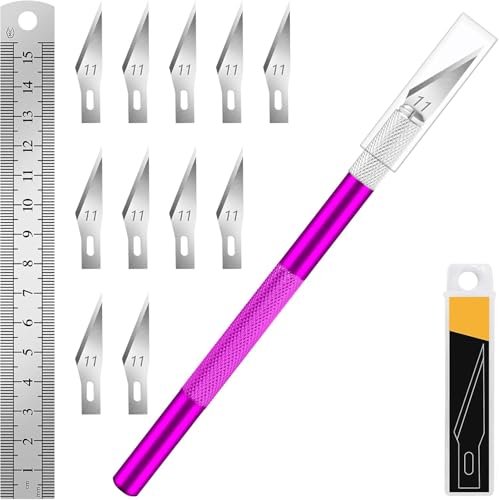 |
DIYSELF Craft Hobby Knife Set Detailed manual cuts |
Check Price |
Top 5 Sticker Cutter Picks: Detailed Reviews
1. Liene PixCut S1 Sticker Printer & Cutter
The Liene PixCut S1 is a Sticker Cutter that prints and cuts custom stickers and labels in one step. Its AI image extraction recognizes subjects in your photos and prepares them for precise cutting, reducing manual editing. Thermal dye-sublimation printing produces 300 dpi output with 16.7 million colors, while four-layer printing automatically laminates the photopaper for more durable stickers. The Liene Photo App adds AI styles, 50,000+ free creative assets and 10,000+ templates without a subscription, giving you a streamlined route from image to finished sticker.
What We Like:
- Printing and cutting in one step keeps the workflow simple.
- AI image extraction can isolate photo subjects without manual outlining.
- Thermal dye-sublimation produces vivid, high-resolution color.
- Automatic lamination helps create longer-lasting stickers.
- The app provides extensive templates, fonts and design elements without a subscription.
What Could Be Improved:
- It is focused on printed stickers and labels, so it is less suitable for unprinted vinyl-cutting projects.
- The app-based workflow may feel restrictive if you prefer fully manual design and cutting.
- Its AI tools and large template library may be unnecessary for occasional basic labels.
Buy the Liene PixCut S1 if you want a compact, guided way to turn photos and designs into colorful, laminated stickers or custom labels. Skip it if you mainly need standalone cutting for unprinted materials or prefer a simple manual craft tool with no app-based creative workflow.
2. Likcut S41 Vinyl Cutter Machine
The Likcut S41 is a Sticker Cutter for letter-size vinyl projects, including stickers, HTV and cardstock. Its three-step workflow and app aim to reduce setup, while AI tools let you create designs from voice commands or text prompts. You can connect it by wire or wirelessly, giving you flexibility if your workspace changes. The maximum 8.5-inch cutting width suits US Letter material, and the sensor-guided system targets a 0.2mm accuracy tolerance. A built-in screen provides cutting status and one-touch controls during projects.
What We Like:
- The 8.5-inch maximum width handles US Letter vinyl and cardstock without feeling cramped.
- Wired and wireless connectivity lets you choose convenience or a stable connection.
- AI voice and text tools can simplify creating custom sticker designs.
- The three-step workflow keeps setup and cutting more approachable.
- The on-device screen gives you real-time status without relying only on the app.
What Could Be Improved:
- The 8.5-inch cutting limit makes it unsuitable for projects wider than letter-size materials.
- AI creation tools may be less useful if you already prefer designing manually in dedicated software.
- Its app-based workflow adds another layer for users who want simple, standalone cutting.
Buy the Likcut S41 if you want a compact vinyl cutter for letter-size stickers, cardstock and HTV, especially if AI-assisted design and wireless control appeal to you. Skip it if you need wider materials, prefer a basic manual cutter, or already have a design workflow you do not want to replace.
3. Likcut S501 Vinyl Cutter Machine
The Likcut S501 Vinyl Cutter Machine is a compact Sticker Cutter with a 4.5-inch cutting width for small stickers and labels. Bluetooth 5.0 and USB 2.0 give you two connection options, while print-then-cut support helps turn printed designs into finished stickers. Its cutting and drawing modes, adjustable pressure, and support for over 50 material types add flexibility. The front cover stores tools and materials, and the design library includes over 1 million designs and more than 1,200 fonts. AI voice and text prompts can also help create custom designs.
What We Like:
- Bluetooth 5.0 and USB 2.0 let you choose wireless or wired connectivity.
- The 4.5-inch width suits compact sticker projects and small labels.
- The front cover provides handy storage for tools and materials.
- Over 1 million designs and 1,200 fonts give you plenty of starting points.
- Cutting, drawing, adjustable pressure, and broad material support expand its uses.
What Could Be Improved:
- The 4.5-inch cutting width limits larger designs and full-size vinyl projects.
- Its compact focus makes it less suitable than a wider cutter for bigger batches or oversized labels.
- The extensive design library and AI tools may still require time to refine designs for your materials.
Buy it if you want a compact cutter for stickers, small labels, and detailed craft projects, especially with Bluetooth, USB, and built-in storage. Skip it if you regularly make large decals or need a wider cutting area. Its design library and AI features suit beginners, while adjustable settings offer room to develop your workflow.
4. Firbon A4 Paper Cutter
The Firbon A4 Paper Cutter is a Sticker Cutter for straight sheet trimming rather than contour-cutting printed designs. Its guillotine blade handles up to 10 sheets of 80 g/m² paper per pass, while the extended centimetre-and-inch scale and 45- to 90-degree angle guide help you line up consistent lengths and angles. It cuts A3, A4 and A5 paper, plus photos, cards and laminated material up to 1.5 mm. The spring-loaded blade operates only when pressed, adding a useful safety measure for home, school or office crafting.
What We Like:
- Guillotine blade makes clean, straight cuts along printed lines.
- 10-sheet capacity speeds up batches of paper labels and cards.
- Centimetre-and-inch markings support flexible measuring.
- The angle plate covers 45 to 90 degrees for angled trimming.
- The spring-loaded safety design helps prevent accidental blade movement.
What Could Be Improved:
- It is for straight cuts, so it does not replace a machine that cuts sticker outlines.
- The maximum capacity applies to 80 g/m² paper, and cutting fewer sheets may help preserve blade life.
- The 12-inch guillotine format is less convenient for tiny detailed cuts than a craft knife.
Buy it if you need a portable tool for trimming sticker sheets, paper, cards or laminated material into straight, measured edges, especially in batches. Skip it if you want automated printed sticker cutting, intricate shapes or contour work; this is a paper trimmer, not a plotter or detailed hand-cutting set.
5. DIYSELF Craft Hobby Knife Set
The DIYSELF Craft Hobby Knife Set works as a Sticker Cutter for hands-on precision rather than automated cutting. Its razor-sharp #11 high-carbon blade handles paper, cardstock, vinyl, foam, rubber stamps, and thin plastic, making it useful for labels, stencils, scrapbooking, and detailed shapes. The lightweight metal handle has a textured grip to support steady control and reduce hand fatigue. You get one knife, 10 replacement blades, and a 6-inch metal ruler. Standard #11 compatibility also makes blade replacement straightforward when the cutting edge wears down.
What We Like:
- Razor-sharp #11 blades help you follow fine lines and small details.
- Works across paper, vinyl, foam, and thin plastic for varied craft projects.
- Ten replacement blades extend the set’s useful life.
- The textured, lightweight metal handle supports controlled, comfortable cutting.
- The 6-inch metal ruler helps guide straight cuts.
What Could Be Improved:
- Manual cutting takes more time and hand control than a machine.
- It is intended for light craft materials, not thick or heavy stock.
- The razor-sharp blades require careful handling and replacement.
Buy this if you want hands-on control for detailed paper, vinyl, foam, rubber-stamp, or thin-plastic work and value replaceable standard blades. Skip it if you want automatic sticker production, fast batch cutting, or a tool for thick materials; this is a precision knife, not a powered cutter.
How To Choose The Right Sticker Cutter
The right Sticker Cutter depends on what you make, how often you make it, and whether you need printed designs or only clean cuts. Start with your usual materials and finished size, then match the tool to your workflow rather than choosing based on the most features.
Choose the cutting method
Machine cutters suit repeatable shapes, batches of labels, and projects where you want consistent results. Some workflows also combine printing and cutting, which can save time if you create finished stickers from your own artwork. Manual tools work better for occasional jobs, quick edits, and designs that need hands-on control. They usually require more patience, especially around small curves and intricate details.
Match the tool to your materials
Think about whether you will cut adhesive paper, vinyl, card, or ordinary sheets. A tool made for straight trimming is useful for preparing sheets, cutting borders, or sizing finished work, but it will not replace a tool designed for shaped cuts. For vinyl projects, consider the size of the material you expect to use and whether your designs are mostly small decals or larger lettering.
Consider size and project scale
Check the working format before buying. Letter-size projects need a cutter that accommodates that sheet size, while compact tools make more sense when you have limited workspace or mainly produce small stickers. If you create multiple copies, an efficient machine-based workflow may be more practical than cutting each piece by hand. For occasional labels, a simpler tool can avoid unnecessary setup.
Prioritise control and ease of use
Detailed designs demand a sharp cutting edge and a steady way to guide the material. Look for a workflow that lets you position sheets accurately and remove excess material without damaging the finished sticker. Also consider cleanup, storage, and how much setup you are willing to handle. A more capable cutter is only useful if you will actually use it regularly.
Finally, separate essential features from nice-to-have extras. Decide whether you need printing, shaped cuts, straight trimming, or fine manual control, then choose the simplest option that covers those needs. That approach keeps the purchase practical and leaves room to upgrade if your projects become more ambitious.
Which Sticker Cutter Fits Your Projects?
The Liene PixCut S1 Sticker Printer & Cutter is the best overall pick because it handles both printed stickers and labels in one workflow. For a more focused vinyl option, choose the Likcut S41 Vinyl Cutter Machine, the best alternative for letter-size vinyl projects. If compact sticker cutting matters more than larger project capacity, the Likcut S501 is the more practical choice. The Firbon and DIYSELF tools suit straight trimming and detailed manual cuts respectively.

Hi, I’m Larry Fish, the mind behind MyGrinderGuide.com.. With a passion for all things kitchen appliances, I created this blog to share my hands-on experience and expert knowledge. Whether it’s helping you choose the right tools for your culinary adventures or offering tips to make your kitchen more efficient, I’m here to guide you. My goal is to make your time in the kitchen not only easier but also enjoyable! Welcome to my world of kitchen mastery!