
Imagine this: you’re ready to relax, grab some popcorn, and dive into the vast world of online content on your big screen. But then it hits you – navigating the internet on your TV feels clunky, slow, and frankly, a little frustrating. Sound familiar? Choosing the right TV browser can feel like a quest through a digital maze, with so many choices and not enough clear answers.
Many of us face this challenge. We want a smooth, easy way to watch videos, play games, or even shop online from the comfort of our couch. But often, TV browsers are either too complicated to use, load pages too slowly, or just don’t work well with our favorite websites. This can turn a relaxing evening into a battle with your remote.
But what if there was a simpler way? In this post, we’ll explore what makes a TV browser truly great. We’ll break down the confusing options and highlight the features that matter most. By the end, you’ll have a much clearer picture of how to pick a TV browser that makes your smart TV experience more enjoyable and less of a headache.
Top Tv Browser Recommendations

- 4K streaming made simple:With America’s number 1 TV streaming platform,* exploring popular apps—plus tons of free movies, shows, and live TV—is as easy as it is fun. *Based on hours streamed—Hypothesis Group
- 4K picture quality: With Roku Streaming Stick Plus, watch your favorites with brilliant 4K picture and vivid HDR color.
- Compact without compromises: Our sleek design won’t block neighboring HDMI ports, and it even powers from your TV alone, plugging into the back and staying out of sight. No wall outlet, no extra cords, no clutter.
- No more juggling remotes: Power up your TV, adjust the volume, and control your Roku device with one remote. Use your voice to quickly search, play entertainment, and more.
- Shows on the go: Take your TV to-go when traveling—without needing to log into someone else’s device.


- Upgrade your TV, instantly – Fire TV Stick HD is our fastest HD streaming stick ever, with a streamlined navigation that jumps straight to your movies, shows, and live TV. Take your entertainment on the go with the new ultra-portable profile. And watch it all come to life with crisp Full HD and Wi-Fi 6 support.
- The newest Fire TV experience (2026) – Our biggest update to Fire TV has a new, modern design that gets you to your entertainment fast. Browse dedicated content categories, pin more of your favorite apps, and get personalized recommendations from Alexa+. Spend less time scrolling, and more time watching.
- All your apps in one place – Prime Video, Netflix, YouTube, Disney+, Apple TV, HBO Max, Hulu, Peacock, Paramount+, and thousands more. It’s easy to find what to watch from hundreds of thousands of movies and TV episodes, including free, ad-supported content. Subscription fees may apply.
- Our most portable stick design – Thin and light, without extra clutter. Connects directly to your TV's HDMI port without blocking other ports.
- Easier than ever to set up – Now with Direct Power, it's powered by your TV with the included USB-C cable and eliminates the need for a wall adapter.

- 4K Ultra HD Resolution: Enjoy your TV in stunning resolution Ultra HD ers four times the resolution of Full HD for greater clarity and detail
- Android TV: With the Android TV operating system you will have access to the best content, download the infinity of applications available through the Google Play Store!
- Voice remote control: Just press the Google Assistant button and ask it to find, play and control content
- Chromecast Built-in: Easily cast movies, shows, and photos from your Android or iOS device to your Android TV
- Easy Setup: Access your Google account and configure the device, language and Wi-Fi network

- Stunning 4K Ultra HD: Enjoy breathtaking 4K movies and TV shows at 4 times the resolution of Full HD. Plus your favorite HD shows, movies, and sporting events are enhanced to near Ultra HD resolution with advanced 4K Upscaling..Image Aspect ratio:16:9.Display Colors : 1.07 billion, Output Power : 10W + 10W
- High Dynamic Range: HDR delivers bright and accurate colors for a lifelike viewing experience.
- 1. Thousands of Streaming Channels: Enjoy the over half a million movies and TV episodes available to stream plus sports, news, music, kids and family, food, science and tech, fitness, foreign language and so much more.
- Stream free TV, live news, sports, movies, and more: Start streaming free TV right from your home screen with Featured Free and The Roku Channel. Browse 150+ free live channels with the Live TV Channel Guide to find what to watch next.
- Easy Voice Control: Find movie titles, launch or change channels, even switch inputs, using just your voice. Access to voice control feature available through the Roku mobile app, compatible third-party voice assistant devices and voice-enabled remote controls that can be purchased separately. Works with Siri, Alexa and Hey Google.
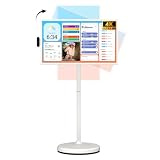
- 32'' 4K Touchscreen for Big-Screen Fun: Turn any room into a large interactive display for streaming, browsing, recipes, workouts, gaming, video calls, kids’ learning, or work. The 3840 x 2160 UHD display with responsive 10-point touch makes this rolling touchscreen TV feel like a giant Android tablet for the whole family.
- Android 16 with Google Play: Powered by Android 16 with Google EDLA certification, this portable smart TV gives families and professionals access to Google Play, Google Assistant, YouTube, Netflix, Prime Video, Disney+, Hulu, Zoom, and more. 8GB RAM, up to 8GB extended memory, and 256GB storage support smooth app use, media playback, and multitasking.
- Cord-Free Entertainment for Flexible Viewing: The built-in 15000mAh rechargeable battery delivers up to 6 hours of cordless entertainment, so you can watch without staying near an outlet. The smooth rolling stand moves easily from the bedroom to the living room, kitchen, home office, or covered patio, making it ideal for spaces where fixed TVs are inconvenient.
- Wireless Mirroring & Wired HDMI Connection: Mirror content wirelessly from a phone, tablet, or laptop, or connect compatible devices via HDMI. Easily enjoy media, presentations, and work content on a larger 32-inch screen. Note: mirroring supports full-screen and local media, but not AirPlay, Google Cast, or streaming casting services.
- More Than a Portable TV: Use the ApoloSign Dashboard to turn this 32-inch portable touchscreen TV into a digital photo frame, family calendar, chore chart, fitness display, classroom screen, menu board, or business kiosk. A practical smart display for families, home offices, classrooms, gyms, salons, showrooms, Airbnb hosts, and small businesses.

- 4K UHD TV: Everything you need to bring your favorite content to life with the power of 4K and the extras you crave.
- ALPHA 7 AI PROCESSOR GEN8: Enhanced brightness, improved sound, refined picture detail with 4K upscaling and Dynamic Tone Mapping. It all comes together for a thrilling watching experience powered by the Alpha 7 AI Processor Gen8.
- WEBOS: No matter which TV you choose, your LG TV makes it easier than ever to find what you need and more. Browse all your favorite streaming apps and let LG Channels connect you to over 350 free channels and thousands of titles on demand¹
- PERSONALIZED PICTURE AND SOUND WIZARD: Set your personalized picture and audio settings. The Personalized Picture & Sound Wizard uses AI technology to analyze your favorite images and sound clips to create a personalized picture and audio experiences tailored for you.
- HDR10 PRO: Delivers a dramatic visual experience and elevated picture quality by enhancing each color on your screen for a "wow" effect.

- 1# TV Cast App since 2014 - Best Video Casting Performance
- Stream and watch videos from your phone or tablet
- Supports webvideos, online movies, livestreams
- Stream personal media from your device
- Integrated browser to search and stream videos with just one tap

- PURE BLACK AND STUNNING CONTRAST: Over 8 million self-lit pixels are precisely controlled to produce pure black and stunning contrast in every scene.
- A PICTURE PAINTED WITH EXTRA COLORS: Unique to Sony, Triluminos Pro enriches your viewing experience with a wider palette of over a billion accurate colors, reproducing more natural shades and hues so everything you watch is lifelike and vivid.
- DISCOVER MORE ON GOOGLE TV WITH GEMINI: Browse 700,000 movies and TV episodes, live TV and more - in one place. And now, you can chat naturally with Gemini to help you find what to watch, get helpful answers to any question, control your smart home devices and more.
- MORE IMMERSIVE MOVIE EXPERIENCE: Get a truly cinematic viewing experience with support for Dolby Vision and Dolby Atmos, and DTS:X for sound that spreads beyond the screen.
- MOVIES INCLUDED WITH THE BRAVIA TV: Access SONY PICTURES CORE with Pure Stream and the largest IMAX Enhanced collection included with BRAVIA. 5 credits to redeem on latest release movies and 12 months subscription on hundreds of classics.
Your Smart TV’s New Best Friend: The TV Browser Buying Guide
So, you’ve got a fancy smart TV, but sometimes you just want to browse the internet like you do on your phone or computer. That’s where a TV browser comes in! It lets you surf the web directly on your big screen. This guide will help you pick the best one.
What to Look For: Key Features
When you’re shopping for a TV browser, keep these important things in mind.
Smooth Navigation
You want a browser that’s easy to move around in. Buttons should be clear. You shouldn’t have to press a million things to get where you want to go. A good TV browser feels natural to use with your remote.
Speed and Performance
Nobody likes waiting. A fast TV browser loads pages quickly. It also handles multiple tabs without slowing down. This means you can switch between your favorite websites without frustration.
User-Friendly Interface
The look of the browser matters. It should be simple and clean. Big icons and easy-to-read text help a lot. You don’t want to feel lost when you open it.
Compatibility
Make sure the browser works with your TV. Some browsers are made for specific smart TV systems. Others might work on a wider range. Check this before you buy.
Security Features
Just like on your computer, you want to stay safe online. Look for browsers that offer good security. This means they protect your information.
What’s it Made Of? Important Materials (and How They Matter)
When we talk about “materials” for a TV browser, we’re not talking about plastic or metal. We’re talking about the software and the technology behind it.
The Browser Engine
This is the “brain” of the browser. It’s what makes websites appear and work. A powerful engine means faster loading and better display of complex websites. Think of it like the engine in a car – a stronger engine goes faster.
Code and Algorithms
These are the instructions that tell the browser what to do. Well-written code makes the browser run smoothly. Bad code can cause glitches and slow things down.
Integration with TV System
How well the browser works with your TV’s operating system is key. Good integration means it feels like a natural part of your TV, not something tacked on.
What Makes it Good (or Not So Good): Quality Factors
Several things can make a TV browser great or a disappointment.
Updates and Support
A browser that gets regular updates is usually a good sign. Updates fix bugs and add new features. Good support means the company is there to help if you have problems.
Website Rendering
This is how well the browser shows websites. Can it display all the pictures and videos correctly? Does it handle tricky website layouts? A browser that renders websites accurately gives you the best experience.
Resource Usage
Some browsers use a lot of your TV’s power. This can make your TV run slower for other apps. A good browser is efficient and doesn’t hog resources.
Ad Blocking
Annoying ads can ruin your browsing. Browsers with built-in ad blockers make your experience much better. They keep the clutter away.
How You’ll Use It: User Experience and Use Cases
Using a TV browser is different from using one on a phone.
Easy Surfing
You can look up recipes while you cook in the kitchen. You can read news articles on the big screen. You can even do some online shopping.
Entertainment and Information
Want to watch a YouTube video that isn’t in an app? A TV browser lets you do that. You can also check sports scores or look up movie showtimes.
Family Fun
You can use it to plan your next family vacation together. Or maybe look up answers to trivia questions during a game night.
Remote Control Challenges
Sometimes, typing with a remote can be a bit slow. Many TV browsers work with voice search or can connect to a wireless keyboard. This makes typing much easier.
Frequently Asked Questions (FAQ) about TV Browsers
Q: What are the main key features to look for in a TV browser?
A: The main key features to look for are smooth navigation, speed and performance, a user-friendly interface, compatibility with your TV, and good security features.
Q: How does the “browser engine” affect a TV browser’s quality?
A: The browser engine is like the car’s engine. A powerful engine makes websites load faster and appear correctly.
Q: Why are regular updates important for a TV browser?
A: Regular updates fix bugs, improve performance, and can add new features, making the browser better over time.
Q: Can I use my regular smartphone keyboard with a TV browser?
A: Often, yes. Many TV browsers can connect to a wireless keyboard or even a smartphone app that acts as a keyboard, making typing easier.
Q: What is “website rendering”?
A: Website rendering is how well the browser shows websites. It means making sure all the pictures, videos, and text look the way they should.
Q: Are TV browsers safe to use?
A: Yes, most TV browsers are safe if they have good security features. It’s always good to be careful about what you click on, just like on any device.
Q: What are some common use cases for a TV browser?
A: Common use cases include looking up recipes, reading news, online shopping, watching videos not available in apps, and planning activities.
Q: Will a TV browser slow down my smart TV?
A: Some browsers might use more resources than others. A good, efficient TV browser won’t noticeably slow down your smart TV.
Q: Do all smart TVs have a built-in TV browser?
A: Not all smart TVs come with a browser pre-installed. Some require you to download one from the TV’s app store.
Q: Is it hard to type web addresses with a TV remote?
A: It can be slow. However, many TV browsers offer features like voice search or the ability to connect a wireless keyboard to make typing much simpler.

Hi, I’m Larry Fish, the mind behind MyGrinderGuide.com.. With a passion for all things kitchen appliances, I created this blog to share my hands-on experience and expert knowledge. Whether it’s helping you choose the right tools for your culinary adventures or offering tips to make your kitchen more efficient, I’m here to guide you. My goal is to make your time in the kitchen not only easier but also enjoyable! Welcome to my world of kitchen mastery!