
As an Amazon Associate I earn from qualifying purchases.
Finding a reliable Way To Share Pictures From Iphone To Android can be harder than it sounds. You may need to move camera files, free up phone storage, or send photos straight to paper.
Start by deciding whether you want digital backup, direct file transfer, or physical prints. Capacity, device compatibility, Wi-Fi requirements, charging support, and automatic scanning all affect how convenient each option will be.
These five picks were selected from the listed features, with different approaches represented rather than repeating colour or size variants. The selection includes high-capacity backup, camera-card transfer, photo printing, and simpler phone storage options.
Below, you will find a quick comparison followed by practical notes on who each product suits and the trade-offs to consider before choosing.
Our Top 5 Way To Share Pictures From Iphone To Android Picks at a Glance
| Product | ||
|---|---|---|
 |
ThePhotoStick Omni 512GB Large multi-device backup |
Check Price |
 |
Bawanfa Plus 4-in-1 Camera Card Reader Camera-to-phone transfers |
Check Price |
 |
Liene M100 4×6 Photo Printer Instant physical prints |
Check Price |
 |
Picture Keeper Connect 32GB Simple phone backup |
Check Price |
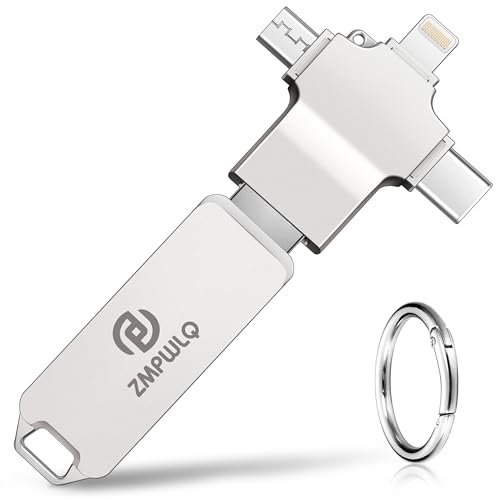 |
PL ZMPWLQ 128GB Auto Backup Photo Stick Flexible automatic backup |
Check Price |
Top 5 Way To Share Pictures From Iphone To Android: Detailed Reviews
1. ThePhotoStick Omni 512GB
ThePhotoStick Omni 512GB is a practical Way To Share Pictures From Iphone To Android and computers. It is a thumb drive that uses a free app to find and save photos, videos, and other files, with an included adapter and onscreen setup. Its 512GB capacity holds over 204,000 images and videos, giving you substantial room for archiving a large collection. Compatibility spans PC, Mac, iPhone, iPad, and most Android phones and tablets. In use, you connect it to each device and let the app organize backups rather than relying on separate storage sticks.
What We Like:
- <h3>Way To Share Pictures From Iphone To Android</h3>Connect it to different phones and computers to move and preserve one shared photo library.
- The 512GB capacity holds over 204,000 images and videos, making it suitable for extensive archives.
- It supports PC, Mac, iPhone, iPad, and most Android phones and tablets.
- The free app automatically finds photos, videos, and other files, reducing manual searching.
- The included adapter and onscreen instructions make the backup process more approachable.
What Could Be Improved:
- You need to download the app, connect the drive with its adapter, and follow the setup steps on each device.
- Compatibility covers most Android phones and tablets, rather than promising support for every Android device.
- The 512GB capacity may be excessive if you only need to back up a small photo collection.
Buy it if you want the largest listed capacity for automatic backup across phones and computers, especially for a large, growing library. Skip it if your needs are modest or you prefer a wireless, app-free transfer method rather than connecting a physical drive to each device.
2. Bawanfa Plus 4-in-1 Camera Card Reader
The Bawanfa Plus 4-in-1 Camera Card Reader is a practical Way To Share Pictures From Iphone To Android, PC, Mac, or another device. Insert an SD or TF card, connect the reader through Lightning, USB-C, or USB-A, and move photos or 4K videos without Wi-Fi or an app. Its USB-A and USB-C female ports also support cameras, flash drives, keyboards, and mice. A dedicated USB-C charging port lets you power a compatible iPhone or iPad during transfers, while supported speeds reach 60–90MB/s.
What We Like:
- Handles both SD and TF memory cards for camera-to-phone transfers.
- Moves photos and 4K videos without requiring Wi-Fi or a companion app.
- The charging port helps prevent interrupted transfers on compatible iPhones and iPads.
- Works with iPhone, iPad, Android, Windows PC, and Mac.
- USB-A and USB-C female ports expand its use beyond memory-card transfers.
What Could Be Improved:
- The fastest claimed speeds are up to 90MB/s, so actual transfers may vary by device, card, and file.
- Older iOS versions have more limited support: iOS 9.1–12.4 allows one-way photo and video import, not office files or USB mouse use.
- You need a compatible SD or TF card, connected device, or cable; this adapter is not standalone storage.
Buy it if you regularly move camera files to an iPhone, Android phone, tablet, PC, or Mac and want charging during longer transfers. It suits photographers and frequent 4K video users especially well. Skip it if you want built-in storage, wireless sharing, or a simpler adapter for occasional phone photos.
3. Liene M100 4×6 Photo Printer
The Liene M100 offers a memorable Way To Share Pictures From Iphone To Android by turning phone photos into physical 4×6-inch prints. Its built-in hotspot creates a direct Wi-Fi connection, helping you print from iPhone, Android, or PC without relying on outside networks. Thermal-dye sublimation produces full-colour photos, while the Liene app lets you add square borders, filters, and brightness or contrast adjustments. Up to five devices can connect at once, making it practical for sharing prints with family or friends. The package includes 100 sheets and three cartridges.
What We Like:
- Direct hotspot printing avoids dependence on an outside Wi-Fi network.
- It supports iPhone, Android, and PC devices.
- The 4×6-inch format suits standard-looking physical memories.
- Up to five devices can connect simultaneously.
- The app offers useful basic photo customisation tools.
What Could Be Improved:
- It creates physical prints rather than serving as a straightforward digital photo-transfer device.
- Printing requires the supplied paper and cartridges, so ongoing consumables are part of using it.
- The 4×6-inch output gives you less flexibility than a device designed for multiple print sizes.
Buy the Liene M100 if you want shared iPhone and Android photos to become physical 4×6-inch keepsakes, especially for family gatherings or quick displays. It also suits users who value direct hotspot connections and simple editing. Skip it if you only need to move photos digitally between phones or prefer larger, varied print formats.
4. Picture Keeper Connect 32GB
Picture Keeper Connect is a compact 32GB backup drive for a simple Way To Share Pictures From Iphone To Android, as well as backing up to PCs and Macs. It connects through Lightning, USB-C, Micro USB, or USB, and its free app needs no Wi-Fi or cloud account: plug it in, open the app, and tap “Start Backup.” It stores photos, videos, and contacts, with space for up to 8,000 photos. AI-powered batch scanning helps digitize memories quickly, while Magic Erase removes unwanted objects from pictures.
What We Like:
- No Wi-Fi or internet connection is needed for backups.
- Multiple connectors support iPhone, Android, Mac, and PC devices.
- Contact storage adds useful protection beyond photos and videos.
- AI-powered batch scanning can speed up memory digitization.
- The drive can free space on phones and computers.
What Could Be Improved:
- The 32GB capacity may feel limited if you have a large photo or video library.
- You need the free app for the simplest three-step backup process.
- As a physical drive, it can be misplaced or damaged more easily than cloud storage.
Buy Picture Keeper Connect if you want a straightforward, offline way to back up photos, videos, and contacts across several device types. It suits users who prefer local storage and occasional transfers. Skip it if you need very high capacity, automatic cloud syncing, or a completely cable-free workflow.
5. PL ZMPWLQ 128GB Auto Backup Photo Stick
The PL ZMPWLQ 128GB Auto Backup Photo Stick is a four-in-one memory stick for iPhone, Android phones, and computers, with Lightning, USB-C, Micro USB, and USB 3.0 connectors. It offers a practical Way To Share Pictures From Iphone To Android while also storing files externally. The free iStore Pro app can automatically scan and back up photos, videos, and files, or let you select specific items. It preserves original quality, file names, and timestamps, and supports formats including JPEG, JPG, HEIC, PNG, and GIF. Its 128GB capacity helps clear space across devices.
What We Like:
- Four connectors let you move files between iPhones, Android devices, and computers.
- Automatic backup saves time, while selective transfer gives you control over what gets copied.
- The app helps you access and manage stored photos and files.
- Files retain their original quality, names, and timestamps.
- The 128GB capacity can store tens of thousands of photos and videos.
What Could Be Improved:
- You must download and use the free iStore Pro app for the intended phone-based workflow.
- The first backup can take some time when scanning and organising a large number of files.
Buy it if you want one storage device for backing up and moving pictures between iPhone, Android, and computer hardware. Its automatic and selective options suit different backup habits. Skip it if you want a transfer method that requires no app setup or initial file scanning.
How To Choose The Right Photo Transfer Option
The right Way To Share Pictures From Iphone To Android depends on where your photos are now, where you want them to go, and whether you need a copy for future use. Start by defining the job: a one-time transfer, regular backup, camera-card import, or physical printing. A product that suits one task may be inconvenient for another.
Way To Share Pictures From Iphone To Android: Check device compatibility
Confirm that the product works with both your iPhone and Android phone, along with any computer or camera you plan to use. Multi-device accessories can be useful if your household uses different phones, but compatibility may depend on the included connectors or the companion app. If you want to move files through a PC, check that the process supports your computer’s operating system and available ports.
Match capacity to your photo library
Storage size matters most when you want to keep a long-term copy rather than move a handful of images. Estimate how many photos and videos you need to store now, then allow room for future files. A larger drive reduces the need to clear space frequently, while a smaller backup device can be easier to manage if you only need a simple, focused archive.
Choose the transfer method you will actually use
Automatic backup can reduce repeated steps, especially if you regularly add photos from a phone. Manual transfers may give you more control over folders and file selection, but they require more attention. For camera images, a card reader may be the most direct route. Consider whether you prefer using an app, connecting a storage device, or transferring through a computer.
Consider portability, output, and privacy
A compact device is easier to carry between phones, cameras, and computers, while a dedicated printer is better if your goal is a physical copy rather than digital storage. Also think about where the files will remain after transfer. Keep an additional backup for important memories, and avoid deleting originals until you have opened several copied files and confirmed that the transfer worked.
Which Photo Sharing Option Should You Choose?
ThePhotoStick Omni 512GB is the best overall pick for a large, multi-device backup, giving you room to preserve a substantial photo library across different devices. The PL ZMPWLQ 128GB Auto Backup Photo Stick is the best alternative if flexible automatic backup matters more than maximum capacity. Choose based on your routine: broad storage and device coverage favor the Omni, while a more automated approach points toward the PL ZMPWLQ.

Hi, I’m Larry Fish, the mind behind MyGrinderGuide.com.. With a passion for all things kitchen appliances, I created this blog to share my hands-on experience and expert knowledge. Whether it’s helping you choose the right tools for your culinary adventures or offering tips to make your kitchen more efficient, I’m here to guide you. My goal is to make your time in the kitchen not only easier but also enjoyable! Welcome to my world of kitchen mastery!