
As an Amazon Associate I earn from qualifying purchases.
Cutting cable does not automatically give you a simple way to watch. You still need a source for online content, a connection to your TV, or the right accessory for private listening.
When choosing among these options, focus on the role each product plays. A guide can help you plan your setup, while adapters and cables depend on the ports and devices you already own.
These picks were selected from the supplied products for distinct cord-cutting uses, including internet-based viewing, computer-to-TV connections, in-car screen mirroring, and wireless TV audio.
This guide covers five different approaches rather than treating every accessory as a complete streaming system. Check compatibility carefully, especially for USB, HDMI, Mini DisplayPort, and audio connections.
Our Top 5 Ways To Watch TV Without Cable Picks at a Glance
| Product | ||
|---|---|---|
 |
A Brief Guide to Cord Cutting Planning a cord-cutting setup |
Check Price |
 |
Gentechvvybuy Bluetooth TV Audio Adapter Wireless TV listening |
Check Price |
 |
Cable Matters Mini DisplayPort to HDMI Cable Watching computer content on TV |
Check Price |
 |
ZTSULEE 4-in-1 Screen Mirroring Adapter Watching content in the car |
Check Price |
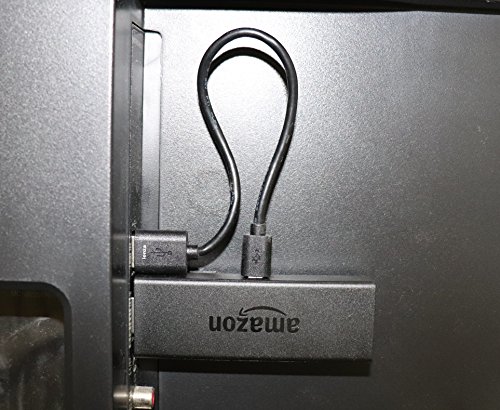 |
ienza Fire TV Stick Micro USB Power Cable Powering a streaming stick |
Check Price |
Top 5 Ways To Watch TV Without Cable: Detailed Reviews
1. A Brief Guide to Cord Cutting
A Brief Guide to Cord Cutting explains the basic idea of watching TV on the internet instead of paying for cable. It serves as a straightforward starting point if you are researching Ways To Watch Tv Without Cable before choosing equipment or services. Because the listing provides no feature details beyond its internet-TV focus, you should treat it as an introduction rather than a complete setup manual. It may help you understand the cord-cutting concept, but it does not replace researching compatible devices, streaming options, or home internet needs.
What We Like:
- It introduces internet-based TV in straightforward terms.
- It can help you begin planning a cord-cutting setup.
- It is useful before committing to hardware purchases.
- It focuses on replacing cable with internet TV.
- It may help clarify what you need to research next.
What Could Be Improved:
- The listing provides no detailed features or coverage of specific streaming services.
- It does not appear to include hardware for watching TV.
- You may need additional research before choosing a complete setup.
Buy it if you want a simple starting point for understanding cord cutting before shopping for devices or services. Skip it if you already know how internet-based TV works or need detailed comparisons, equipment guidance, or a ready-to-use viewing solution.
2. Gentechvvybuy Bluetooth TV Audio Adapter
This Gentechvvybuy Bluetooth 5.0 adapter is a practical option among Ways To Watch Tv Without Cable, adding private wireless listening to compatible TVs and PCs. It connects through optical TOSLINK, 3.5mm AUX, or coaxial audio, while optical input requires PCM format. Bluetooth 5.0 supports aptX Low Latency or FastStream to reduce lip-sync delay. You power it through USB-C, connect your headphones or speaker, and pair them. Volume control helps you adjust listening without disturbing others, provided your Bluetooth device is not connected elsewhere.
What We Like:
- Three audio inputs make it suitable for TVs with different connection options.
- Low-latency support can keep dialogue better aligned with the picture.
- Wireless headphones let you watch at your preferred volume.
- It can add Bluetooth to a non-smart or non-Bluetooth TV.
- The setup process is straightforward once your headphones are disconnected from other devices.
What Could Be Improved:
- Optical audio must use PCM format, which may require changing your TV’s audio settings.
- Your headphones or speaker must support Bluetooth and be free from another active connection during pairing.
- The adapter needs USB-C power, so it adds another powered device to your setup.
Buy it if you want wireless TV listening and your television has optical, AUX, or coaxial output. It suits shared homes, late-night viewing, and older TVs without built-in Bluetooth. Skip it if your headphones lack Bluetooth, your TV cannot output a supported connection, or you want a completely cable-free adapter setup.
3. Cable Matters Mini DisplayPort to HDMI Cable
Among the Ways To Watch Tv Without Cable, this Cable Matters cable suits anyone who wants to show computer content on a TV without adding a separate adapter. It connects a Mini DisplayPort or Thunderbolt 2 computer directly to an HDMI-equipped HDTV, monitor, or projector, carrying both video and audio. The six-foot length gives you some placement flexibility, while the low-profile computer connector helps preserve access to nearby ports. It supports video up to 1080p, with gold-plated connectors, shielding, and molded strain relief intended to improve durability and signal reliability.
What We Like:
- It carries audio and video through one cable, simplifying your setup.
- The direct Mini DisplayPort-to-HDMI connection avoids a separate converter.
- Six feet gives you useful flexibility between the computer and display.
- The low-profile connector is less likely to obstruct adjacent computer ports.
- It works with listed Apple, Microsoft Surface, and ThinkPad computers that have compatible ports.
What Could Be Improved:
- It is limited to 1080p, so it is not suited to higher-resolution display needs.
- You must have a computer with Mini DisplayPort or Thunderbolt 2 and a display with HDMI input.
- It does not offer wireless viewing, so the computer remains physically connected to the TV.
Buy this if you have a compatible Mini DisplayPort or Thunderbolt 2 computer and want a straightforward wired way to watch its content on an HDMI TV. Skip it if your computer uses another port, you need resolutions above 1080p, or you want the freedom of wireless streaming.
4. ZTSULEE 4-in-1 Screen Mirroring Adapter
This ZTSULEE adapter is one of the Ways To Watch Tv Without Cable if you want to mirror compatible content on your car’s screen rather than add a separate display. It converts factory wired Apple CarPlay or Android Auto into a wireless connection and is designed for in-car TV and movie playback. Dual-band Wi-Fi (2.4GHz and 5.8GHz) and Bluetooth 5.3 are intended to support fast pairing and stable data transfer. Its coin-sized, flush-fit body keeps the dashboard tidy, while OEM touchscreen control remains available. Compatibility is strict: your car needs factory wired CarPlay or Android Auto and an OEM touchscreen.
What We Like:
- It adds wireless CarPlay and Android Auto connectivity to compatible factory systems.
- Dual-band Wi-Fi supports both 2.4GHz and 5.8GHz connections.
- Bluetooth 5.3 is included for pairing and data transfer.
- The compact, flush-fit design avoids a cluttered dashboard.
- It preserves control through the car’s original touchscreen system.
What Could Be Improved:
- It only works with cars that already have factory wired CarPlay or wired Android Auto.
- Your vehicle must also include an OEM touchscreen, so compatibility is limited.
- You need to verify your car’s system before buying; it is not a universal adapter.
Buy this if your car has factory wired CarPlay or Android Auto and you want wireless screen mirroring in a compact package. Its dual-band Wi-Fi, Bluetooth 5.3, and flush-fit design suit a tidy installation. Skip it if your vehicle lacks wired support or an OEM touchscreen.
5. ienza Fire TV Stick Micro USB Power Cable
For Ways To Watch Tv Without Cable, the ienza Micro USB Power Supply Cable gives compatible streaming sticks a short route to power from your TV. Its 8.5-inch length helps reduce dangling wires and clutter behind the screen, while its Micro USB connection works with all Amazon Fire TV Stick models, Roku Streaming Stick, and Chromecast Streaming Stick. The key limitation is compatibility: it works only with newer HDTVs that have a USB 3.0 port, so you should check your TV before ordering.
What We Like:
- The 8.5-inch length keeps the setup tidy.
- It can power compatible streaming sticks from the TV’s USB port.
- It works with all Amazon Fire TV Stick models.
- It also supports Roku Streaming Stick and Chromecast Streaming Stick.
- Its short design avoids wires dangling behind the TV.
What Could Be Improved:
- It requires a compatible USB 3.0 port on a newer HDTV.
- It is not suitable for TVs without the specified USB port.
- You need to verify your TV’s port type before buying.
Buy this if you want a cleaner way to power a Fire TV Stick, Roku Streaming Stick, or Chromecast Streaming Stick from a compatible TV. Skip it if your television lacks a USB 3.0 port or you need a longer cable for a setup where the streaming device sits farther away.
How To Choose Ways To Watch TV Without Cable
Start with the viewing problem
The best choice depends on which of the Ways To Watch Tv Without Cable you actually need. Decide whether you want to plan a complete cord-cutting setup, listen to TV audio privately, show computer content on a television, mirror a device in the car, or supply power to a streaming stick. These are different jobs, so a useful accessory for one may do nothing for another.
Check compatibility before you buy
Match every adapter or cable to the devices you already own. A display cable only helps if your computer and TV support the connections it is designed for. Likewise, a screen-mirroring adapter must suit the device you intend to mirror, while a power cable needs to fit both the streaming stick and its power source. Confirming those details first can prevent buying an accessory that cannot connect to your equipment.
Consider how you will use it
Think about where and how often you watch. A permanent home setup may benefit from a straightforward connection, while car use places more emphasis on portability and easy setup. Private listening can be useful when you do not want to disturb other people, but an audio adapter addresses sound rather than the wider task of finding and displaying TV content.
Separate planning tools from hardware
A guide to cord cutting can help you map out your services, devices, and connections before spending money. Hardware then solves a specific part of that plan, such as carrying computer content to a TV or providing power to a streaming stick. Treating these as separate purchases makes your decision clearer and helps you avoid expecting one cable or adapter to replace an entire viewing system.
Finally, weigh simplicity against flexibility. A dedicated cable may be easy to understand but limited to compatible devices, while an adapter may support a more specific use case without solving other viewing needs. Choose the item that removes your biggest practical obstacle, not the one with the broadest-sounding description.
Which Way To Watch TV Without Cable Fits You?
A Brief Guide to Cord Cutting is the best overall pick because it helps you plan the whole setup before choosing individual accessories. The Cable Matters Mini DisplayPort to HDMI Cable is the best alternative if your main goal is watching computer content on a TV. The other picks serve narrower needs: wireless listening, in-car mirroring, or powering a streaming stick, so they make more sense when one of those tasks is your priority.

Hi, I’m Larry Fish, the mind behind MyGrinderGuide.com.. With a passion for all things kitchen appliances, I created this blog to share my hands-on experience and expert knowledge. Whether it’s helping you choose the right tools for your culinary adventures or offering tips to make your kitchen more efficient, I’m here to guide you. My goal is to make your time in the kitchen not only easier but also enjoyable! Welcome to my world of kitchen mastery!